Product ZoomMate AI

Turn any meeting into finished work with ZoomMate and the Zoom AI Productivity Suite

You brought the conversation. ZoomMate brings the completed work.
5 min read

Published on June 1, 2026

Image Placeholder
Robin Bunevich
Robin Bunevich
Product Marketing Manager, Zoom AI

Robin Bunevich is a Product Marketing Manager at Zoom. She oversees product marketing and strategy for Zoom AI. After three years of leading marketing for Zoom’s Event Solution products, and launching one of the fastest growing products at Zoom, Zoom Events, she is now focused on helping organizations seamlessly adopt AI into their workflows. Prior to Zoom, she ran marketing for live events at The New York Times, and was instrumental in helping the organization transition to a fully virtual events program in March of 2020. At Zoom, Robin uses her 15 plus years of marketing and advertising experience to drive awareness and adoption for Zoom’s AI solutions.

Every day, people at work lose hours switching between apps — copying meeting notes into docs, reformatting slides, rebuilding spreadsheets, and chasing down the latest version of a file. The result? Lost focus, duplicated effort, and slower decisions.
 
The Zoom AI Productivity Suite is a unified workspace that turns your meetings, notes, and ideas into finished work instantly. No exporting. No reformatting. No app-hopping.
 

Get hours back from your meeting follow-ups.

Why modern work still feels fragmented

If your team uses Zoom for meetings, a chat app for messages, a doc app for writing, a tracker for projects, a CRM for customers, and a knowledge base for the rest, you're working like a lot of teams do today. Most teams work across six to a dozen systems on any given day, and each one captures a slice of the truth without knowing what the others know.
 
Take the simplest after-meeting workflow. You wrap a team meeting. Someone needs to send the recap. Someone else needs to update the project tracker. A few action items need to land somewhere. One decision needs to be communicated to a team that wasn't on the call. None of this is hard. It's just slow, manual, and easy to drop.
 
Zoom's 2026 GenAI ROI Study found that 64% of workers still create those post-meeting follow-up emails by hand, and each one takes one to two hours. Multiply that across a week of meetings and the modern knowledge worker spends a meaningful chunk of every week translating what was said into what gets done.
 
That's the gap ZoomMate is built to close.

What ZoomMate actually does

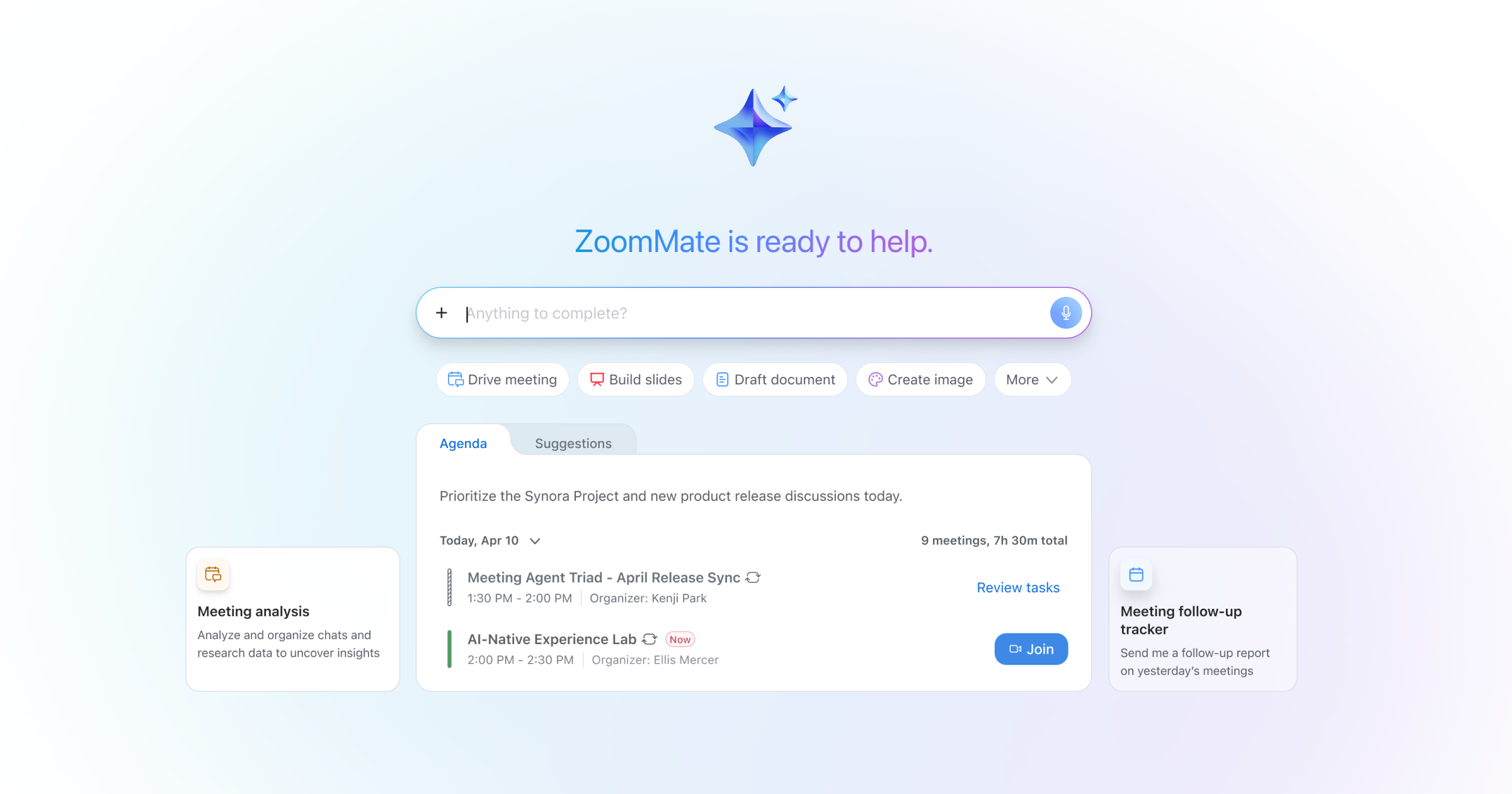
ZoomMate is an AI workspace built into Zoom Workplace — your personal teammate for the workday. It uses context from your meetings, including available transcripts, summaries, and other workplace data, to help you find information across the systems your team relies on. ZoomMate can help turn decisions into action, surface relevant context, and assist in creating the deliverables and follow-up work that come next.
 
The mental model is three verbs:
 
  • Search. ZoomMate uses agentic search to retrieve information and context across Zoom and the apps connected to it — your CRM, your docs, your project tracker, your knowledge base, and the meetings, chats, and notes that already live in Zoom.
  • Orchestrate. ZoomMate can execute the workflows and follow-up tasks that conversations generate — assigning tasks, updating records, sending recaps, kicking off approvals — with your direction.
  • Complete. The Zoom AI Productivity Suite — Slides, Sheets, Paper, and Canvas — turns conversation context into polished deliverables. The deck, the spreadsheet, the brief, the page.
Behind those verbs are the components that do the work: My Notes keeps a persistent memory of your conversations. Agentic Search is the retrieval layer. Workflows is the AI workflow automation engine. Agents the custom assistants your team configures for specific jobs. And the productivity suite is where the output lives.*
 
You don't need to think about that architecture day to day. You just need to know that the context of your work is finally connected.

Meet the Zoom AI Productivity Suite

The suite brings together four AI-first tools alongside Zoom Workplace: Zoom Canvas (formerly Zoom Docs), Zoom Sheets, Zoom Slides, and Zoom Paper. Canvas is your foundation — a flexible, collaborative workspace for documents, wikis, and workflows. Sheets, Slides, and Paper build on that with AI-first spreadsheets, presentations, and polished business docs. Together, they form one connected system that moves with you from meeting to deliverable without breaking your flow.
 

Zoom Canvas (formerly Zoom Docs)

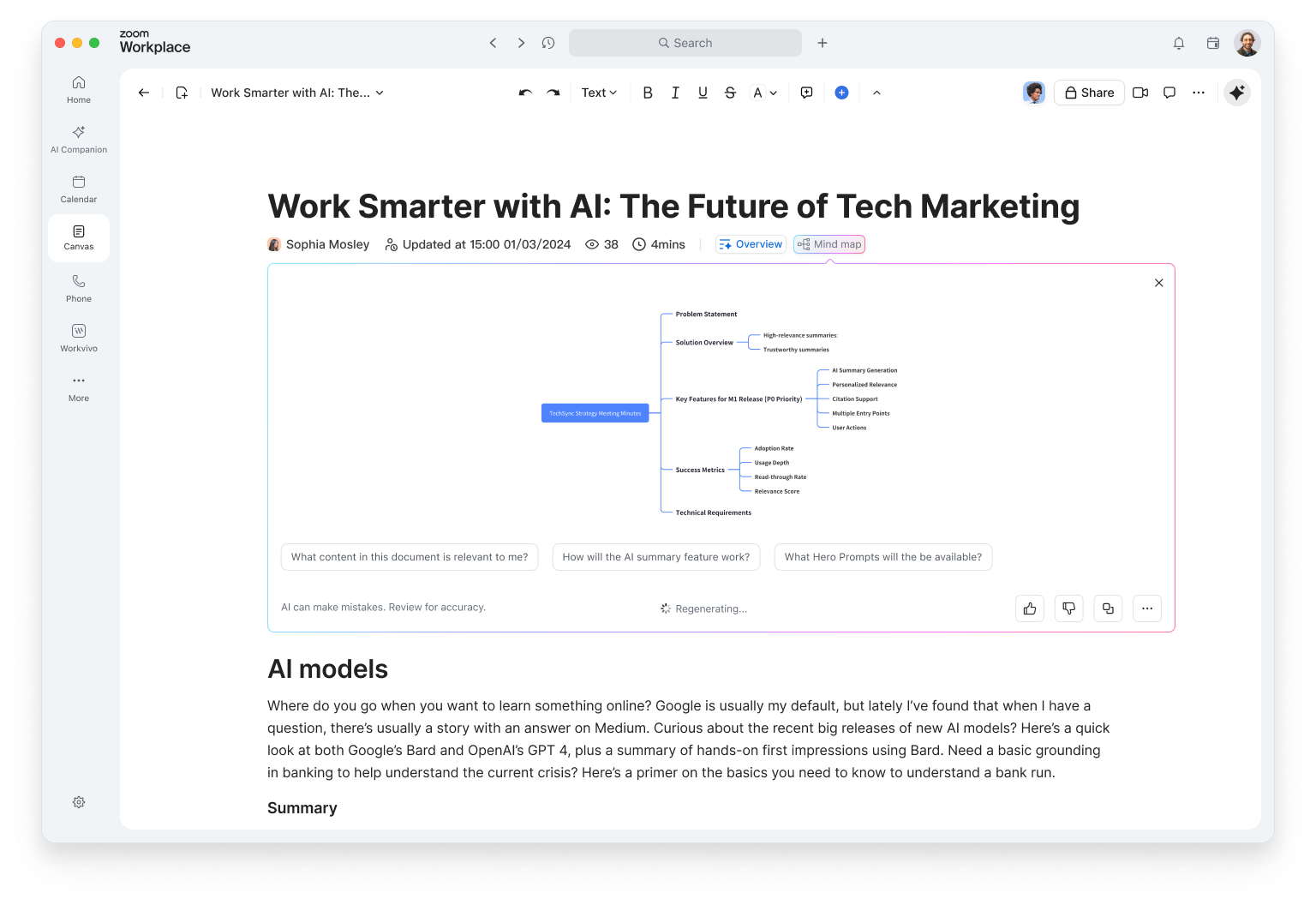
Canvas is where ideas become action. It's an AI-first workspace for creating and collaborating on docs, wikis, tables, and forms — all inside Zoom Workplace. Whether you're drafting a proposal, capturing meeting notes, or building a project tracker, Canvas helps you start with context, not a blank page.
 
Pull in meeting summaries or transcripts directly from Zoom Meetings to generate a project brief or recap automatically. Use ZoomMate to structure your thoughts, improve clarity, and even suggest next steps. Add tables, forms, and automations to keep work moving — no copy-paste required.
 
Canvas also powers company wikis and knowledge hubs, complete with nested pages, templates, and smart search. It's flexible enough for any team — from marketing to IT — and it's included with all paid Zoom Workplace plans.
 

Zoom Sheets

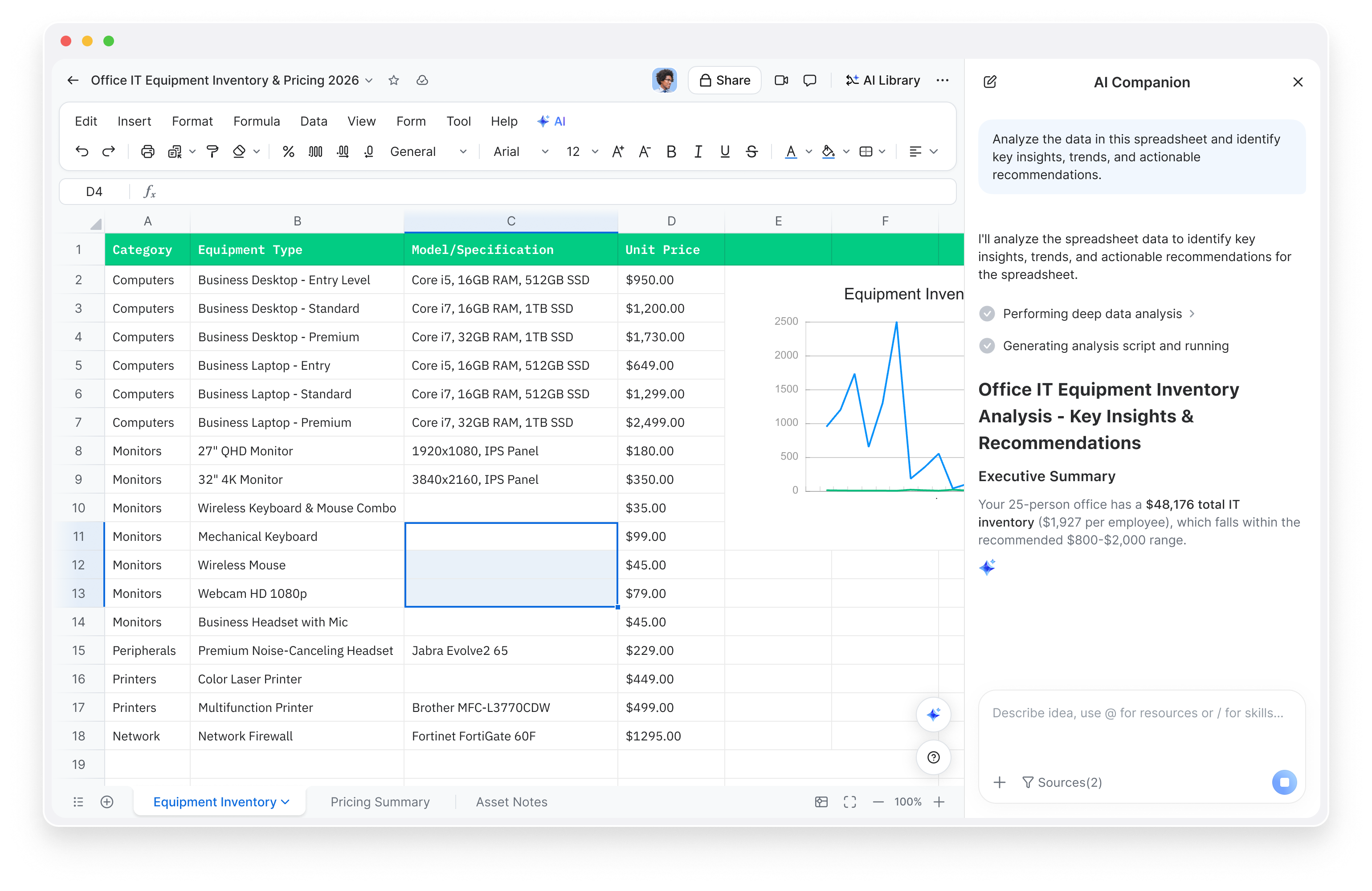
Spreadsheets shouldn't slow you down. Zoom Sheets turns messy data into clear insights — no formulas, no fuss. Ask questions like you'd talk to a colleague: "show me deals closing this quarter," and ZoomMate delivers the answer, complete with charts and analysis.
 
You can create a sheet from a meeting, a simple prompt, or an imported file. ZoomMate organizes transcripts into structured rows and columns, cleans up data automatically, and even builds formulas for you. It's the fastest way to go from conversation to calculation.
 
With AI-generated formulas, proactive insights, and smart data cleaning, Sheets helps you make decisions faster. And because it lives inside Zoom Workplace, your data stays connected to your meetings, docs, and chat — no exporting needed.
 

Zoom Slides

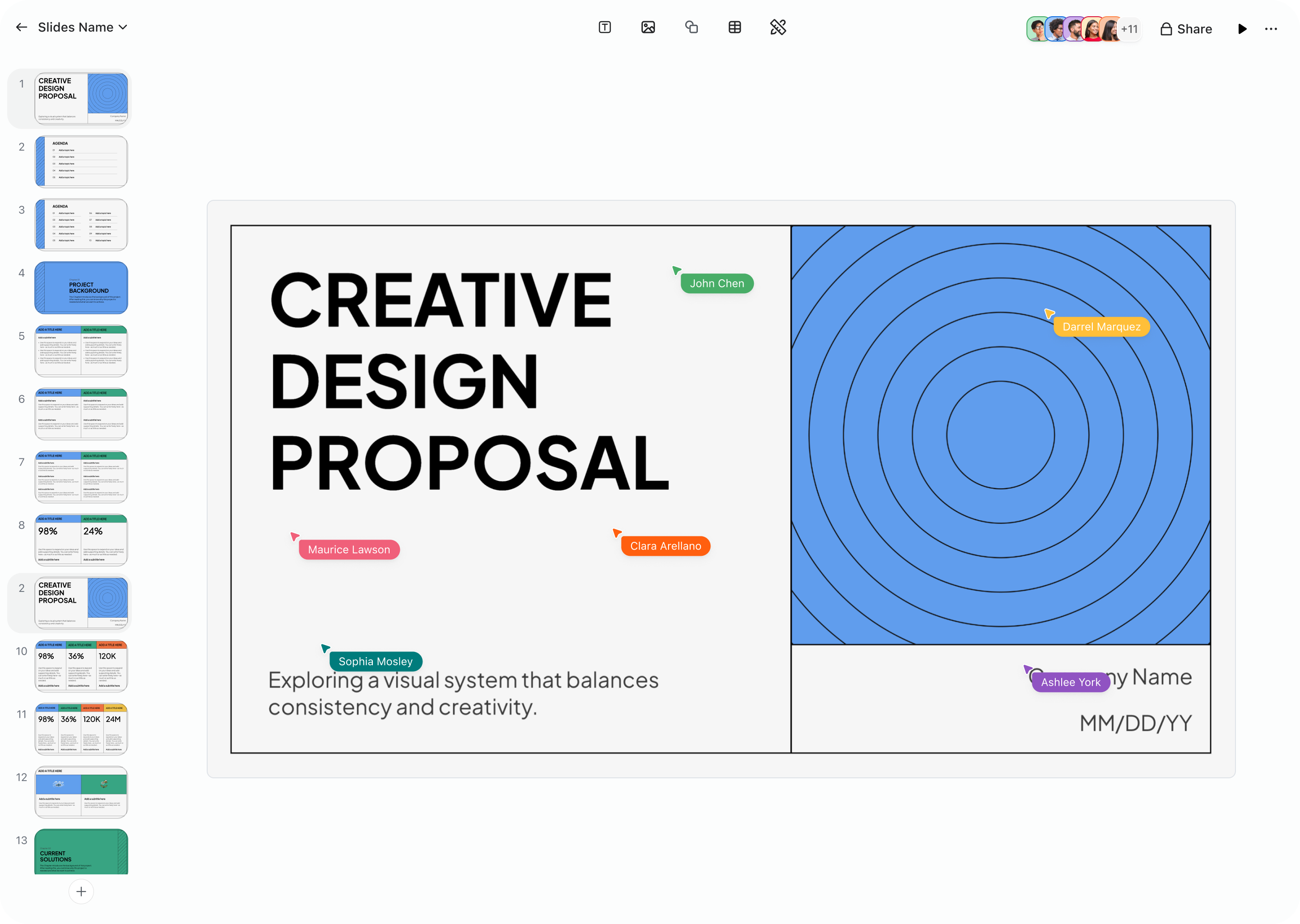
Building decks shouldn't take longer than delivering them. Zoom Slides quickly turns your meetings, docs, and ideas into polished presentations. Just describe what you need ("create a quarterly business review with revenue and next-quarter priorities") and ZoomMate generates a complete, on-brand deck in minutes.
 
Slides connects directly to your meetings, so you can turn transcripts into structured presentations with speaker notes and visuals. ZoomMate refines your content, adjusts the tone, and helps every slide look consistent with your brand.
 
From sales proposals to campaign recaps, Slides helps teams move from discussion to delivery instantly. Real-time co-editing, version history, and seamless export make collaboration effortless — and when it's time to present, you can do it right inside Zoom.
 

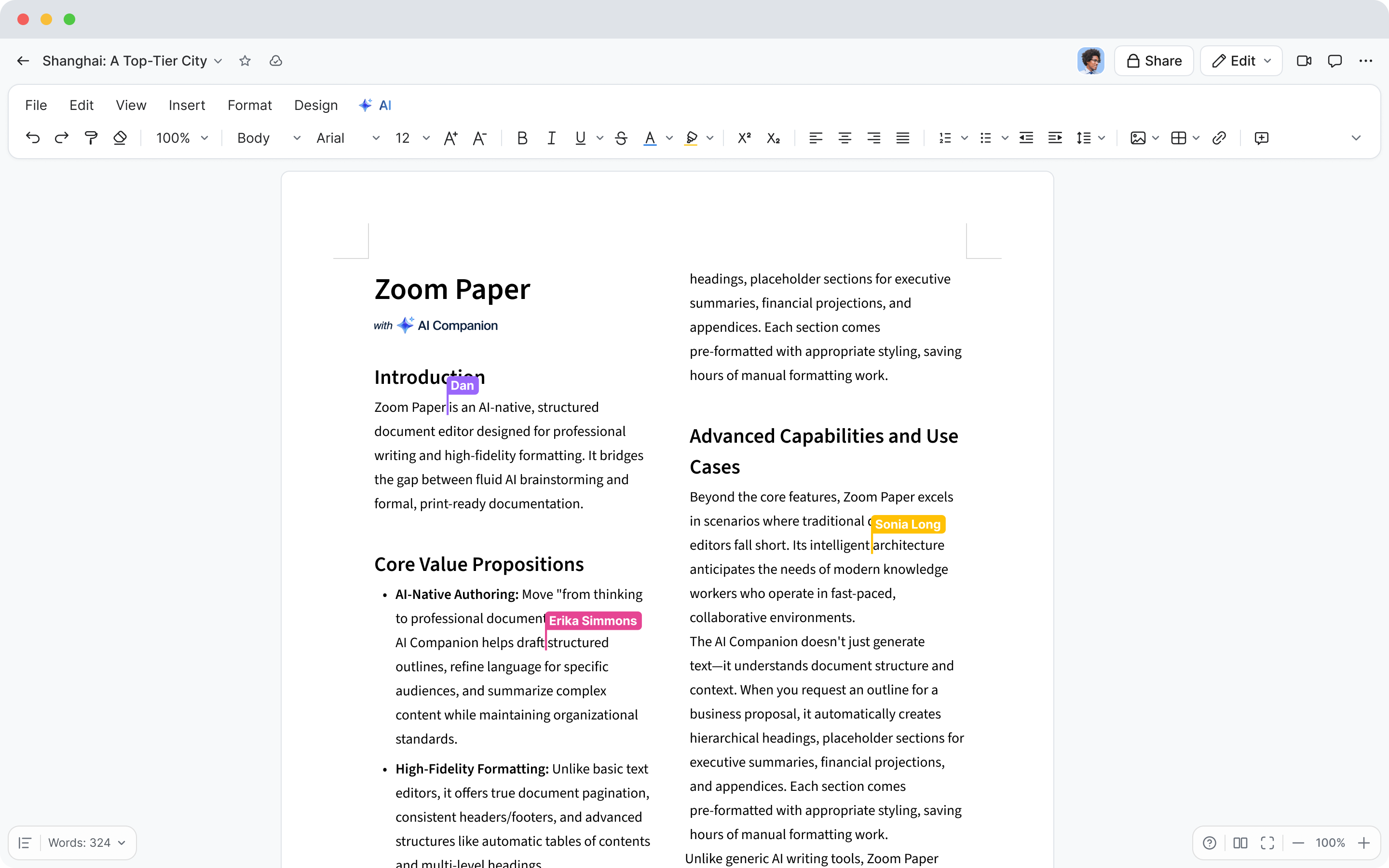
Zoom Paper

Sometimes you just need to capture ideas fast. Zoom Paper is your lightweight, AI-first document editor for quick notes, summaries, and drafts. It's perfect for turning meeting takeaways into polished documents without the formatting grind.
 
Start from a blank page, a meeting, or an imported file — Paper handles the structure, formatting, and tone. ZoomMate can rewrite sections, summarize long content, or match your writing to company templates automatically. It's the fastest way to go from thought to finished doc.
 
Paper is ideal for proposals, reports, and client deliverables — especially when speed matters. And because it's built into Zoom Workplace, your notes, meetings, and documents all live in one connected space.


Put ZoomMate to work in your workflow.

How it all connects

Here's the magic: everything in the Zoom AI Productivity Suite works together. A meeting becomes a set of My Notes. Those notes flow directly into Canvas for documentation, Sheets for data, Slides for presentations, or Paper for quick summaries. No exporting. No juggling tabs. Just one continuous workflow — from conversation to completion — powered by ZoomMate and built right into Zoom Workplace. Imagine wrapping up a client call and having a ready-to-share proposal, spreadsheet, and deck generated for you shortly after. That's the kind of productivity leap the suite delivers.
 
The productivity suite handles creation, but ZoomMate's other capabilities complete the loop. Agentic search retrieves synthesized, cited answers across your connected systems — Google Drive, Salesforce, ServiceNow, Confluence, and more — so you're never hunting through tabs before a meeting or chasing down context after one. For longer-horizon questions, deep research runs multi-source investigations and returns a structured response with citations. And workflows and agents handle the operational follow-through — assigning tasks, updating CRM records, routing approvals, and automating the recurring work that conversations generate.
 
The Zoom AI Productivity Suite is built for teams that want to move faster, stay focused, and get more done without leaving their workflow. Whether you're a 10-person agency or a 500-person company, it's your shortcut from meeting to finished work.

Getting started with ZoomMate

The fastest way to feel the difference isn't to set up everything at once. It's to pick one place where the gap between conversation and completion is costing your team the most time, and start there.
 
  • If meeting follow-ups are eating your week, start with My Notes and a workflow on a recurring meeting. Watch the recap, the action items, and the tracker update happen without you.
  • For long-running work, organize related meetings, documents, and chats into a Project so ZoomMate can draw on the full history of a customer or initiative when you ask it for context or a deliverable.
  • If your team is constantly searching across systems, turn on agentic search with the connectors that hold your most-asked-about information — Google Drive, Salesforce, ServiceNow, Confluence, OneDrive, Box — and ask it the questions your team keeps asking each other.
  • If you spend more time formatting deliverables than producing them, try the productivity suite on a piece of work you'd normally dread building from scratch.
The point is to put ZoomMate next to a piece of work you do every week, and let it earn the rest of its place from there.


Conversations create work. ZoomMate completes it.

Zoom started as a way for your team to have better conversations. With ZoomMate and the Zoom productivity suite, it's becoming the system that turns those conversations into action — organizing context, automating follow-through, and giving teams a connected place to work across meetings, chats, search, and AI-first deliverables.
 
The future of productivity isn't just smarter meetings. It's finished work, and a Monday morning that's already further along.
 

From meeting to done — without the busywork.

Try ZoomMate and let it handle the search, the follow-up, and the deliverable while you focus on the work that matters.
*Agents will be available later in June 2026.

ZoomMate and the Zoom AI Productivity Suite are now available for purchase, with both offerings including AI Credits for metered AI actions. Please note that availability may vary by customer type, region, and industry vertical at launch, with broader rollout expected throughout the year.

Our customers love us

Okta
Nasdaq
Rakuten
Logitech
Western Union
Autodesk
Dropbox
Okta
Nasdaq
Rakuten
Logitech
Western Union
Autodesk
Dropbox

Zoom - One Platform to Connect