Product AI Zoom Workplace

Your guide to getting started with Zoom Paper 2026

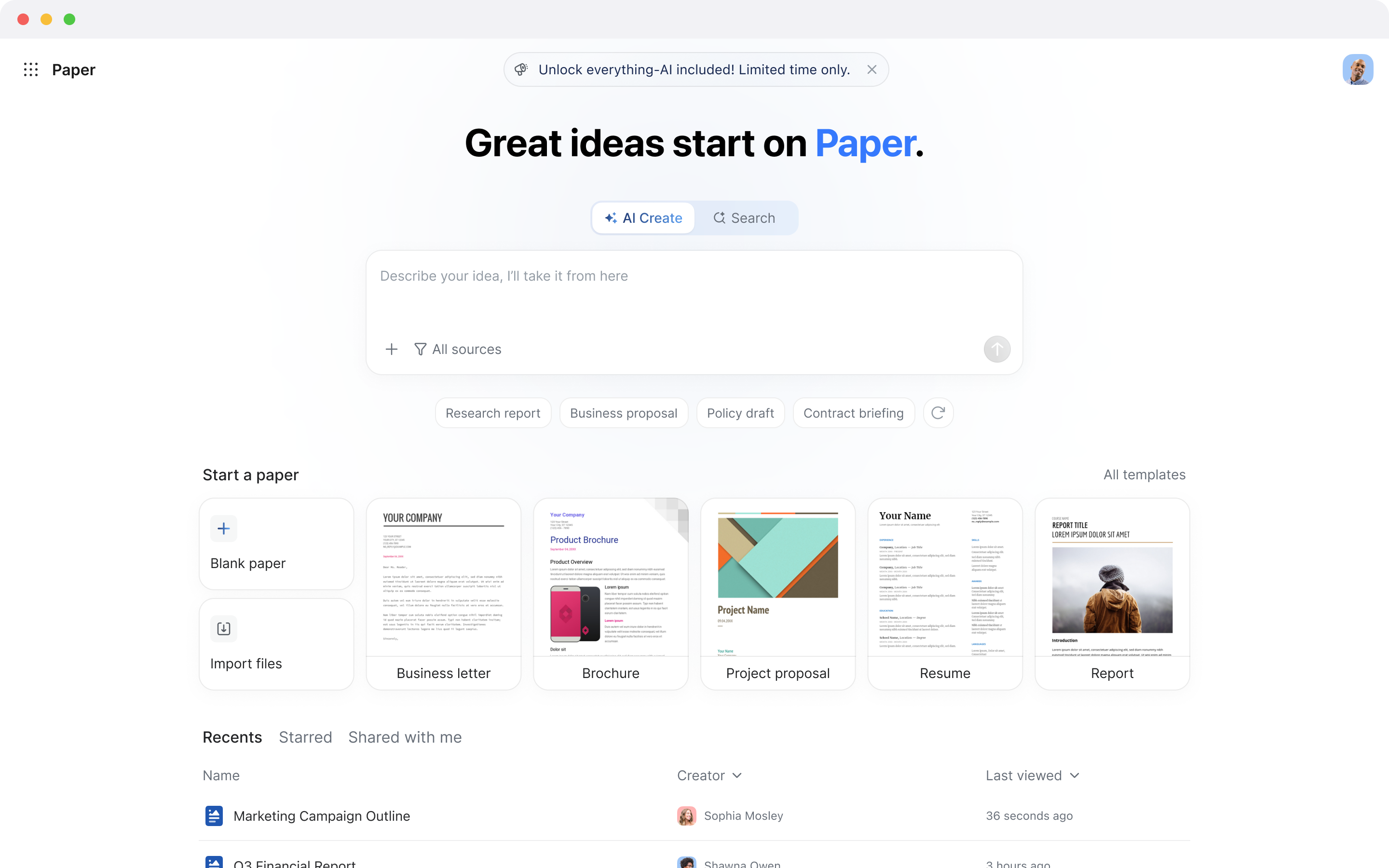
Zoom Paper turns your ideas, notes, and conversations into polished documents — no formatting headaches, no version chaos, no switching between tools. From first draft to final approval, you move seamlessly from thought to finished work.
5 min read

Published on June 1, 2026

Image Placeholder

What is Zoom Paper, and what can you do with it?

Documents are the backbone of every organization — proposals, reports, contracts, plans, policies — but creating and managing them can be a fragmented, time-consuming process. Between juggling local Microsoft Word files, email attachments, and external tools like Google Docs, teams often lose time to version confusion, disconnected workflows, and the constant friction of copying content between apps.
 
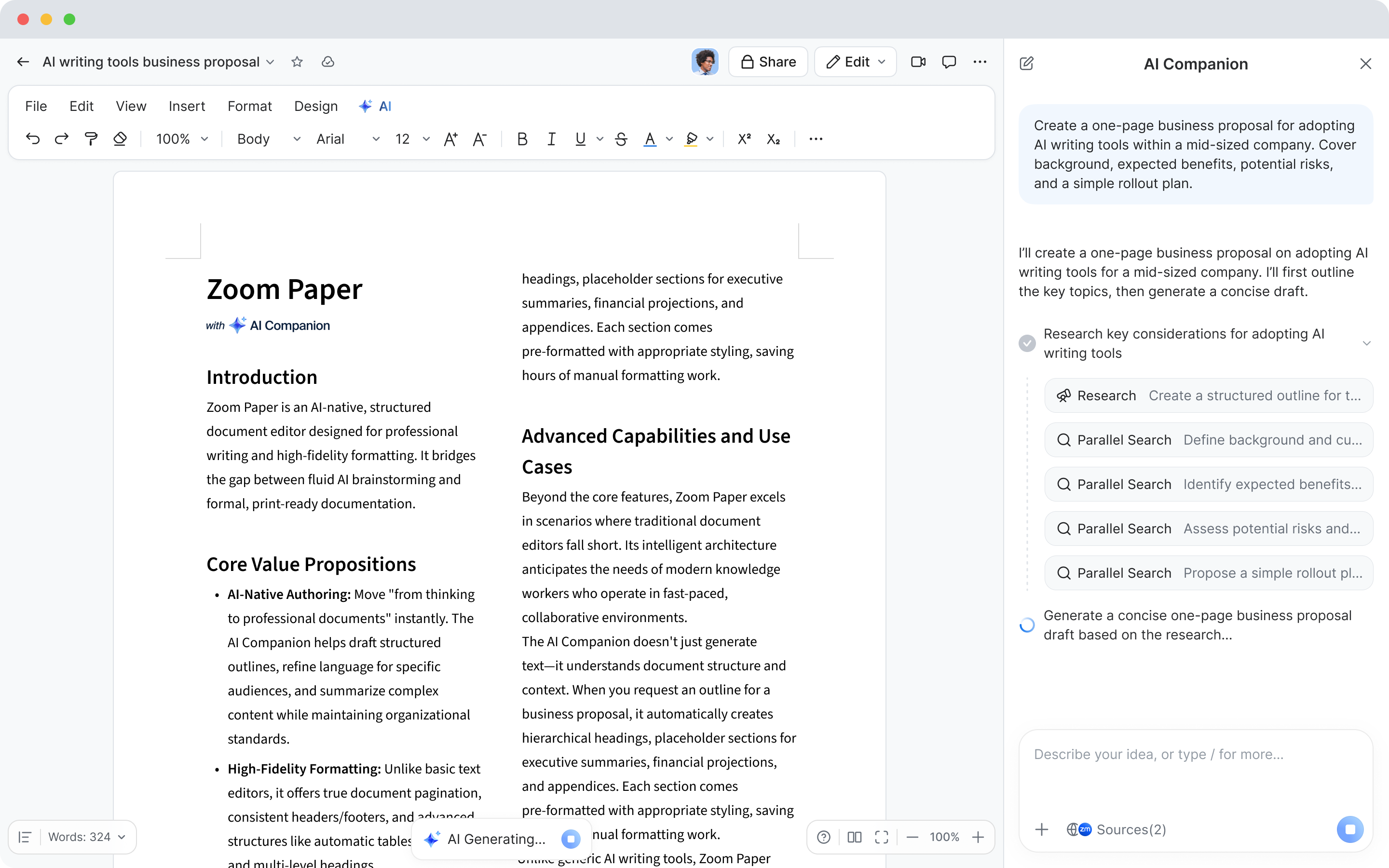
Zoom Paper changes that equation entirely. Built into Zoom Workplace, Zoom Paper is an AI-first document editor that combines the familiarity of a word processor with the intelligence of AI. Instead of staring at a blank page and manually formatting every heading, paragraph, and table, you describe what you need — or point AI at a meeting transcript, a set of notes, or an existing file — and it generates a structured, polished draft for you.
 
What makes Zoom Paper especially powerful is its deep connection to the rest of Zoom Workplace. The conversations you have in Zoom Meetings don't have to stay buried in a transcript or scattered across someone's personal notes. They can flow directly into a living document where AI features organize your thoughts, apply structure, and help ensure your content stays consistent with your organization's templates and tone. It's a seamless bridge from discussion to documentation, from talking about ideas to actually capturing them in a format that's ready to share, review, and act on.
 
 
Whether you're a legal team drafting contracts, a marketer writing campaign briefs, a project manager documenting requirements, or a teacher building a syllabus, Zoom Paper gives you a faster, smarter way to go from concept to completion. And because it lives inside Zoom Workplace alongside your meetings, chat, docs, sheets, slides, and whiteboards, there's no context-switching — just one connected workflow from conversation to finished document.

Turn your next meeting into a finished document.

How to create your first Zoom Paper document

Getting started with Zoom Paper is straightforward, and there are several ways to jump in depending on how you prefer to work. All your documents are stored in Zoom Hub alongside your other Zoom assets — meeting summaries, recordings, docs, sheets, slides, clips, and whiteboards — so everything stays organized in one place.


Start from a blank document

Open the Zoom Workplace desktop or mobile app and navigate to Hub. From there, select the option to create a new Zoom Paper document. You can begin typing right away or — better yet — ask AI to help you get started. Describe the document you need in plain language, something like "draft a project proposal with an executive summary, goals, timeline, and budget," and AI will generate a structured, editable draft in seconds. It's the fastest way to go from a blank page to a working document.
 

Create a document from a meeting

This is where Zoom Paper truly shines. After a Zoom Meeting, you can pull in meeting summaries, transcripts, and important discussion points directly into a new document. AI will parse the conversation, identify the most important themes, decisions, and action items, and organize them into a clear, professional format — complete with headings, sections, and logical flow. Imagine finishing a client call and having a ready-to-share summary or proposal waiting for you moments later, no manual note-taking required.
 

Import existing files

Already have a document in Microsoft Word or another format? You can import .docx files directly into Zoom Paper with high formatting fidelity — styles, headings, tables, and layout all come through cleanly. After your content is in, AI can help you refine, restructure, or expand it. No more spending the first 30 minutes of your editing session just reformatting a document that lost its structure in transit.
 

Generate from Hub

From the Hub homepage, you can use create a document synthesized with content from multiple sources — meeting summaries, sheets, docs, or other files — into a single cohesive document. This is particularly powerful when you want to consolidate information across projects without manually copying and pasting between apps. Select the files you need, describe the output you're looking for, and let AI do the heavy lifting.

Let AI handle the heavy lifting

Zoom Paper is packed with ways to make writing, editing, and collaboration effortless. Here's a closer look at the features that set it apart from traditional word processors.

AI drafting and rewriting
 
  • Generate first drafts from prompts, templates, or existing content. AI can rewrite sections for clarity, adjust tone, restructure for better flow, or translate content into multiple languages — all without leaving the editor.
Smart formatting and templates
 
  • Maintain consistent structure and style automatically. Zoom Paper applies your organization's templates, fonts, and branding so every document looks professional and on-brand — whether it's a contract, a policy document, or a quarterly report.
Summarization and version comparison
 
  • Quickly summarize long documents or compare versions to see what's changed. AI highlights differences and provides plain-language explanations of edits, making it easy to track how a document has evolved across review cycles.
Knowledge-aware writing
 
  • Zoom Paper can connect to your company's internal knowledge base, helping AI-generated content align with your organization's terminology, policies, and best practices. Instead of generic, correct-sounding filler text, you get content that actually reflects how your company communicates.
Real-time collaboration
 
  • Co-edit documents with teammates, leave comments, and @mention colleagues for feedback — all in real time. Version history lets you track changes over time and revert to earlier drafts if needed. Share your documents with colleagues via Zoom Chat or a direct link, and set granular permissions to control who can view, comment, or edit.
Built for enterprise
 
  • Zoom Paper lives on the same platform as your meetings, chat, and other Zoom productivity tools — so documents stay centralized rather than scattered across disconnected apps. Admins can manage permissions and sharing controls from a single environment.
You can also integrate Zoom Paper into your broader workflows using Zoom's developer capabilities, including OpenAPI, webhooks, and the Model Context Protocol (MCP), connecting your documents with the other tools your team relies on.
 

Write less. Finish more.

How teams are using Zoom Paper

Zoom Paper is designed to bridge the gap between meetings, collaboration, and documentation across every department. Here's how different teams can put it to work.
 

Legal

Draft and review contracts faster with AI-assisted clause suggestions, translation, and risk detection. AI can flag missing clauses, identify compliance risks, and provide domain-specific legal guidance — all within the document editor. Version comparison makes it easy to track changes across revisions, and enterprise governance features ensure sensitive legal documents stay protected with the right access controls.
 

Marketing and sales

Turn discovery calls and strategy sessions into polished proposals, campaign briefs, and content plans. AI extracts key points from meeting transcripts and drafts tailored documents that reflect client priorities and internal strategy — saving hours of manual editing. Branded templates ensure every deliverable looks professional and on-brand, whether it's a client-facing proposal or an internal campaign recap.
 

Education and research

Teachers and students can co-author papers, syllabi, lesson plans, and research reports in real time. AI assists with drafting, summarization, formatting, and translation — making it easier to produce polished academic documents without wrestling with formatting tools. Import existing .docx files to continue working on documents you've already started elsewhere.
 

Finance and consulting

Generate analysis reports, client deliverables, and compliance documentation with AI-first drafting that draws on your organization's internal knowledge base. AI helps maintain consistency across templates and ensures content aligns with corporate terminology and standards. When you're juggling multiple engagements, having AI handle the document heavy lifting means faster turnaround and more consistent quality.
 

Operations and HR

Standardize internal policies, onboarding materials, process documentation, and official communications. Zoom Paper ensures consistency across enterprise templates and helps teams collaborate securely with centralized permissions and audit controls. AI can generate first drafts of routine documents — employee handbooks, policy updates, process guides — reducing the time spent on repetitive documentation work.


Ready to get started?

Zoom Paper is included with eligible Zoom Workplace paid accounts as part of the Zoom AI Productivity Suite. For full access to all AI features in Zoom Paper, get ZoomMate — the best way to use AI in Zoom Workplace.
 
ZoomMate brings together the entire Zoom AI Productivity Suite alongside everything else you need to turn conversations into finished work. Both ZoomMate and the Zoom AI Productivity Suite are now available for purchase and include AI Credits for metered AI actions.
 
Please note that availability may vary by customer type, region, and industry vertical at launch, with broader rollout expected throughout the year.

From conversation to finished document — without the formatting grind.

Try ZoomMate and let AI handle the drafting, structuring, and polishing while you focus on the ideas that matter.

Our customers love us

Okta
Nasdaq
Rakuten
Logitech
Western Union
Autodesk
Dropbox
Okta
Nasdaq
Rakuten
Logitech
Western Union
Autodesk
Dropbox

Zoom - One Platform to Connect