

Select a language


Cloud has dominated the cloud vs. on-premises debate when it comes to voice communications. Most businesses are moving to the cloud and increasingly choosing a UCaaS (Unified Communications as a Service) model as part of that migration.
In fact, in recent years, premises-based voice deployments are declining while deployments of cloud solutions are increasing.
Workplace Communications — Licenses and Unit Shipments | Q3 2017 — Q3 2020
From Q3 2017 to Q3 2020, On-Premises IP Line shipments decreased 6%, Phone Shipments decreased by 29%, and On-Premises UC Client shipments decreased by 4%. Quarter-over-quarter (QoQ), On-Premises IP Lines shipments decreased by 9%, Phone Shipments declined by 11%.
Starting with the onset of COVID-19, companies’ adjustments to support business continuity suggest that those who don’t move to the cloud stand the risk of falling behind.
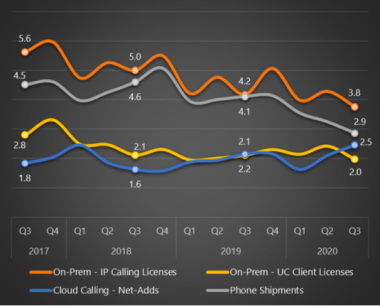
Notes: numbers in 000’s
Souce: Wainhouse, Q3 2020 UC SpotCheck
Another factor influencing the move to the cloud is that many legacy PBXs are at the end of life, and manufacturers are starting to end support. Finding resources to manage a legacy PBX can be challenging as most administrators have adopted more modern cloud administrator skill sets.
As organizations shift to hybrid work environments, modernizing their communications becomes business-critical. Many employees will continue to work from home or another remote location for the foreseeable future.
“Our research shows that as businesses worldwide begin to move employees back to the office, 38% of businesses will have increased levels of remote working. Businesses continue to look to UC for employee productivity gains by providing them with more tools and flexibility, which includes collaboration, video, and voice communications. The cloud gives administrators more options for the deployment and management of UC, in addition to the latest and most up-to-date features and applications.”
One benefit of moving voice to the cloud is that it often comes with a complete UCaaS offering, which facilitates internal and external communication across various modalities, replacing a voice-only solution.
Many organizations also prefer a cloud solution. It provides more predictable control over spending, allowing them to expand and contract the services with the ebbs and flows of their business needs.

The communication needs of most businesses have now outpaced the capabilities of a legacy PBX. Employees are increasingly working from home or another remote location. There will always be a need for the “road warrior” who lives on a mobile device for personal and business communications. As a result, cloud-based communications continue rapid growth as companies recognize the flexibility, simplicity, and lower overhead cost associated with a cloud solution.
Rather than simply replacing an old phone system with a new phone system, use this transition to provide enhanced unified communications capabilities, including messaging and meetings, that make your workers more productive and effective. Your phone solution should effortlessly enable users to transition between chat, calling, and meetings. It should also provide an intuitive experience across various devices from mobile to desktop or desk phone.
Using this opportunity to expand the capabilities of your phone system to a full-featured UCaaS solution will provide several benefits:
UCaas drivers
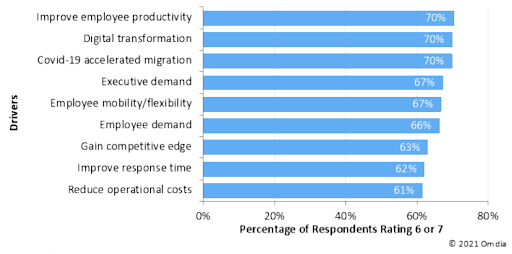
Based on surveys conducted by Omdia Research for drivers to adopt unified communications as a service, the key reasons center on improving employee productivity and digital transformation initiatives catapulted by the pandemic experience when businesses had to send all employees to work from home indefinitely. Executives are demanding this transformation to enable employees to work flexibly with mobility, so their company can remain competitive and responsive while reducing their total operations cost.

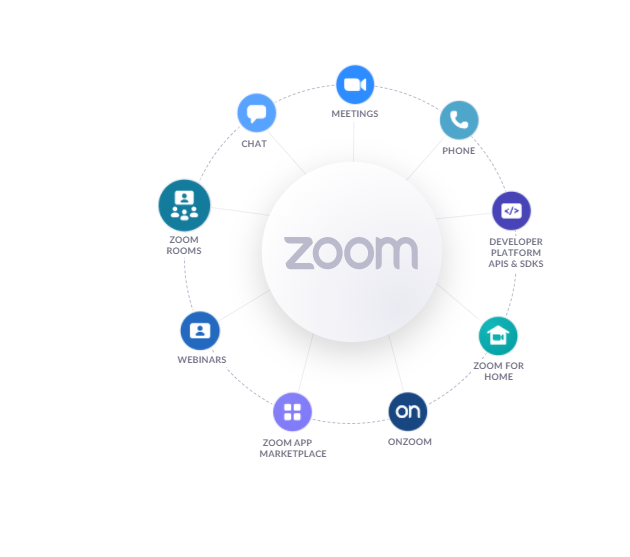
Zoom Phone is a key component of the Zoom UCaaS platform, which delivers a seamless experience across communication modalities. Key benefits of Zoom as your unified communications solution include:
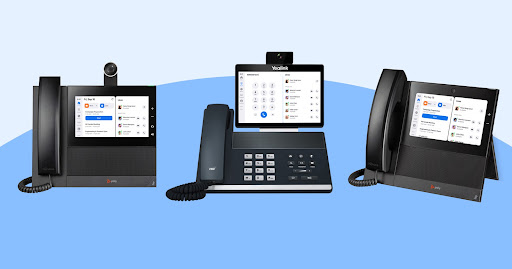
Visit the Zoom Phone website for a full list of available features and additional hardware information.
Zoom is a cost-effective solution for companies moving to a UCaaS solution, as Nemertes Research shows in its 2020 Cost-Benefit Analysis – Workplace Collaboration and Contact Center. For the annual operational cost per license, Zoom is estimated at $525 compared with the industry average of $1,196. A majority of companies surveyed who rely on Zoom for their communications find it superior to the competition for enabling a remote workforce.
Benefits of migrating to Zoom Phone
World Fuel Services had a legacy phone system that required expensive service contracts, on-premises management, and mounting maintenance costs. The organization migrated to the cloud with Zoom Phone and consolidated solutions, saved money, gained operational agility, and improved business efficiency.

Zoom Phone offers flexible options for businesses to connect the cloud PBX to the PSTN (public switched telephone network). These options include Local PSTN Service or Bring Your Own Carrier (BYOC).
Zoom Phone offers local PSTN connectivity in 47 countries and territories and continues to add new regions to its portfolio. Zoom Phone offers flexible plans to meet the needs of businesses of all sizes, whether they are a large multi-national company or small businesses with local presence in a single country.
Plans range from regional plans in US/Canada, UK/Ireland, Australia/New Zealand, as well as a Global Select plan for businesses outside these regions. Metered and unlimited plans are available as well as options for toll-free numbers.
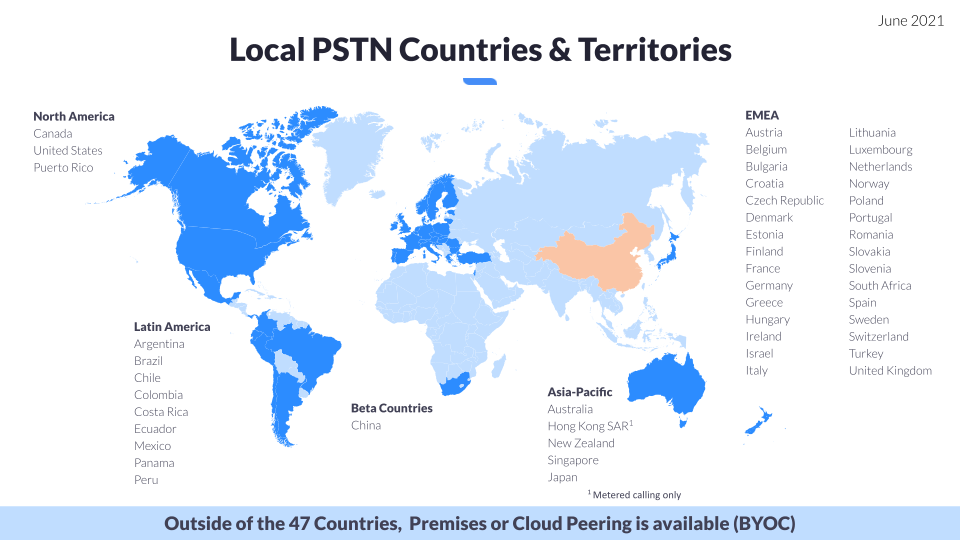
Zoom Phone BYOC allows you to enjoy all of the benefits and features of Zoom Phone while keeping your existing service provider contracts, phone numbers, and calling rates with your preferred carrier of record. The result is more flexibility and control for your organization’s journey to the cloud.
With Zoom Phone BYOC, the PSTN connectivity can be from the customer premises with trunks from legacy peering known as “premises peering” or from the desired PSTN cloud provider to our UCaaS cloud known as “cloud peering.”
“At first we thought, Zoom Phone wouldn’t be an option because it wasn’t supported in Colombia. But we learned that we could bring our own carrier, which meant that we could run Zoom Phone on Colombia Telefonica’s PSTN network.”

As you prepare to move your voice communications to the cloud, consider the following:
Identify executive sponsors and agree upon business success criteria. Create a cross-functional team across your organization to represent your requirements.
Identify your personas, use cases, and unique voice scenarios. Define how the proposed solution will meet the requirements for every user type. Identify dependencies such as year-end closing or seasonal requirements that may restrict the timing of your deployment.
It’s important to keep in mind that a cloud solution generally has minor up-front investment, unlike an on-premises solution. The spending is more predictable with a cloud solution, and contracts can usually be structured either annually or month-to-month.
Do you have legacy requirements that could modernize by moving to the cloud? Meet with providers to discuss options. How many users will be using a desk phone vs. a softphone with a USB device such as a headset. How will you equip mobile-first users?
If you have multiple sites, you may wish to deploy a smaller site first to acquaint your team with the onboarding process. Ensure to factor in time for porting phone numbers and for awareness messaging to key stakeholders and end users.
If you are moving to a new communications platform, or simply adding modalites to your existing one, make time to educate end users about their new capabilities. Coordinate the training with the cutover/migration schedule so users are comfortable with the new solution. Handouts, videos and instructor-led training are all good options. Identify champions across the organization who can help individual teams make the transition.
All Zoom Phone customers qualify for three deployment assistance meetings with the Zoom Phone Enablement Team to configure web portal settings. The following self-service resources are also available:
For customers with more complex deployments or who would like to professional engineering guidance and project management during the migration, the Zoom Professional Services team can assist with the following:
“This is the smoothest Go Live I’ve ever been through. The
users would have never known we were moving to a new system if they hadn’t had to migrate… and with a 6 week window to do it. We’ve had projects here that weren’t as big as a phone system change that have taken months to do.”
“We decided going straight to the experts would cut down on possible issues had we went at it alone. Everything was very intuitive but having a safety net helped assure stakeholders… and the pricing was darn fair – straightforward without any surprises.”
"Traditionally, everyone needed a desk phone. With Zoom, we didn’t necessarily need that desk phone anymore. As a result of that transformation, the amount of use for traditional phones went way down. So from an ROI perspective, we could roll out Zoom Phone and decrease costs 30 to 40%.”
“We were attracted to a cloud telephony platform that didn’t require SIP trunks, with potential single-points-of-failure, or SIP middlemen because Zoom Phone is a truly global telephone provider. We also learned that we could achieve savings with Zoom Phone over the leading alternatives, and significant savings over our existing telephone system.”
“Our old [on-premises] digital phone system was becoming obsolete. It was antiquated, costly, and difficult to maintain from a technical standpoint. We had to have a network engineer install new phones.”