2. Write a script (presenters) It’s always a good idea to write a script, no matter how familiar you are with a topic. This gives your host an idea as to the length of your presentation and is especially helpful if they’re managing any visual aids, preparing for the next speaker, or need to make a sudden adjustment. At a minimum, having a bulleted outline can reduce anxiety for everyone and lead to a smoother session.
3. Practice makes perfect (presenters and hosts) As the adage says, practice makes perfect. We recommend practicing a minimum of 24 hours in advance. Ideally, you should rehearse your event on the same devices you plan to use during the event. And don’t wait until the day of your event to learn new technology or software features. Zoom Events is filled with tools that augment the user and attendee experience but require some advanced setup. Try to mirror your event as much as possible during your rehearsals to glean insight into any last-minute needs that may arise.
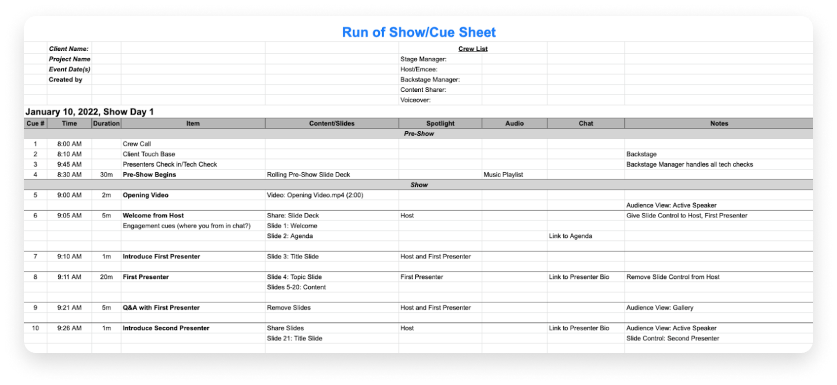
4. Develop a run of show (hosts) Sometimes thought of as a cue sheet or cue-to-cue, the run of show is the sequence of actions during an event and is a master document for stakeholders to follow. More than an agenda, the run of show is a critical tool to help you stay organized and reduce the anxiety that can accompany hosting an event. The details in your run of show will vary based on the complexity of your event, but at a minimum, it’s helpful to include these elements:
-
- Contact list (presenters, speakers, A/V teams, contractors, catering)
- Event flow (order of speakers, locations (virtual conference rooms, remote offices, or on-site meeting spaces))
- Technical elements (technical cues for music, slideshows, videos)
- Timing cues (speakers, sessions, breaks, opening/closing)
We recommend creating a template that can be easily edited for future events.
5. Prepare for audience engagement in advance (hosts and presenters)If you plan to have a Q&A session or want to chat with your audience, think about how you’ll engage with them. For highly attended events, it’s helpful to have someone other than the speaker manage the questions that come through the chat or Q&A function. We also recommend asking a few colleagues to attend your event with questions prepared in advance to jumpstart the conversation.If you’re speaking at a hybrid event, don’t forget about the virtual audience. Remote attendees will feel more engaged if you remember to address their questions and speak directly to them. To avoid people talking over one another, encourage attendees to use the Zoom Webinars Reactions feature, which lets virtual users respond to content with favorable emojis.