



Your guide to getting started with ZoomMate
Everything you need to start using ZoomMate: notes, search, workflows, and AI tools — all inside Zoom Workplace.
Zoom AI features are now built into Zoom Workplace — and ZoomMate takes it further
Published on June 24, 2026



Robin Bunevich is a Product Marketing Manager at Zoom. She oversees product marketing and strategy for Zoom AI. After three years of leading marketing for Zoom’s Event Solution products, and launching one of the fastest growing products at Zoom, Zoom Events, she is now focused on helping organizations seamlessly adopt AI into their workflows. Prior to Zoom, she ran marketing for live events at The New York Times, and was instrumental in helping the organization transition to a fully virtual events program in March of 2020. At Zoom, Robin uses her 15 plus years of marketing and advertising experience to drive awareness and adoption for Zoom’s AI solutions.
If you've been using AI features in Zoom — meeting summaries, smart compose, transcription — you might have noticed some changes. The features you love still work the way you remember, but the names and the product landscape have evolved. So here's what changed, what's new, and how it all fits together. It's also a look back at the full history of AI at Zoom, because the story of how we got here matters.
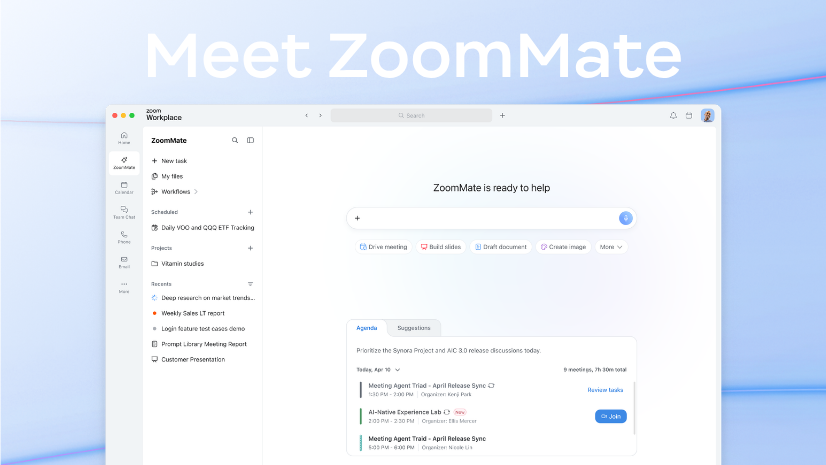
Zoom AI Companion's features are now natively built into Zoom Workplace. ZoomMate is Zoom's new agentic product that builds on Custom AI Companion, taking it further: it acts on meeting context to complete work automatically.
Meeting summaries, smart compose, transcription, call summaries, voicemail prioritization — all the capabilities that used to carry the AI Companion name are still built right into Zoom Workplace, still included with eligible paid plans. They're just called by what they do now. When Zoom AI summarizes your meeting, it's a meeting summary. When it helps you compose a chat reply, it's chat compose. Same features, same experience, just built into Zoom Workplace.
We launched ZoomMate on top of everything Zoom AI already does, designed to move work from conversation to completion.
Where the built-in AI features handle specific tasks within specific products (summarizing a meeting, composing a message), ZoomMate operates across your entire workday. It captures context in real time, remembers what matters, and turns decisions into action.
What ZoomMate can do:
The core idea: you lead with intent, ZoomMate handles the follow-through. Every conversation can become finished work. Here's what that looks like in practice: you finish a meeting where your team agrees on next steps. The built-in AI gives you the summary. ZoomMate takes it further — scheduling the follow-ups, drafting the deliverables, and updating your project tracker. One is the intelligence. The other is the action. And both live inside Zoom Workplace — no separate platform, no additional governance concerns, no tool sprawl.
The story of AI at Zoom began long before generative AI became mainstream. From the beginning, our focus was on solving practical problems that made communication more effective and collaboration more natural.
The features people used every day were powered by machine learning all along. Noise suppression filtered out background distractions in real time. Virtual backgrounds used computer vision to replace your backdrop without a green screen. Real-time transcription and closed captions — powered by automatic speech recognition (ASR) — became available to all accounts. This was foundational: the same ASR technology would later power meeting summaries and everything that followed. Low-light enhancement, auto-framing, speaker focus, and gesture recognition rounded out the era.
As these technologies matured, Zoom expanded AI beyond the meeting experience. We launched Zoom Revenue Accelerator — to analyze customer conversations, surface deal insights, and provide coaching recommendations. We also introduced Zoom Virtual Agent, bringing AI-powered self-service experiences to customer support.
We built our AI architecture around a federated approach — combining our proprietary models with leading third-party LLMs from providers like OpenAI. We expanded our AI features with Chat Compose for drafting messages, Email Compose for contextual replies, and Meeting Summary for automatic takeaways without requiring recordings.
As generative AI matured, we brought AI capabilities to Zoom Phone (voicemail and call summaries), Zoom Events (session descriptions and follow-up content), and Zoom Canvas (smarter content workflows). Ask AI gave you a conversational interface to query meetings, chats, and documents. We published a deep dive on our federated AI approach — explaining how the combination of proprietary models, OpenAI, Anthropic, and Meta's open-source models could deliver better results than any single LLM alone.
AI Companion could summarize a meeting, but it couldn't remember what you talked about last week. Each interaction started from scratch. AI Companion 2.0 changed that — transforming it into a persistent, context-aware experience in a sidebar across Zoom Workplace.
AI Companion had evolved beyond meeting summaries into persistent work memory.
Large teams needed custom terminology and specific integrations. Custom AI Companion launched as an add-on:
Everything up to this point was about understanding your work. AI Companion 3.0 took a step toward acting on that understanding with new capabilities that hinted at what agentic AI could do.
These capabilities represented the most advanced version of AI Companion — and they laid the groundwork for what would become a fundamentally different product: ZoomMate, which would take the concept of agentic action much further.
When we shipped our first noise suppression model, the goal was simple: make the technology work without asking anyone to think about it. No setup, no toggle, no "AI" badge. Just a better meeting.
That same instinct runs through everything that came after. Meeting summaries that are automatically drafted. Transcription that just works. And now, ZoomMate — which takes the context from your conversations and finishes the work.
The tools have gotten dramatically more capable. But the philosophy hasn't moved: make the technology practical and make it accessible.
Yes. Features that were part of AI Companion like meeting summaries, chat compose, transcription, call summaries, voicemail prioritization are still built directly into Zoom Workplace. You'll find them now under their functional names rather than the AI Companion brand.
Custom AI Companion customers will continue to be supported.
Eligible paid Zoom Workplace plans continue to include core AI features at no additional cost. This has been Zoom's approach since we launched AI Companion — making core AI capabilities available to paid customers.
The built-in AI features in Zoom Workplace handle specific tasks within specific products — summarizing a meeting, composing a message, transcribing a call. ZoomMate operates across your entire workday: it captures context in real time, remembers what matters, and takes action on it — scheduling follow-ups, drafting deliverables, updating records, and generating finished work from meeting context.
We've published a dedicated getting started guide that covers ZoomMate's capabilities, use cases, and how to get started.
No. You can continue using the included AI features in your Zoom Workplace plan. ZoomMate is a new add-on product — you can explore it when you're ready, but your existing AI capabilities remain fully functional.








