According to Sociality.io's 2026 AI in Social Media Marketing Report, 45.9% of marketers are already using AI for text and caption writing, but most are approaching it the same way: pasting a vague prompt into a chat window and hoping the output is good enough to post. It's easy to fall into that trap as we navigate the new, shiny world of AI prompting.
If you're a small business owner or solopreneur trying to figure out how to use AI for social media content in a way that actually saves time and sounds like you, this guide is for you. We'll walk through an actionable strategy framework, a practical breakdown of the AI workflows worth building, and the approach we shared with our Zoom Solopreneur 50 community — including a live demo that showed how to turn a single Zoom meeting into a full month of scheduled social posts.
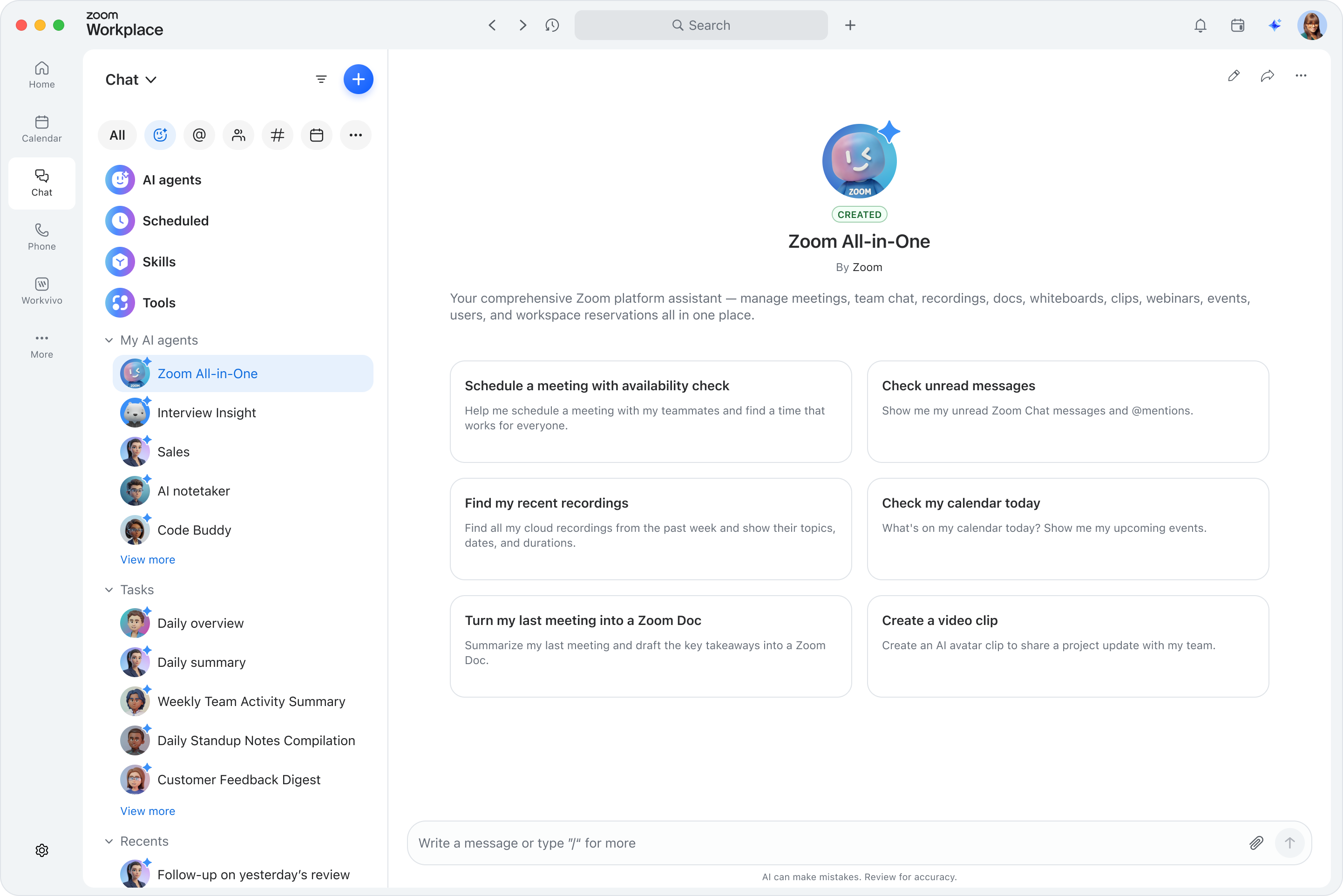
ZoomMate can help you find social media gold in your meetings.
Why many small businesses are using AI for social media content wrong
The most common AI content workflow looks like this: open a tab, type "write me five Instagram captions about [topic]," get five generic outputs, pick the least bad one, and post it. The problem isn't the AI; it's the approach. AI produces generic content when you give it generic inputs. The quality of your output is a direct function of the context you provide: your voice, your audience, your niche, and the specific idea you're trying to communicate.
The second mistake is turning to AI before having a strategy. AI is an accelerator, not a compass. If you're not clear on what you're saying or who you're saying it to, AI makes that problem faster, not better. And that's when the dreaded hallucinations appear. Strategy first. Automation second.
Build your strategy before you automate it
At our Solopreneur 50 roundtable, we hosted social media strategist Jack Appleby for a fireside chat followed by a live content automation demo. Jack's framework challenged nearly every assumption in the room about what it takes to build a consistent, effective social media presence as a small business. Here's what he shared:
Start with 50 ideas, not a blank calendar
Jack's first exercise for anyone who feels stuck: write 50 content ideas without stopping, without filtering, without editing yourself. The first 20 are always the obvious ones — the tips you've shared a hundred times, the questions your clients ask most often. The interesting content lives in ideas 21 through 50. That's where the niche, high-value perspectives emerge, such as the angles your competitors haven't covered because they stopped before they got there. This exercise, Jack told our community, can unlock months of content in a single sitting. And once you have that list, AI can help you develop each idea far faster than you could alone.
Mine your calendar: every meeting is content
You don't need a separate brainstorming session. Your calendar is your content engine. Every client call surfaces a challenge someone else is probably facing. Every discovery conversation reveals an assumption worth addressing publicly. Every team meeting generates at least three content ideas if you're paying attention. Jack recommends treating every meeting as a dual-purpose event: you're having the conversation and generating raw material for your next few posts. No additional creative effort required.
Hook first, everything else second
Most people write their content and add a hook at the end. Jack reverses the process entirely. Write the most compelling one-line version of your idea first — the hook — then build the body around it. His example from our roundtable: a prediction post framed as "I literally only have one social media prediction, and if we don't get it right, we're all going to lose our jobs" dramatically outperformed a standard tips-style post covering the exact same idea. Same content. Different frame. The hook determines whether anyone reads the rest.
Which platform should a small business focus on?
The right platform depends on your business model. Short-form vertical video can be posted across Instagram Reels, TikTok, and YouTube Shorts with virtually no additional work. For B2B service businesses and professionals, LinkedIn offers the strongest organic reach for educational content and a direct path to business relationships. For consumer brands and solopreneurs building a community, Instagram offers both audience growth and new business discovery.
Jack's advice: pick one platform, commit to it for 90 days, measure what's working, and only then consider expanding to a second. Consistency on one channel beats mediocrity across five.
One thing Jack was clear about: scheduling content in advance doesn't hurt your reach on any major platform. Batch-create, schedule freely, and stop posting reactively.
How to use AI for social media content creation: A practical workflow
Using AI well for social media content means giving it the context it needs to reflect your voice — not handing it a blank prompt and accepting whatever comes back. Here's a three-step workflow that produces content that sounds like you, not like a language model approximating you.
1. Give AI real context, not a vague prompt.
The quality of your AI output is limited by the quality of your input. Before you ask AI to write anything, tell it what your business does and who you serve, what you want this specific post to accomplish, what platform it's for (LinkedIn voice reads very differently from TikTok), what tone you use, and include an example of a post you've written or loved. With that context, a well-structured prompt produces a first draft that sounds meaningfully closer to you. Without it, you'll spend more time editing than you saved.
2. Use AI as a collaboration partner, not a ghostwriter.
Jack Appleby's personal workflow involves dictating raw thoughts; speaking an idea out loud while AI listens or transcribes, then iterating on the output eight to ten times until it sounds genuinely like him. His insight from our roundtable: he sounds more like himself because of AI, not less, because AI handles structure and he handles perspective. The goal isn't to hand the post off and walk away. It's to spend less time on the mechanical parts of writing — formatting, transitions, platform adaptation — and more time on what only you can provide: the original idea and the authentic point of view.
3. Repurpose across platforms without starting over.
One of the highest-leverage habits in social media content is repurposing. A LinkedIn post built around a strong insight can become an Instagram carousel, a TikTok script, and a short email newsletter section, all from a single core idea. AI makes this dramatically faster. Once you have a post that has performed well or clearly captured an idea, use AI to adapt it for the next platform. You're not writing new content; you're distributing the same idea across the places where your audience lives.
AI use cases for small business social media content
The table below summarizes some of the most practical AI applications for small-business social media content, from first-draft writing through scheduling and performance analysis.
Each of these use cases represents a distinct step in the content production process. Most small businesses and solopreneurs will get the most value by starting with caption and copy writing, as it's the highest-friction task and the most immediate time-saver. They can then add meeting-to-content conversion once they're using a tool like ZoomMate. Scheduling and performance analysis can be layered in once the content creation habit is established.
Are you a business of one? Explore Solopreneur 50 and apply to join.
How ZoomMate can help you turn your Zoom meetings into a social content engine
ZoomMate, your AI teammate, available with a ZoomMate subscription, can take the meeting-as-content-engine principle and make it operational. Attach a past meeting transcript from My Notes, add your brand guidelines, invoke a saved workflow, and generate a full month of social post drafts, ready for your review and approval before they go live on LinkedIn, Instagram, and TikTok, all without switching tools or starting from scratch. One of the most compelling moments at our Solopreneur 50 roundtable was watching this workflow run live.
Here's how the ZoomMate meeting-to-content workflow operates:
1. Use Skills as your repeatable content workflow.
A Skill in ZoomMate is a saved, reusable standard operating procedure that you can continue to refine over time. Once you've refined it through a few rounds of iteration, invoking it produces consistent output. You can build separate Skills for LinkedIn narrative posts, Instagram carousel copy, and TikTok hooks, and update each incrementally as your strategy evolves.
2. Attach the meeting transcript.
After a Zoom meeting, you can attach the conversation directly to a ZoomMate prompt from My Notes. ZoomMate reads the context from what was actually discussed and generates post copy grounded in that conversation, not generic filler. Jack Appleby's calendar-as-content-engine principle becomes operational: your meetings do double duty with one step.
3. Add your brand guidelines.
Uploading a brand document, your tone of voice, sample posts, key phrases, and audience description as context for ZoomMate can significantly improve how closely the output matches your voice. The more specific context you provide, the more closely the output matches your established voice parameters and brand guidelines.
4. Generate a full month in one prompt.
A single ZoomMate prompt with an attached meeting and an active Skill can produce a full month of posts, with Option A and B variants per posting day, tailored by platform. Longer text for LinkedIn, carousel copy for Instagram, and short hooks paired with video cues for TikTok. You can even convert the output into calendar invites with post copy pre-loaded for each posting day.
5. Set it to run automatically.
ZoomMate's scheduling feature lets you set a Skill to run on a recurring basis — for example, every Monday morning — to automatically process last week's meeting transcripts and generate that week's social content. Participants in our roundtable described this as having a content workflow that runs before they start their day.
Shahed Mohseni Zonoozi, founder of Intercontinental Music Awards and one of our Solopreneur 50 participants, transcribed an eight-hour award ceremony through Zoom. With the My Notes transcript, he can generate social content and participant summaries from that single event for months of posts. He shared:
"Instead of allowing these moments to disappear when the meeting ends, we can identify what moved people, preserve it, and continue sharing those voices with our community and the wider world."
And if you're already working inside Claude, ChatGPT, Codex, Muse, Copilot, or Gemini (coming soon), you don't have to leave your preferred AI surface to tap into Zoom's meeting intelligence. Pre-built connectors enable you to bring your Zoom meeting content directly into these tools, so you can generate social content, pull key insights, and build on what was discussed in your calls without switching context.
When using AI tools to process meeting transcripts as part of your content workflow, knowing what your AI tools can access matters, especially for businesses that discuss sensitive client information on calls.
Zoom has added controls that let you decide what information your AI workflows can access in the first place. Sensitivity labels, available now, let you mark specific meetings as confidential and limit who can read the transcript or summary.
On the output side, new AI guardrails govern what ZoomMate is allowed to say in its responses, regardless of what it saw in context. For example, even if a transcript includes financial data or a discussion about a competitor, guardrails are designed to prevent that information from surfacing in a summary or social post unless you explicitly want it there.
Before incorporating any meeting content into an automated AI workflow, it's worth reviewing your tool's data processing policy to confirm it aligns with your obligations.
FAQ
Q1: How do I use AI for social media content as a small business?
Start with strategy before automation: know your content pillars, your target platform, and your brand voice. Then give your AI tool rich context, your audience, your tone, and a strong brief, and use it to generate first drafts, adapt content across platforms, and repurpose high-performing posts. If you're already using Zoom for meetings, ZoomMate (available with a ZoomMate subscription) can take this further by generating draft posts directly from your My Notes meeting transcripts, without switching to a separate tool.
Q2: Does AI-generated social media content perform as well as original content?
It depends on how much of your own voice and perspective you bring to the output. AI-generated content published without editing tends to read as generic and performs accordingly. The most effective approach, and the one Jack Appleby demonstrated at our Solopreneur 50 roundtable, is to use AI for structure and adaptation while keeping your original ideas and point of view front and center. AI accelerates the mechanical work; your perspective is what makes the content worth reading.
Q3: How do I use AI for social media content without losing my brand voice?
Feed your AI tool as much context about your brand as possible before generating anything: tone of voice, sample posts you've written, your audience, your values, and what you want to avoid. For ongoing consistency, you can even create a Skill in ZoomMate to review content against your brand guidelines, then simply invoke the Skill with a slash command to keep messaging aligned. This means the output will continue to align with your voice over time. Iterate, don't accept a first draft. Jack Appleby told our community that he goes through 8 to 10 iterations before he considers a post ready.
Q4: How can I use AI to create a month of social media content at once?
Batch your content creation rather than posting day by day. Start with a strong list of ideas — Jack's 50-idea exercise is a practical starting point. Then select your top ideas for the month, and use AI to develop each one across formats. With ZoomMate, you can generate a full month of posts across LinkedIn, Instagram, and TikTok from a single meeting transcript, with Option A and Option B variants per date, and scheduling automation that runs the workflow weekly without additional manual effort.
Q5: How do I use AI for social media content without it sounding robotic?
Treat AI as a collaboration partner rather than a ghostwriter. Dictate your raw thoughts in your own words first, even as a voice memo, then use AI to organize and structure the output. Review every draft with the question: "Would I actually say this?" Edit until the answer is yes. The more specific your input and the more actively you iterate, the more the output reflects your actual voice rather than a generic guess of it.
Learning how to use AI for social media content as a small business is less about finding the perfect tool and more about building the right process. Get your strategy right first, know your platform, your audience, and your voice, then use AI to accelerate the execution. And if you're already running your business on Zoom Workplace, ZoomMate and My Notes can give you a workflow that turns every meeting you're already having into draft posts ready for your review, without adding another tool to your stack.
One platform to run your business and your content. Zoom Workplace with ZoomMate and My Notes.








 7 min read