How-to Meeting & Chat AI

How to build an AI agent: A complete guide for small businesses

Discover step-by-step guidance, real-world use cases, and tips to automate workflows and boost productivity.

5 min read

Published on June 22, 2026

Image Placeholder
If you’ve ever wished you could clone yourself to handle repetitive tasks, you’re not alone. Many small business owners and teams feel stretched thin, juggling customer messages, project updates, and endless follow-ups. Learning how to build an AI agent can help you automate those tasks and free up time for the work that matters most.
 
In this guide, we’ll walk you through every step — from defining your agent’s purpose to connecting it with tools and data — and show you how easy it is to create a custom AI agent directly inside Zoom Chat. Whether you’re a business owner, IT admin, or marketer, you’ll learn practical ways to bring AI into your daily workflows without needing advanced coding skills.
 

Build your first AI agent in Zoom Chat

Understanding what an AI agent is

Before you start building, it helps to understand what an AI agent actually is and how it differs from traditional automation.
 

Defining the modern AI agent

An AI agent is a digital system that perceives its environment, makes decisions, and takes actions to achieve a goal. Think of it as a teammate that can reason, adapt, and learn from experience. Unlike a simple automation script that follows fixed rules, an AI agent can interpret intent, analyze data, and act dynamically based on context.
 
For example, a basic chatbot might respond to a customer asking, “What’s your return policy?” with a static, prewritten answer. An AI agent, however, could interpret the intent behind the question, check the customer’s order history, confirm whether the item qualifies for return, and even initiate the return process — all within a single conversation.
 
This ability to combine reasoning, data access, and action makes AI agents far more capable than traditional bots. They don’t just respond; they analyze and act.
 

The core components of an agent

Every AI agent includes a few essential parts that work together to create intelligent behavior. You can think of these as the agent’s “body” — each part plays a distinct role:
 
  • Large language model (LLM) — the “brain”: The LLM is the reasoning engine that interprets input, understands context, and generates responses. It enables the agent to think through problems, summarize information, and communicate naturally.
  • Data inputs — the “senses”: These are the channels through which the agent perceives its environment. Inputs can include text from emails, chat messages, documents, or database entries. The richer the data, the better the agent can understand what’s happening.
  • Connected tools or APIs — the “hands”: Tools are what allow the agent to take action. Through APIs, it can send messages, update records, schedule meetings, or retrieve information from other systems. Without tools, an agent can only talk — with them, it can actually do.
  • Memory — the “experience”: Memory lets the agent recall past interactions and use that context to improve future responses. It can remember user preferences, previous questions, or key facts, making interactions feel more natural and consistent.
Each of these components contributes to the agent’s ability to operate autonomously and intelligently. Together, they form the foundation of a system that can reason, act, and learn over time.
 

Examples of AI agents in action

AI agents already support many everyday tasks across industries. Here are a few examples that show their range and impact:
 
  • Customer service agent: Imagine a digital assistant that doesn’t just answer FAQs but resolves complex issues. A customer reports a billing error — the agent verifies the account, checks recent transactions, identifies the discrepancy, and drafts a refund confirmation message. This process, which might take a human 15 minutes, can be completed in seconds.
  • Personal travel agent: A travel agent AI can plan an entire trip based on your preferences. You tell it your budget and destination, and it searches flights, compares hotel prices, and books your itinerary. It could find a round-trip flight, reserve a hotel, and schedule airport transfers — all while staying within your budget.
  • Research assistant: A research agent can gather and summarize information from multiple sources. If you need to understand market trends, it can scan reports, analyze data, and deliver a concise summary highlighting key insights. What would take hours of manual research can be done in minutes.
These examples show how AI agents can reduce manual work, improve accuracy, and help teams move faster with less effort.

Step 1 — Define the agent’s purpose and scope

Before you write a single line of code or connect any tools, you need clarity on what your AI agent will do — and what it won’t.
 

Identify the problem to solve

Every successful AI agent starts with a clear problem statement. Think about the repetitive or time-consuming tasks that slow your team down. Maybe your customer support team spends hours sorting incoming emails, or your sales reps lose valuable time updating CRM records.
 
Look for bottlenecks — processes that require manual effort but follow predictable patterns. For example, if your operations team manually compiles weekly status reports from multiple systems, that’s a perfect candidate for automation. Defining a specific challenge helps you design an agent that delivers measurable value instead of a general-purpose tool that tries to do too much.
 

Outline specific tasks and goals

Once you’ve identified the problem, break it down into precise, measurable tasks. Avoid vague goals like “handle customer inquiries.” Instead, define exactly what your agent will do.
 
For example, if you’re building an email management agent, your task list might look like this:
 
  • Read incoming emails in the “Support” inbox.
  • Categorize messages into predefined topics such as billing, technical support, feature requests, or urgent issues.
  • Extract key details like customer name, order number, and main issue.
  • Draft a summary of the message for internal tracking.
  • Suggest three relevant knowledge base articles for the support team.
  • Flag urgent messages for human review within 30 minutes.
This level of detail helps you measure success and refine your agent’s performance over time.
 

Set clear boundaries and limitations

It’s just as important to define what your agent shouldn’t do. Setting boundaries helps maintain safety, accuracy, and trust.
 
For instance, your agent might draft responses but not send them without human approval. Or it could access public data but not internal financial records. These limitations help prevent errors and protect sensitive information.
 
Boundaries also help your team feel confident using the agent. When everyone knows exactly what it can and can’t do, adoption often becomes easier and safer.

Step 2 — Choose your development approach

There’s no single way to build an AI agent. Your approach depends on your technical comfort level, available resources, and desired complexity.
 

Using no-code and low-code platforms

No-code and low-code platforms are ideal for small businesses that want quick results without deep technical expertise. These tools let you visually design workflows, connect apps, and define logic through drag-and-drop interfaces.
 
Platforms such as Zapier, Make, and Airtable Automations make it easy to connect systems like Gmail, Slack, or Salesforce. You can create workflows that trigger when certain events occur — for example, when a new lead is added to your CRM, your agent can automatically send a welcome message or schedule a follow-up task.
 
No-code tools are perfect for automating simple, repetitive tasks like routing messages, summarizing content, or generating reports — all without writing code. They’re a great starting point for small teams that want to see quick wins.
 

Working with AI agent frameworks

If you need more customization, AI agent frameworks offer pre-built components for developers. Frameworks like LangChain and LlamaIndex can help connect large language models to your data and tools, making it easier to build agents that understand your business context.
 
LangChain, for example, provides modules for connecting LLMs to APIs, databases, and external systems. LlamaIndex focuses on helping LLMs consume and interact with your private or domain-specific data. Together, they give developers the flexibility to design agents that can reason, retrieve information, and act intelligently.
 
This approach requires some coding knowledge, typically in Python, but gives you more control over your agent’s behavior and integrations.
 

Building from the ground up with code

For advanced use cases, developers can build agents from scratch using programming languages like Python and APIs from model providers. This method generally offers full control over logic, performance, and integrations — but it’s more time-intensive.
 
You might choose this route if you need an agent that performs highly specialized tasks or integrates deeply with proprietary systems. For example, a logistics company could build a custom-coded agent that monitors inventory levels, predicts restock needs, and automatically places supplier orders.
 
While this approach requires technical expertise, it provides maximum flexibility and scalability. Many small businesses, however, can achieve powerful automation using no-code or low-code tools.


Step 3 — Select and prepare the core model

Your agent’s “brain” is the large language model (LLM) that powers its reasoning and responses. Choosing the right one is key.
 

Choosing a large language model (LLM)

Different models have different strengths. Some excel at creative writing, others at summarization or structured reasoning. Consider your agent’s primary function, cost, and response speed when selecting a model.

Key strengths

Typical use cases

Cost considerations

Speed considerations

GPT (OpenAI)
Strong general intelligence and creativity
Content generation, complex reasoning, customer support
Pay-per-use API pricing
Varies by model and load
Claude (Anthropic)
Long context windows and safety focus
Summarization, long-form content
Competitive API pricing
Good for long prompts
Gemini (Google)
Multimodal capabilities and efficiency
Code generation, data extraction, analysis
Tiered pricing
Optimized for diverse tasks
Llama (Meta)
Open-source, customizable, and flexible
Research, fine-tuning, local deployment
Free to use in certain commercial and research applications, hardware costs apply
Depends on deployment setup
Each model offers unique advantages. The right choice depends on your goals, budget, and technical setup.
 

The difference between open-source and proprietary models

  • Proprietary models (from providers like OpenAI or Anthropic) are easy to use and perform well out of the box. You pay per use through an API, and setup is minimal. They’re ideal if you want fast results and reliable performance.
  • Open-source models (like Llama) offer more control and privacy because you can host them yourself. They require more setup but can reduce long-term costs and give you full control over data handling.
If your business needs to customize the model’s behavior deeply, open-source may be the better fit. If you want simplicity and speed, proprietary models are often the best choice.
 

Giving your agent instructions with prompts

Prompts define how your agent behaves. A good system prompt includes the agent’s role, tone, and goals.
 
For example:
 
“You are a helpful support assistant. Always be polite, concise, and accurate. Your goal is to resolve customer questions efficiently. If you don’t know the answer, ask for clarification or refer the user to a human team member.”
 
You can refine your prompt by adding examples of good and bad behavior, specifying tone, or defining how the agent should handle uncertainty. Testing and iteration will help you find the right balance between flexibility and control.
 

See how ZoomMate turns conversations into completed work

Step 4 — Connect your agent to tools and data

An AI agent becomes truly useful when it can access your data and take action in real workflows.
 

Providing knowledge with retrieval-augmented generation (RAG)

Retrieval-augmented generation (RAG) lets your agent pull information from your own documents or databases. This helps it give accurate, grounded answers instead of relying only on general training data.
 
For example, imagine your company has hundreds of internal support articles. Without RAG, your agent might guess an answer to a customer’s question. With RAG, it can search your internal knowledge base, retrieve the most relevant article, and use that information to respond accurately.
 
This approach is especially valuable for customer support, HR, or operations teams that rely on internal documentation. It helps ensure your agent’s responses are consistent, factual, and aligned with company policies.
 

Giving your agent tools to take action

Connecting your agent to APIs or apps allows it to perform real tasks. Examples include:
 
  • Internet search: Retrieve current information or verify facts.
  • Email API: Draft and send messages automatically.
  • Calendar API: Schedule meetings or find available time slots.
  • CRM integration: Look up customer details or update deal records.
  • Internal database queries: Access real-time business data like inventory or order status.
  • Project management tools: Update tasks in Asana, Jira, or Trello.
Each integration expands what your agent can do — turning it from a conversational tool into an active teammate that gets work done.
 

Managing memory for context

Memory helps your agent maintain context across interactions.
 
  • Short-term memory tracks the flow of a conversation. For example, if a user asks, “What’s the status of my order?” and then says, “And when will it ship?”, the agent understands both questions refer to the same order.
  • Long-term memory stores persistent information such as user preferences or recurring details. If a customer prefers weekly updates on Tuesdays, the agent can remember that preference for future interactions.
Together, these memory types make your agent feel more natural and personalized — like a colleague who remembers your past conversations.

Step 5 — Test, refine, and deploy

Testing is where your agent evolves from concept to reliable assistant.
 

Creating a testing framework

Before your agent interacts with real users, create a list of tasks it should handle and test each one. Include typical, edge, and error scenarios.
 
For example, if your agent schedules meetings, test it with requests like:
 
  • “Schedule a 30-minute meeting with Alex tomorrow at 10 a.m.”
  • “Find a time for a 15-minute call with Sarah next week.”
  • “Cancel my last meeting with the marketing team.”
Define what success looks like for each test — a correct response, a completed action, or a helpful fallback message. Start with at least 20–30 test cases and expand as you learn more.
 

Reviewing and learning from failures

Every agent makes mistakes. The key is learning from them. Here’s a simple process:
 
  1. Log interactions. Record all inputs, outputs, and actions.
  2. Categorize errors. Identify whether the issue was misunderstanding, hallucination, or tool misuse.
  3. Find root causes. Was the prompt unclear? Did the agent lack data? Did an API fail?
  4. Iterate and improve. Refine prompts, add examples, or adjust workflows to prevent repeat issues.
For example, if your agent frequently confuses time zones when scheduling meetings, update its instructions to confirm the user’s local time before booking.
 

Deploying your agent responsibly

Start with a small internal rollout before expanding. Choose a few team members to test the agent in real workflows. Gather feedback, track performance, and monitor for unexpected behavior.
 
Maintain human oversight for sensitive actions like sending external emails or processing payments. Responsible deployment builds trust and helps ensure your agent adds real value without introducing risk.
 
The steps above apply to general AI agent development. Zoom's AI Agent builder handles the technical layer for you — here's how to get started.

How to build an AI agent with Zoom

 
Building an AI agent doesn’t have to be complicated. With Zoom’s AI Agents in Zoom Chat, you can create a tailored digital assistant that works right where your team already collaborates — no coding required.
 

What custom AI agents are

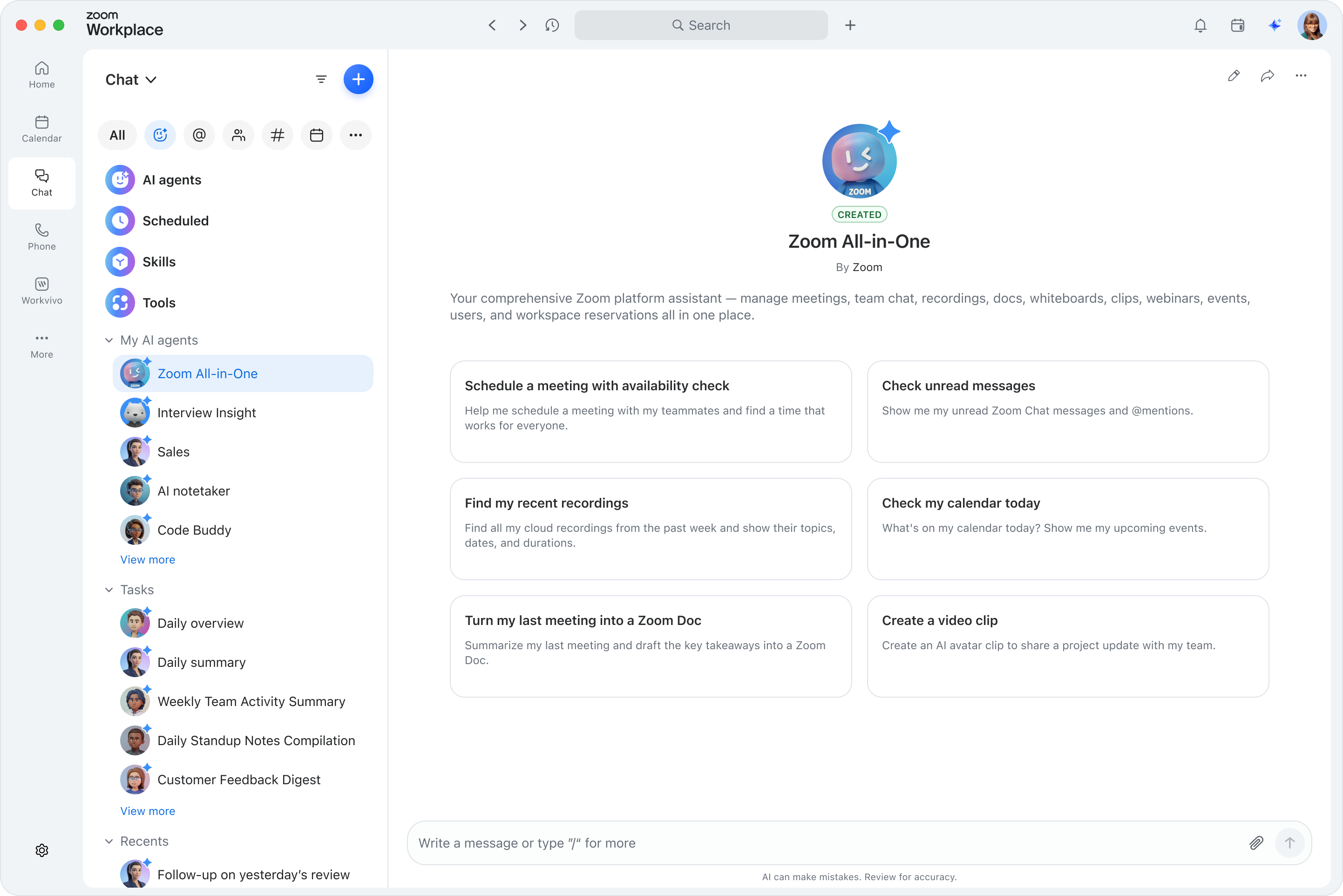
We built custom AI agents right into Zoom Chat, included with ZoomMate. They act like specialized teammates you can @mention in chat channels to answer questions, perform tasks, and surface information from your uploaded knowledge sources.
 
You can build one directly in Zoom Chat using the built-in agent builder — just describe what you need, configure it in minutes, and deploy. Because your agent lives inside Zoom, it’s easy to manage, test, and refine without switching platforms.
 

How to set up an AI agent in Zoom Chat

 
Here’s how easy it is to get started:
 
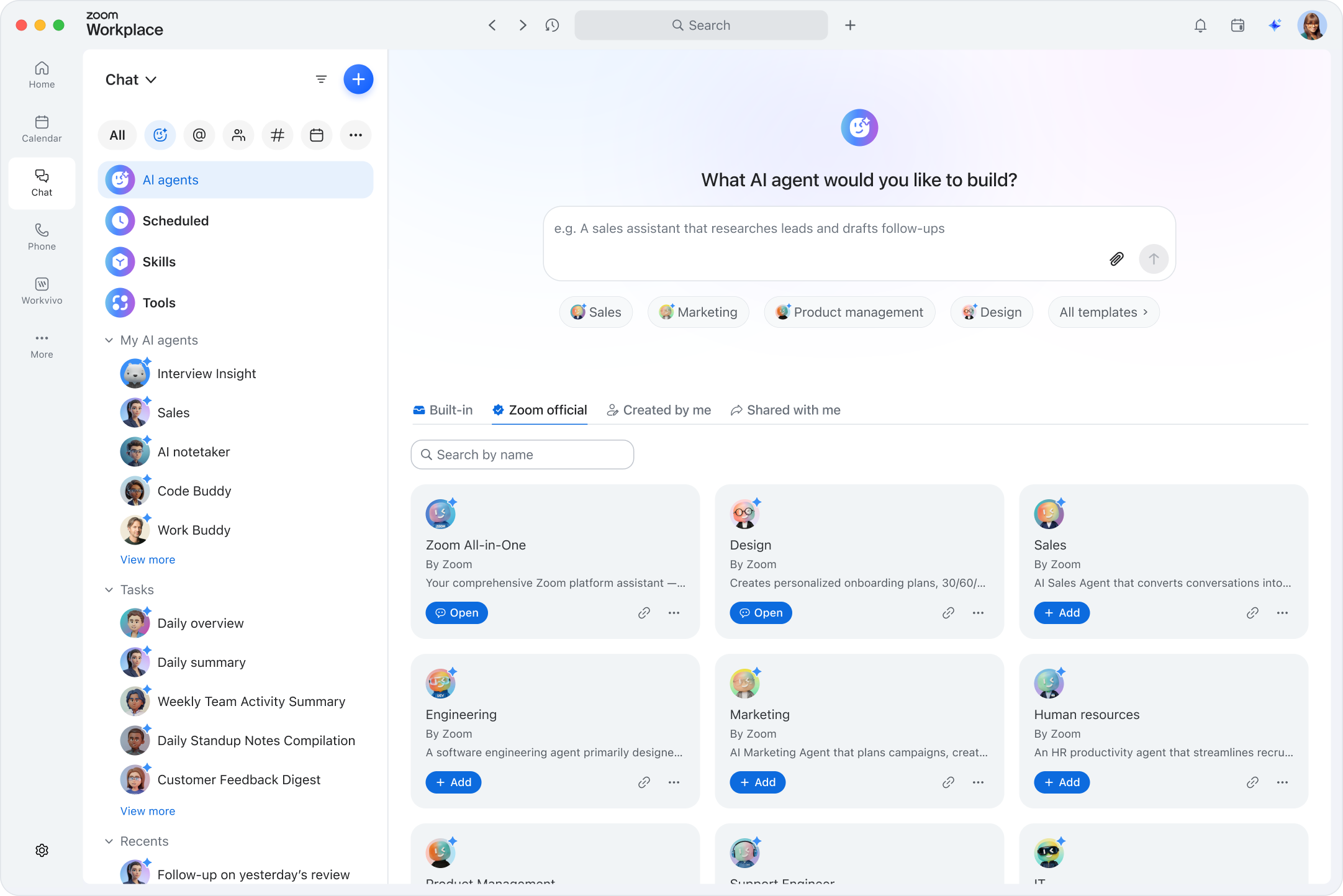
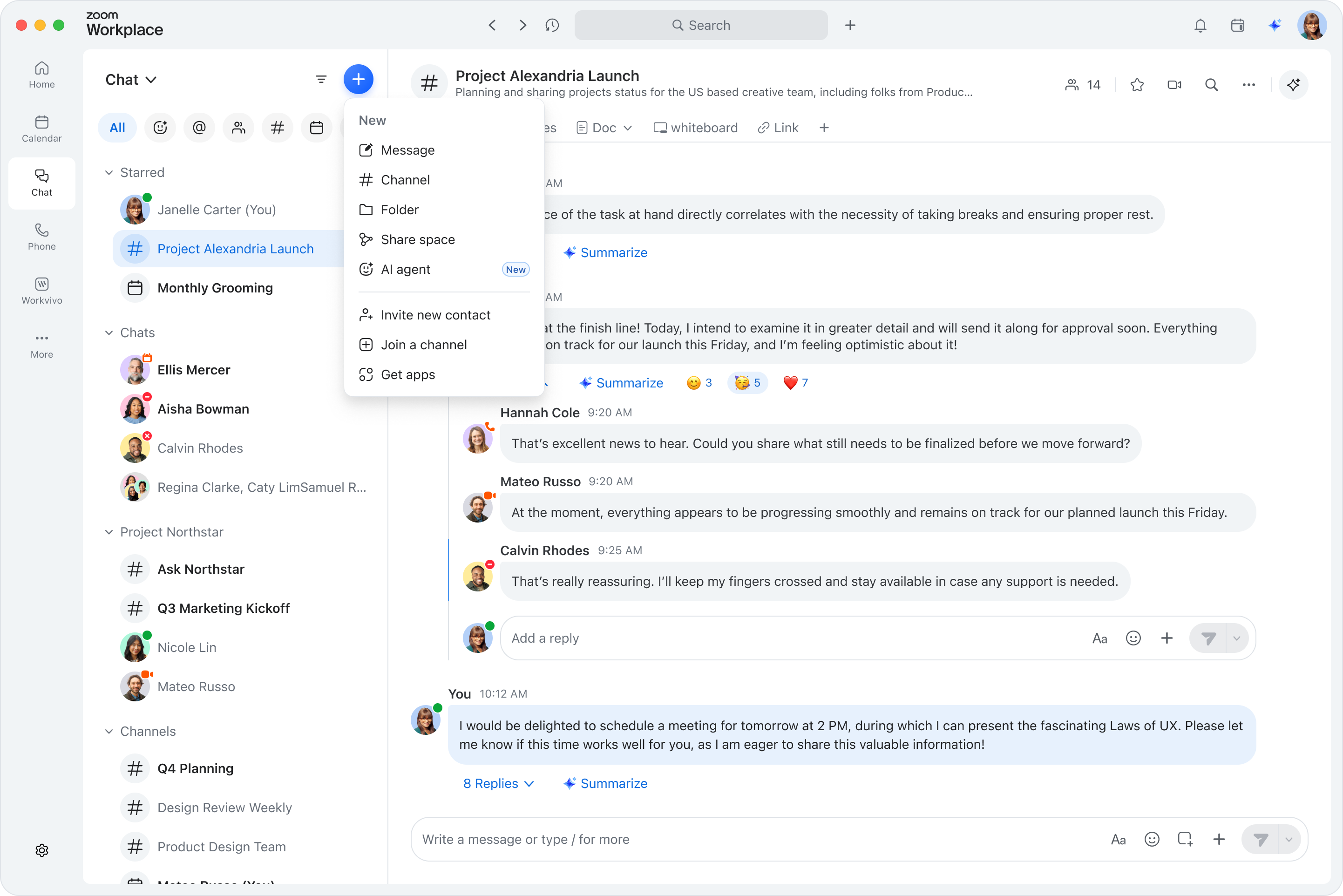
  1. Start a new agent. From the Chat tab, click the + (New message) button and select Agent. You can also click the + button in the compose box of any group chat or channel and select Create agent.
  2. Choose your starting point. Pick from a premade template (FAQ responder, sprint summarizer, onboarding guide, and more) or build your agent from scratch.
  3. Name, describe, and brand your agent. Give it a custom avatar and intro message so your team knows what it does at a glance.
  4. Upload knowledge sources. Add internal documents, runbooks, wikis, or spreadsheets so your agent answers from real, approved data.
  5. Define slash commands. Create specific actions users can invoke mid-conversation for quick, structured responses.
  6. Add suggested prompts. Help your teammates know exactly how to interact with the agent by providing example questions.
  7. Preview and test. Validate your agent’s responses before anyone else sees them using the built-in preview mode.
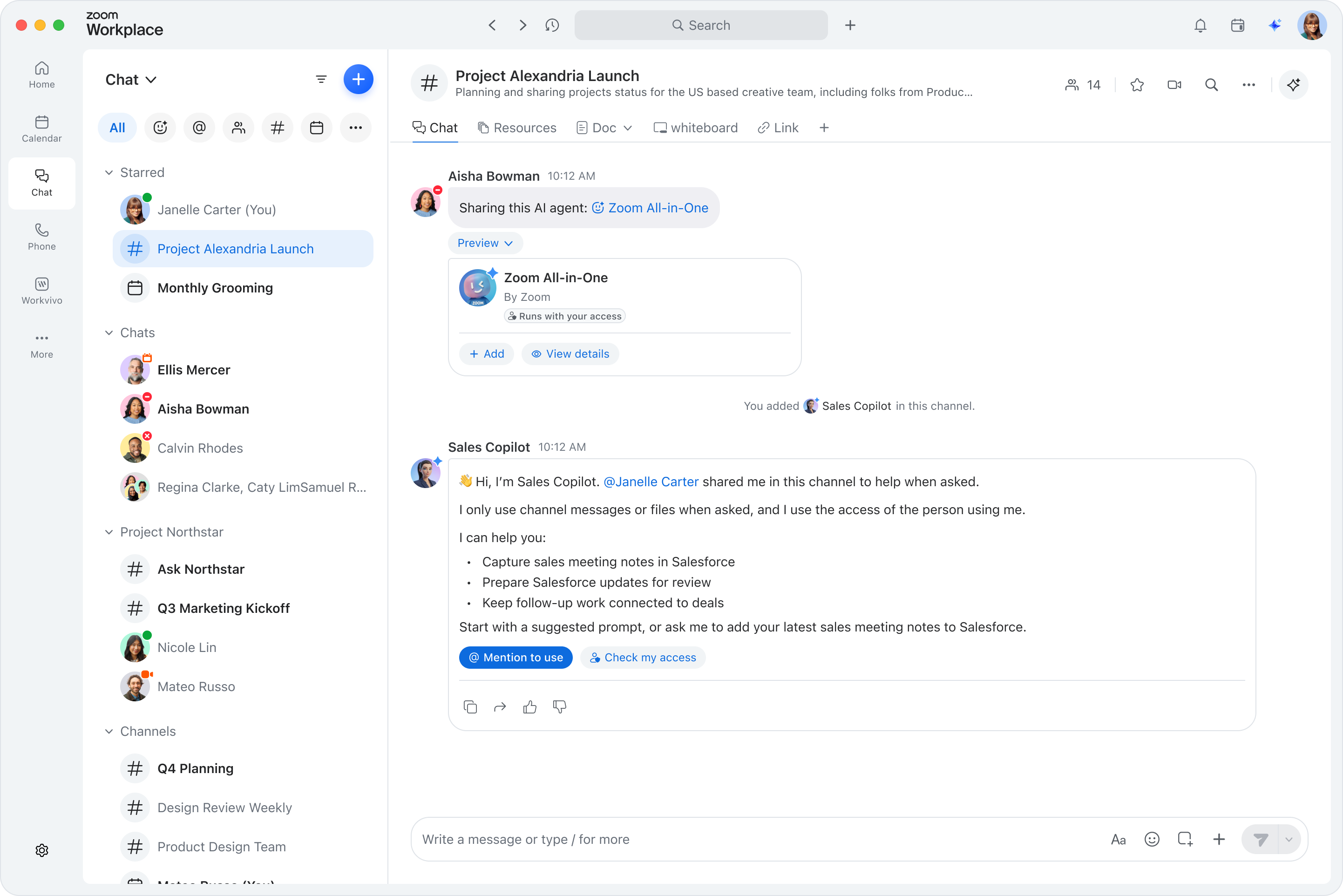
  8. Publish and deploy. Choose where your agent lives — in a personal 1:1 chat, a group chat, or a channel where all members can access it.
That’s it — your custom AI agent is ready to work alongside your team, helping you get more done directly in Zoom Chat. You can create multiple agents for different departments or workflows, each tailored to specific needs.

Zoom AI Agents use cases for your business

 
AI agents can support nearly every department. Here are a few ways small businesses are using them today:
 

IT support agent

An IT admin can create a “support agent” in Zoom Chat that answers common questions from uploaded runbooks and documentation. Team members simply @mention the agent to get instant answers about permissions, access requests, or troubleshooting steps — potentially saving hours each week.
 
Over time, the agent can learn common issues — like password resets or access requests — and handle them automatically. This reduces response times and frees IT staff to focus on more complex problems.
 

Sales deal agent

A sales team can use the built-in Sales agent template or build a custom “deal agent” that helps reps close deals and update their CRM through natural conversation. It keeps the pipeline moving without manual data entry.
 
By surfacing deal insights directly in Zoom Chat, sales reps can stay informed without switching tools. The agent can even remind them of upcoming follow-ups or flag stalled opportunities.
 

Marketing campaign agent

Marketing teams can build a “campaign agent” trained on brand guidelines, messaging pillars, and campaign briefs. Team members @mention the agent to check content drafts for tone and alignment, get quick answers about campaign status, or surface key information from shared documents — all within Zoom Chat.
 
This helps marketing teams stay coordinated and maintain brand consistency, even across multiple campaigns and contributors.
 

Customer experience agent

A “customer pulse agent” can be loaded with support documentation, FAQs, and troubleshooting guides. When team members @mention it in chat, it surfaces relevant solutions and known fixes instantly. This helps CX teams respond faster and maintain consistent service quality.
 
It can also summarize customer feedback and highlight recurring issues, giving managers actionable insights to improve service and retention.

Frequently asked questions

1. What are the first steps in learning how to build an AI agent?

Start by defining the problem you want to solve and the specific tasks your agent should handle. Then choose your development approach — no-code, low-code, or custom-coded — and select the right model for your needs. Once you’ve outlined your goals, you can begin connecting data and tools.
 

2. Do I need to be a developer to build an AI agent?

Not necessarily. Many no-code tools make it easy to build agents without writing code. In Zoom Chat, you can create a custom AI agent directly through the interface — no technical background required. Developers can still extend functionality through APIs if needed.
 

3. How do AI agents differ from chatbots?

Chatbots follow predefined scripts and can only respond to specific inputs. AI agents reason, adapt, and take action based on context. They can connect to tools, access data, and perform tasks beyond simple conversation, making them more versatile and intelligent.
 

4. How can Zoom’s custom AI agents help my business?

Our custom AI agents in Zoom Chat let you answer team questions instantly, automate repetitive tasks, and surface key information from your uploaded knowledge sources — all inside your existing chat channels. They’re included with ZoomMate, so you can start building without complex setup.
 

5. What kinds of data can my AI agent use?

Your agent can access structured data (like CRM records), unstructured data (like documents or chat logs), or external APIs. With retrieval-augmented generation, it can reference your own knowledge base to give accurate, grounded answers that reflect your business’s real information.
 

6. How can I make my AI agent safe and reliable?

Set clear boundaries for what your agent can and can’t do. Test thoroughly, monitor its performance, and maintain human oversight for sensitive actions. Responsible deployment helps ensure accuracy, security, and trust across your organization.
 

7. Can I integrate Zoom Custom Agents with other tools?

Yes. You can upload knowledge sources like internal documents, runbooks, wikis, and spreadsheets to give your agent access to the information it needs. You can also define slash commands that trigger specific actions mid-conversation. For example, you could build an agent that creates Jira tickets from chat conversations or pulls data from your CRM — all without leaving Zoom Chat.

Conclusion

Learning how to build an AI agent opens new possibilities for small businesses. From automating daily tasks to improving customer experiences, AI agents can help your team focus on meaningful work instead of manual busywork.
 
With Zoom’s custom AI agents in Zoom Chat, we’ve made it easier than ever to bring this power into your existing workflows — no coding, just practical automation that fits your business.
 
Ready to see what your team could achieve with AI built into your workspace?
 

Bring AI into your workflow with Zoom Workplace

Our customers love us

Okta
Nasdaq
Rakuten
Logitech
Western Union
Autodesk
Dropbox

Zoom - One Platform to Connect