Small Business AI Meeting & Chat

Real SMBs reviewed Zoom's AI note-taker and meeting summaries. Here's the pattern we noticed.

Three things happened when these teams stopped taking notes

5 min read

Published on July 30, 2026

Image Placeholder
Robin Bunevich
Robin Bunevich
Product Marketing Manager, Zoom AI

Robin Bunevich is a Product Marketing Manager at Zoom. She oversees product marketing and strategy for Zoom AI. After three years of leading marketing for Zoom’s Event Solution products, and launching one of the fastest growing products at Zoom, Zoom Events, she is now focused on helping organizations seamlessly adopt AI into their workflows. Prior to Zoom, she ran marketing for live events at The New York Times, and was instrumental in helping the organization transition to a fully virtual events program in March of 2020. At Zoom, Robin uses her 15 plus years of marketing and advertising experience to drive awareness and adoption for Zoom’s AI solutions.

We pulled the highest-rated G2 reviews from small and mid-sized business customers using Zoom AI's meeting summaries and My Notes, Zoom's AI note-taker built into Zoom Workplace. Every single one said some version of the same thing: once they let AI handle meeting documentation, something shifted.
 
Not just "I saved time." Something more specific than that.
 
Across 11 reviews (all 4.5–5 stars), three patterns kept showing up. The same outcomes, described by different people in different industries, at companies ranging from two to 500 employees. Here's what they said.

Start using Zoom's AI note-taker for your small business

You get your full brain back

"Instead of spending time taking detailed notes, I can focus on the conversation and engagement. The AI-generated summaries help ensure important information is captured, decisions are documented, and responsibilities are clearly assigned." 

— Program Director | Education Management

"It's particularly impressive how accurately it delivers meeting summaries, ensuring I never miss out on crucial action items or details. The automatic capture of these actions allows me to stay fully focused during meetings rather than worrying about documentation, drastically improving my efficiency."

— Sr. Manager – B2B Operations and Strategy | Higher Education | 201–500 employees

This is the most consistent theme across every review: the quality of the conversation improves when nobody is playing secretary. You ask better questions. You catch nuance. You build rapport instead of transcribing it.
 
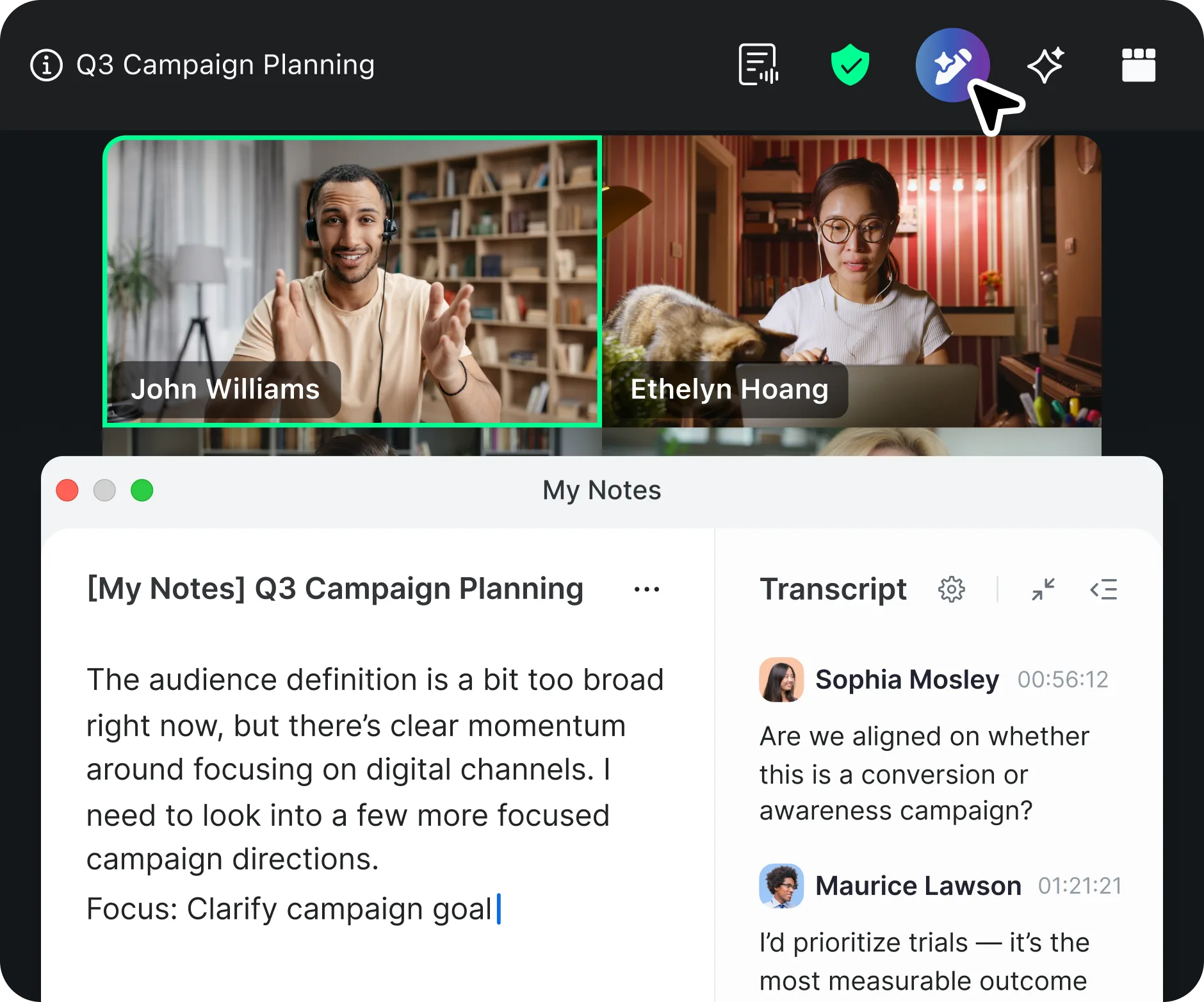
My Notes handles the documentation layer for you: summaries, key decisions, and action items. Your attention stays where it belongs, on the people in the room. It works across Zoom Meetings, Microsoft Teams, Google Meet, and even in-person conversations, so it doesn't matter where the meeting happens.
 
According to Zoom's 2026 GenAI ROI Study, workers spend 1–2 hours each on follow-up emails, meeting summaries, and prior meeting recaps. Zoom AI can automate these tasks, helping customers reclaim up to three to six hours per week by reducing meeting prep and follow-up time. That's not a productivity hack. That's a structural change in how your week works.


See how much time you could save

Meetings start producing outcomes, not just minutes

"It helps us capture key takeaways, action items, and decisions from internal meetings, demos, and cross-team calls — especially when conversations move quickly or include multiple stakeholders. Instead of scrambling to take notes, we can stay focused on the discussion and trust that the summary will be there after." 

— Demand Generation Manager | Computer Software | 11–50 employees

"They're super accurate and save me tons of time by highlighting key points and action items right after the call. It's honestly a game changer for staying organized!"

— Lead Software Consultant | Computer Software | 11–50 employees

Small teams don't have project managers. They don't have someone whose job is to chase action items and send reminder emails. So when meeting notes live in one person's notebook, follow-through depends entirely on that person's memory and initiative.
 
My Notes changes the default. Action items are captured, attributed, and shared with you automatically. The meeting itself becomes the project management tool. No extra app, no extra process, no extra person.

See how My Notes keeps your team aligned

"You had to be there" stops being a problem

"Productivity has improved because everyone gets a consistent summary, even if they couldn't attend the meeting. Overall, [Zoom AI] has made our internal communication and decision tracking much more efficient." 

— Co-founder and CTO | 2–10 employees

"It enhances productivity by summarizing meetings, capturing action items, and generating follow-ups automatically. It reduces manual note-taking, improves team alignment, and supports seamless collaboration across time zones." 

— Software Engineer | IT and Services | 51–200 employees

Small teams run lean. People wear multiple hats. Not everyone can be in every meeting, and they shouldn't have to be. But "I'll catch you up later" rarely happens, and when it does, half the details get lost in translation.
 
Zoom AI makes every meeting accessible to everyone. Consistent summaries, clear decisions, and next steps, all of which you can configure to share automatically through Slack, Zoom Chat, or email. Your team stays aligned whether they were in the room or not.

What this means for your team

The pattern across these reviews is clear: small teams that automated their meeting documentation didn't just save time. They got better at executing, collaborating, and staying aligned because they stopped losing information at the point of capture.
 
Here's what Zoom AI with My Notes brings to the table:
 
  • Automatic summaries, decisions, and action items from every meeting
  • Cross-platform support: works on Zoom Meetings, Microsoft Teams, Google Meet, and in-person
  • Configure sharing via Slack, Zoom Chat, or email
  • 30+ language support for Zoom Meetings for multilingual teams
  • Included with Zoom Workplace at no extra cost
86% of GenAI users report improved productivity once AI is integrated into their workflow. The teams in these reviews aren't early adopters taking a risk. They're practical operators who found a tool that works and kept using it.

And when you're ready for more

My Notes handles what happened in the meeting. But what about everything that needs to happen after?
 
That's where ZoomMate comes in. ZoomMate is your AI teammate built into Zoom Workplace that goes beyond note-taking. It drafts follow-up emails, updates your CRM, prepares you for your next meeting, and connects the dots across your entire workday.
 
My Notes helps you capture everything. ZoomMate helps you get everything done.
 
If you're already seeing the value of AI-powered notes, ZoomMate is the natural next step. Every conversation becomes completed work, automatically.

Start with My Notes. Go further with ZoomMate.

Let Zoom's AI handle the follow-through so you can focus on impact, not admin.

Reviews sourced from G2 (4.5–5 star ratings), including some that were subject to G2 platform incentives. The AI note-taking capabilities referenced in these reviews are now available in Meeting summaries and My Notes, powered by Zoom AI within Zoom Workplace.

Our customers love us

Okta
Nasdaq
Rakuten
Logitech
Western Union
Autodesk
Dropbox

Zoom - One Platform to Connect