





会议和聊天

 8 阅读分钟数
还在为碎片化沟通而困扰吗?了解连接团队的高效协作纽带
当团队通过集中式互联空间(例如 Zoom Chat)来分享创意、执行决策并确保全员无缝协作时,团队的工作效率就能显著提升。
我们的员工使用 Zoom 平台重塑全球性团队协作,通过异步通信和多语言 AI 功能实现高效连接。
5 阅读分钟数
发布日期 2024年3月8日

分布式团队往往需要付出更多努力才能有效地协作,而许多帮助队友了解最新情况的任务可能会影响真正的协作。发送会议记录、行动事项或向协作者更新项目状态等任务,可能会妨碍一个人与他人联系并专注于有意义的工作的能力。事实上,根据我们的《工作场所中的人工智能》报告,73% 的领导者和 55% 的员工每周至少都会投入几次时间与同事分享记录和行动事项,71% 的领导者和 51% 的员工每周会多次提供项目状态更新信息。大量繁忙的工作会妨碍团队协作。
在 Zoom,我们也面临着这些挑战。 作为一家全球性公司,我们必须对如何开展团队合作采取战略性态度。 我们依靠自己的工具提供帮助,我们的经验甚至使我们能够思考和设计新的功能和解决方案,帮助团队更高效地协同工作。 我们是这样做的
由于团队成员分布在不同的大洲,职场协作成为跨时区协调的难题。如果要确保所有人参与实时通话,总有人不得不在深夜加入会议。
The Zoom platform is the glue that binds teams together, enabling continuous collaboration across time zones and languages. Central to the platform is Zoom Chat, which provides a way for employees to communicate asynchronously or in real time, one on one or in groups.
“我使用的是东海岸时间 [美国],而我的大部分同事都在西海岸,但我也会与欧洲和亚洲的同事进行合作。”生产力应用程序主管 Darin 说,“我们正在进行这种真正的全球协作。”
As a manager, Darin tries to be mindful of sending chats to his colleagues outside of work hours. “Some people don’t mind being messaged after hours, but others prefer that boundary. Zoom Chat allows us to work both ways. I can schedule a chat so the recipient will get it in the morning, their time,” he said.
Zoom Chat helps Darin stay in the loop on many different types of workstreams, whether he’s an active player or just needs to be aware at a high level. Even when those conversations are happening in another language, Darin uses Zoom’s built-in Zoom Chat translation feature to translate the messages. And when collaboration spans across multiple products — from meetings to chat, for example — continuous meeting chat helps keep the discussion in one place so he can continue the conversation even after the meeting ends.
为了节省时间,Darin 使用 Zoom AI Companion(我们具有跨平台功能的生成式 AI 助手)来总结冗长的聊天会话。这有助于他把握团队活动的脉搏,而不会被困扰在细枝末节中。
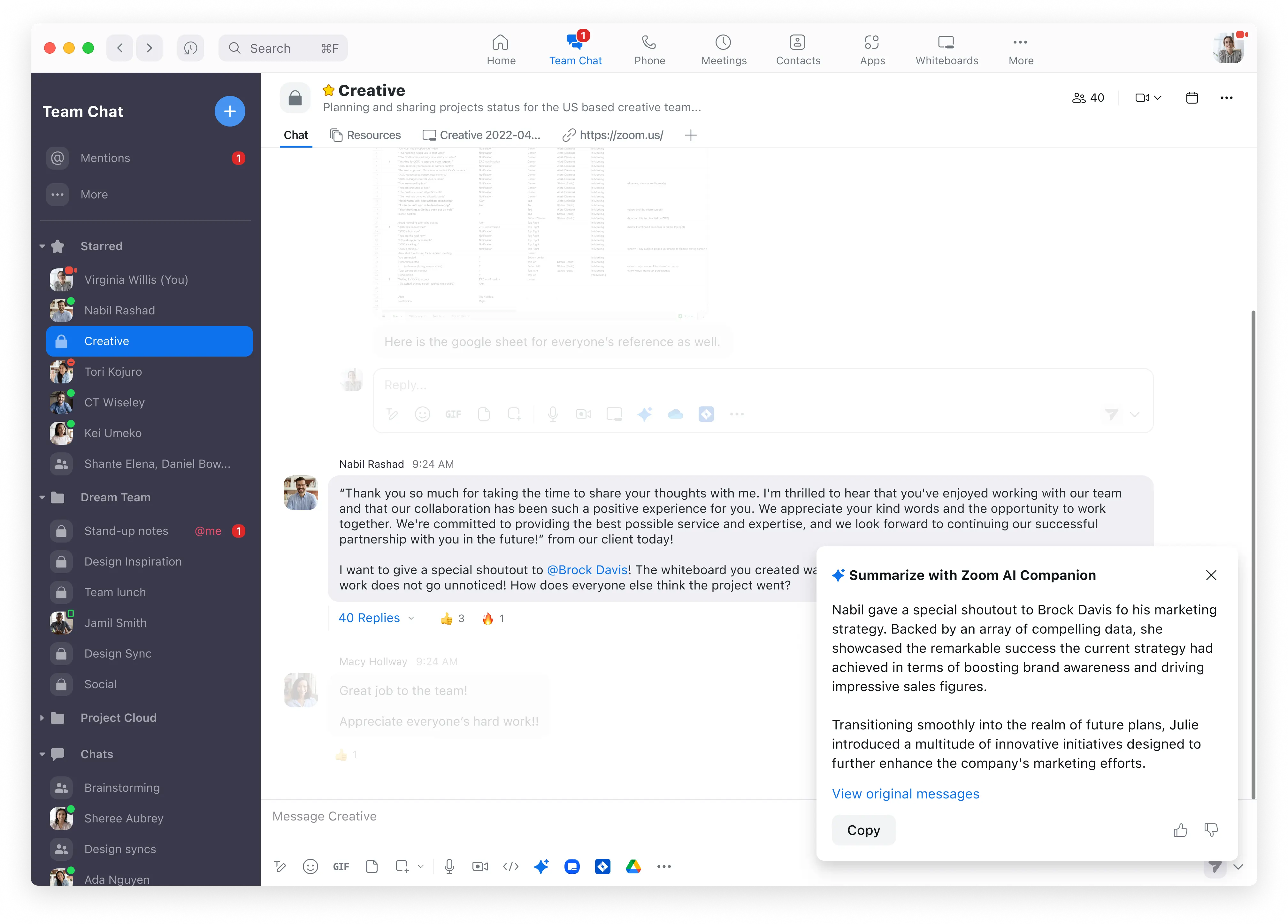
"我们通过聊天进行了大量的交流。其中的一些内容我需要深入了解,但也有一些内容无关紧要。当我来到一个有 30 或 40 条未读消息的聊天频道时,我可以获得一个摘要,了解其中的要点,然后即可继续参与,”Darin 说,“作为对我的时间的回报,这是无价的。”
Zoomies rely on Zoom Chat as a hub for communication, discussion, and decision-making. But when team members need to share a product mock-up or point out a bug, words and static images often don’t tell the whole story.
“过去,我们会进行屏幕截图并编写说明,然后粘贴到聊天记录或文档中。您可以将正在发生的事情拼凑起来,但这要耗费更多时间。”Darin 说。
随着内置在 Zoom 平台中的异步视频工具 Zoom Clips 的推出,这一过程发生了改变。
“在 Clips 的帮助下,我们可以通过视频进行异步协作。我认为它是最好的演示工具。”产品经理 Matthieu 说。他可以在法国与全球各地的工程团队合作,对特定产品功能进行微调。
“工程团队将开发一个功能,并录制一个简短的演示。当我在线时,我可以检查它是否符合需求以及设计。”Matthieu 解释说,“如果我发现剪辑中有不符合需求的地方,我可以在剪辑的某个特定点发表评论,并由此展开讨论”。

On the other end of that feedback loop is Kendall, manager of product design, and his team. “As a designer, sometimes I receive a requirement within a Clips link. It gives me context, like I just had a walk-through meeting with the product manager,” Kendall said. “If I have a draft design ready in the afternoon, I can take a few minutes to prepare a clip to present my ideas, and the following morning, I will have comments on my clip or in Zoom Chat. If everything works well, they post their thumbs-up to the clip.”
表情回应并不是 Zoom Clips 中唯一的高级功能。为了帮助提高视频质量,Kendall 和 Matthieu 可以对自己的形象进行美颜,利用降噪技术,甚至使用虚拟形象。分享剪辑后,他们可以看到有多少人观看了该剪辑,并对在剪辑中的特定点留下的问题和评论做出回应。
Darin 认为,这种解决聊天消息来回传递的方法为他的团队带来了巨大的投资回报。“我们可以在很短的时间内进行清晰的沟通。”他说。
Matthieu 发现,即使时差不是问题,在某些情况下,他也更喜欢使用剪辑录制而不是参加实际会议。“会议中的演示效果可能较差 — 人们需要做准备,而且他们可能会对在现场回答问题感到有压力。”他说,"使用 Clips 时,您可以直接开始录制。花在演示上的时间大幅减少”。
作为观看者,Matthieu 更喜欢在最方便的时候观看演示,而不是在会议期间观看直播。“我发现我的注意力更高。如果需要的话,我可以回到起点或某个特定点。”
异步通信让英国的内容设计师 Laura 有时间消化所呈现的信息并组织她的思路。“就我个人而言,当我收到一个剪辑时,能有一点空间来思考我的回应是一件很棒的事情。”她说,“对我来说,Clips 让沟通变得更容易。”
时差并不是我们的全球性团队需要克服的唯一挑战。语言障碍也会阻碍团队进行清晰的沟通。团队协作工具需要能够支持不同语言之间的沟通。
一般来说,在会前提供议程不仅是一种好的做法,而且还有助于那些不会说主要会议语言的人提前做好准备。Darin 说,他在 Zoom Notes 中跟踪议程项目,这些项目可以在聊天中分享,也可以在会议选项卡中调出。

Laura’s engineering and product design counterparts, who mainly speak a different language, share their meeting agendas in Zoom Chat, where she can then translate the messages into English with a couple of clicks. During the meeting, she turns on real-time translated captions to keep up with the conversation. “I’m able to participate and listen comfortably without language being a huge barrier,” she said.
最近,我们在 Zoom AI Companion 中引入了更多功能,并支持多达 36 种语言 (预览版)以用于会议中功能,从而帮助全球性团队更好地沟通。在启用之后,AI Companion 可以自动检测会议中使用的受支持语言,并以该语言生成会议摘要。AI Companion 还能使用受支持的语言回答问题,即使会议中没有使用该语言。这意味着像 Laura 这样的会议参会者可以用英语向 AI Companion 提问,并得到英语回复,即使对话使用的是另一种语言。
如果您想帮助您的分布式团队跨越时区和语言障碍更好地沟通,以下三点值得考虑:
If you have Zoom Workplace, you can get started with Zoom Clips and Zoom Chat today! Check out our Zoom Clips user guide and Zoom Chat guide.
希望通过更多方法来提高全球性团队的工作效率?查看我们的点播网络研讨会“释放生产力:提升 Zoom 体验的 10 个技巧”。
8 阅读分钟数
当团队通过集中式互联空间(例如 Zoom Chat)来分享创意、执行决策并确保全员无缝协作时,团队的工作效率就能显著提升。
 4 阅读分钟数
了解 Zoom 的翻译字幕如何减少对口译员和第三方集成的需求,从而使您可以促进更具包容性的会议或网络研讨会。
 9 阅读分钟数
To help enable clear communication and cut back on wasted time, try our AI-first, asynchronous video offering, Zoom Clips.









