



Your guide to getting started with ZoomMate
Everything you need to start using ZoomMate: notes, search, workflows, and AI tools — all inside Zoom Workplace.
 16 min read
Published on February 4, 2025




Running a modern contact center means constantly balancing speed, service quality, and customer expectations. Without clear visibility into performance data, it’s difficult to identify bottlenecks. That’s where contact center analytics comes in.
In this guide, we’ll break down what contact center analytics is, the different types available, and key metrics that matter most. This helps you form the right analytics strategy, streamline operations, and elevate your customer experience.
Contact center analytics uses data to understand what’s really happening in your contact center. It collects information from every customer interaction via various communication channels — whether it’s a phone call, chat, email, or social media — and turns that data into insights.
These insights are gathered using tools such as activity usage reports and queue analytics to show you how well agents are performing, how quickly issues are being resolved, and what your customers are really feeling. Recent advances in AI have the potential to help organizations generate deeper insights faster and more effectively than ever before.
For instance, contact center analytics can reveal why customers are calling, highlight common pain points, and indicate where agents might need a little extra support or training.
Contact center analytics helps organizations move beyond handling support requests to actively improving the customer experience. Analyzing data from calls, chats, emails, and other interactions reveals existing issues teams might otherwise miss.
In addition, they can uncover friction points in the customer’s journey and understand how agent performance affects key metrics displayed across a call center analytics dashboard.
Contact center predictive analytics and insights derived from interaction data help teams continuously refine operations. This can result in reduced call volume drivers, improved agent effectiveness, and faster, more consistent customer experiences.
To get the most value from contact center analytics, businesses should treat it as an ongoing optimization process rather than a one-time experiment. Here’s how to get started:
Call center analytics come in various forms, with each offering unique insights into different aspects of your contact center’s performance. Here are five key types of call center analytics that can help you understand everything from customer behavior to agent efficiency.
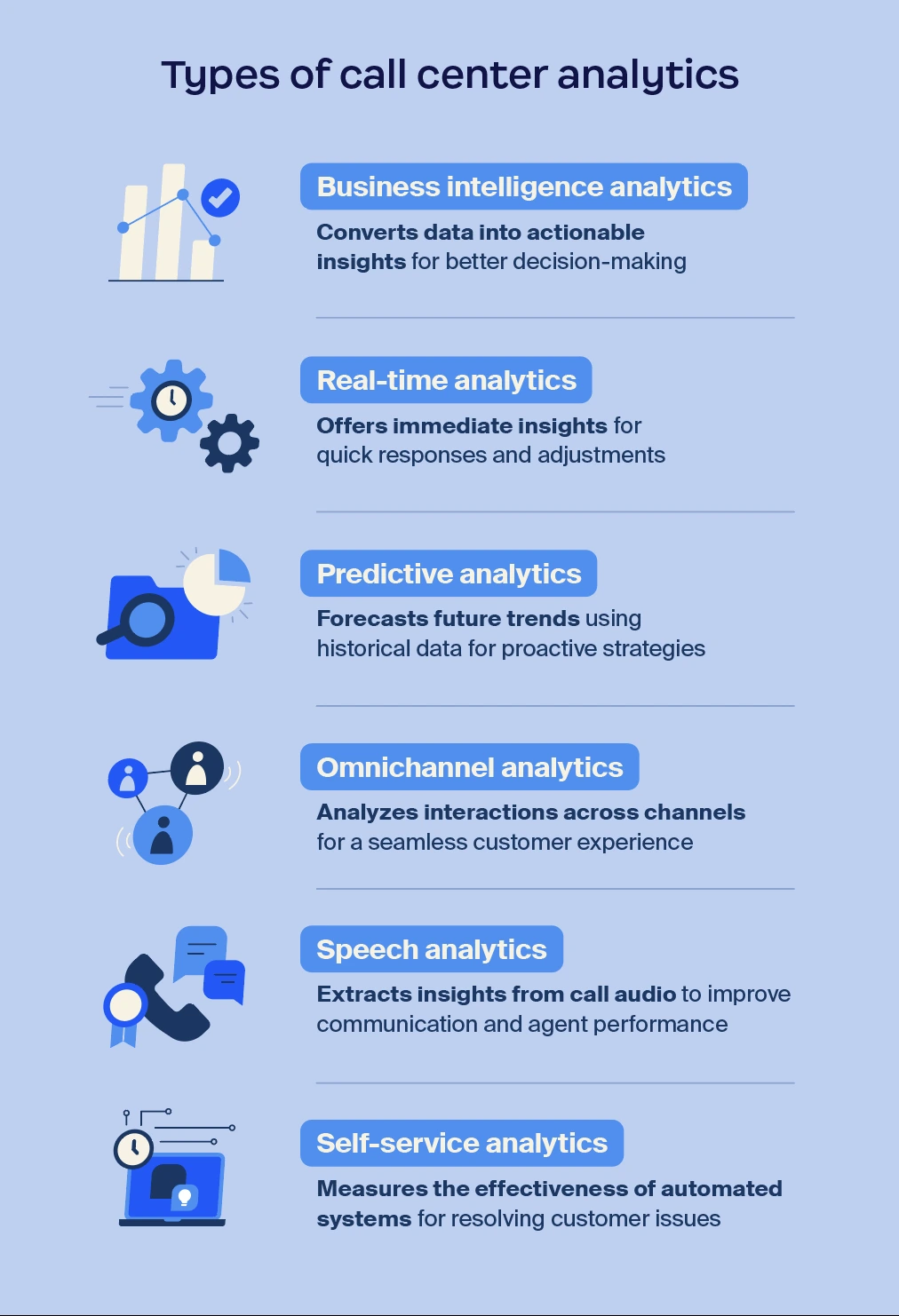
Business intelligence analytics, also known as historical analytics, focuses on analyzing past contact center data to identify trends and patterns. Through reviewing previous interactions, organizations can better understand customer behavior, agent performance, and operational efficiency.
A contact center’s business intelligence analytics help teams account for recurring issues, evaluate what’s working well, and make better decisions about staffing, training, and workflows to improve overall contact center performance.
Examples of business intelligence analytics:
Pro Tip: Use historical data to create a “top 3 action plan” after each review. Identify the three biggest patterns or issues in your past call data and set specific actions to address them — such as adjusting staffing during peak times or refining scripts for common issues. This focused approach turns insights into immediate improvements.
Real-time analytics gives you instant insights into ongoing customer interactions. For example, with AI-first Zoom Workforce Management you can monitor activity in real time — including queue status, agent performance, active calls, call duration, and average hold times — enabling you to respond quickly to any issues.
If an agent is facing a tough call, you can jump in to assist. Or, if call volume spikes, you can adjust staffing immediately to keep wait times low. This proactive approach can help you keep your service running smoothly and your workforce streamlined.
Examples of real-time analytics:
Pro Tip: Set up real-time alerts for spikes in call volume. If wait times exceed a set threshold, immediately shift available agents from lower-priority tasks, like after-call work or email support, to handle incoming calls and keep queues under control.
Predictive analytics involves analyzing historical data to forecast future trends, helping you optimize your contact center operations. By examining past customer interactions and behaviors, this type of analytics allows you to anticipate customer needs and handle them more efficiently.
Think of it as having a crystal ball that helps you prepare for what’s ahead, so your team is ready to tackle any challenge.
Tracking predictive analytics is crucial because it enables proactive decisions. For example, if you spot a trend indicating an increase in customer inquiries about a specific product, you can prepare your agents with the right information and resources in advance. This foresight can help you anticipate customer needs and respond more effectively.
Examples of predictive analytics:
Pro Tip: Leverage predictive analytics to forecast peak call times and schedule your top-performing agents accordingly. This puts the right skills in place when demand is highest, reducing call handling time and boosting customer satisfaction.
Omnichannel analytics tracks customer interactions across multiple channels — phone, email, chat, and social media — and consolidates them into a single view. Instead of looking at each channel separately, this approach helps you see the full customer journey and understand how they navigate between channels.
Tracking these analytics is crucial because it shows you what’s working, what’s not, and how you can improve the overall experience.
Examples of omnichannel analytics:
Pro Tip: Regularly review your omnichannel analytics to identify the most popular customer channels and optimize them first. For instance, if chat support sees the highest traffic but has slower response times, consider reallocating resources or training specific chat agents to boost efficiency and customer satisfaction on that channel.
Speech analytics is a tool that analyzes audio from calls to uncover insights into customer sentiment, agent behavior, and call outcomes. It examines keywords, tone, and speech patterns to understand not just what’s being said but how it’s being conveyed.
Tracking speech analytics helps you identify common customer complaints, monitor compliance, and find opportunities to refine the customer experience and improve agent performance.
Examples of speech analytics:
Pro Tip: Set up your speech analytics tool to flag calls with disgruntled customers in real-time. Use these alerts to prioritize immediate follow-up by a supervisor or a senior agent, allowing you to address customer concerns before they escalate further.
Self-service analytics measure how effectively customers resolve issues using automated support channels. These may include Virtual Agents, knowledge bases, and help centers.
When businesses regularly track self-service performance, they can identify gaps in documentation, refine virtual agent responses, and help customers quickly find the information they need.
Acting on self-service analytics can lead to better automated support experiences while allowing agents to focus on more complex customer needs.
Examples of self-service analytics:
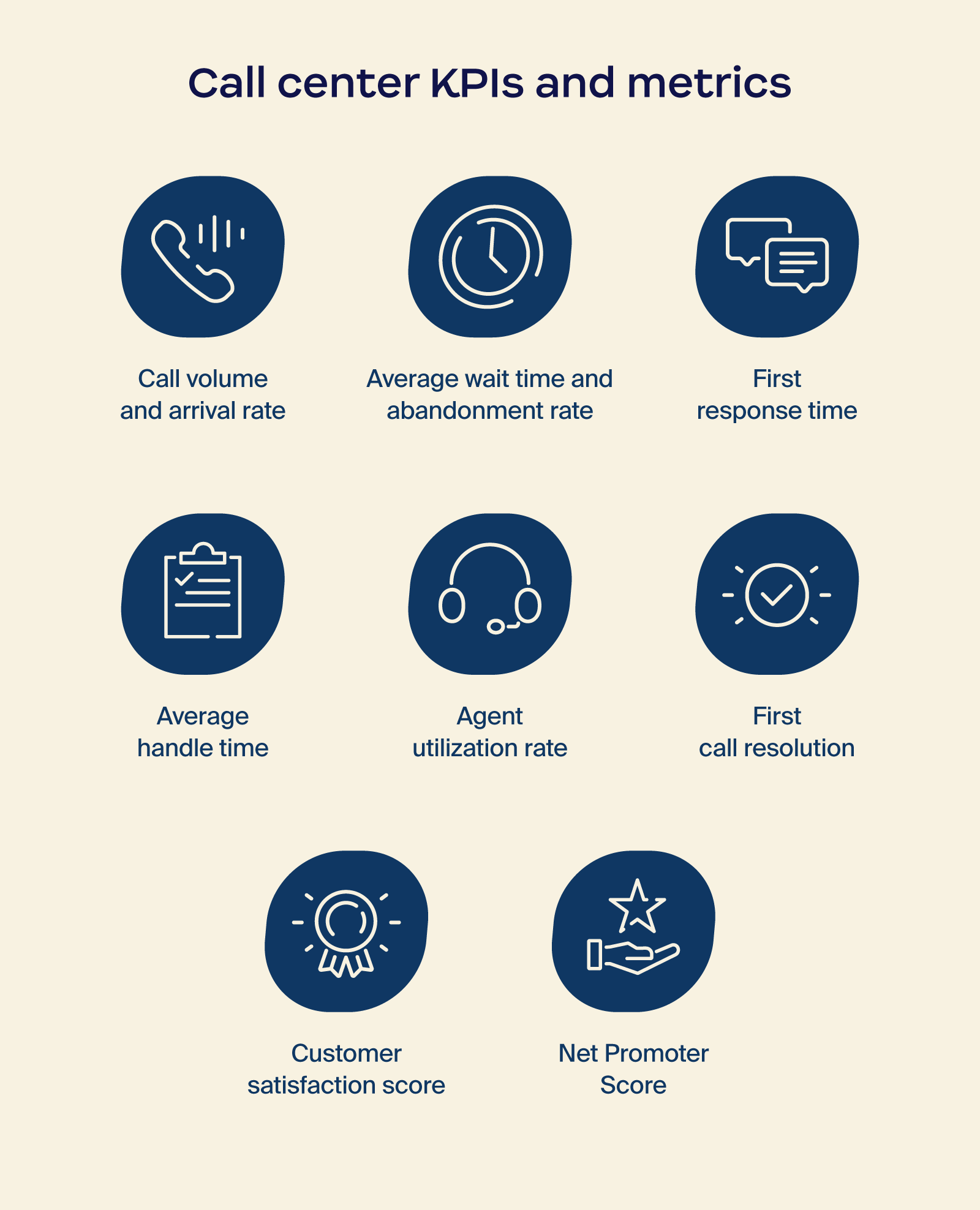
Measuring the right key performance indicators (KPIs) and metrics is essential for understanding your contact center’s performance and identifying areas for improvement. These metrics give you a detailed view of how well your team handles customer interactions, manages call volume, and maintains efficiency.
Here’s a closer look at key KPIs every contact center should track:
Tracking call center metrics is essential for any business looking to improve contact center performance and deliver exceptional customer service. By leveraging analytics, you can gain a deeper understanding of customer interactions, optimize your operations, and make smarter, data-driven decisions that drive results.
To effectively track performance, measuring contact center analytics is key. By using various tools and methods, you can collect data on agent efficiency, customer interactions, and overall service quality. Here’s how to leverage these analytics to gain actionable insights and optimize your contact center’s performance.
To start measuring performance, zero in on the KPIs that matter most to your contact center. Think about your business goals, what your customers expect, and industry benchmarks.
For example, if your focus is on boosting customer satisfaction, prioritize metrics like first-call resolution and CSAT. If efficiency is your main goal, keep an eye on average handle time and agent utilization rate. The right KPIs will give you actionable insights into what’s working and what’s not.
Using a balanced scorecard approach can help you track KPIs from multiple angles: financial (cost per call), customer satisfaction (NPS, CES), internal processes (average wait time), and growth (agent training effectiveness). This way, you’re not just measuring numbers—you’re getting a full view of your contact center’s performance and identifying areas for improvement.
Selecting the right software is crucial for aligning with your KPIs and turning data into actionable insights. Zoom Contact Center offers robust AI-first tools, including real-time analytics, automated reporting, and predictive insights, to help you stay ahead of trends and improve performance. With Zoom Contact Center, you can capture key metrics, enhance decision-making, and streamline operations.
Set up customizable dashboards to clearly visualize your data. Our intuitive dashboards can be tailored for different stakeholders, from managers tracking agent productivity to executives monitoring customer satisfaction. This helps everyone stay aligned and can easily identify areas for improvement, driving better outcomes across your organization.
Set up a robust data collection system to capture all relevant information, including call recordings, agent performance metrics, and customer feedback. Use AI to help gather data consistently across channels and improve visibility into customer interactions. Implement checks to validate data quality and avoid errors that could skew your analysis.
After collecting data, leverage analytics tools to drill down into specifics — like identifying the top reasons for call escalations or tracking patterns in customer complaints. Use these insights to pinpoint actionable improvements, such as refining scripts or adjusting agent training. Regularly audit your data accuracy so that you can always make decisions based on reliable information and address issues quickly.
Establishing benchmarks for your KPIs is essential for measuring your contact center’s performance against both industry standards and your own internal goals. Start by researching industry averages for key metrics, such as average handle time and FCR, to set realistic targets. This gives you a clear framework to assess how well your team is performing and highlights areas that may need attention.
Once benchmarks are in place, track your progress regularly to identify trends and areas for improvement. Use your analytics tools to monitor performance over time and compare it against your established benchmarks.
This ongoing analysis allows you to make informed decisions, whether it’s reallocating resources, adjusting training programs, or refining processes to optimize your call center operations. Consistent tracking helps you stay proactive in enhancing performance and delivering better customer experiences.
Contact center software solutions with AI-enabled analytics, such as Zoom Contact Center, can help organizations gain insights into customer interactions, agent performance, and overall operational efficiency.
These solutions enable businesses to analyze data effectively, allowing for informed decision-making that enhances customer experiences and optimizes workflows. By leveraging analytics software, companies can uncover trends, identify pain points, and ultimately improve service delivery.
When evaluating contact center analytics software, consider these key components:
With Zoom Contact Center’s AI-first CX suite, businesses can engage customers effectively, enhance agent productivity, and improve operational workflows. When human intervention is needed, AI helps route customers to the right agent, with all relevant customer context in hand.
On the agent side, AI streamlines workflows and provides insights that can help support agent performance and customer interactions. With real-time performance tracking, businesses can improve operations, empower agents, and create a loyal customer base.
To effectively streamline your contact center data collection and reporting, leveraging a comprehensive solution like Zoom Contact Center can make a significant difference.
With its robust analytics capabilities, you can easily gather insights across channels to get a full picture of customer interactions and agent performance. This can help support informed decision-making and operational efficiency.
With the right tools in place, you can transform your data into actionable insights and drive continuous improvement in your contact center. Learn how you can start optimizing your data collection and reporting with Zoom Contact Center today.
Still have questions about contact center analytics? We answer them below so you can better understand how to leverage data for improved performance.
A contact center analyst evaluates data related to customer interactions and agent performance to enhance operational efficiency. They identify trends, recommend improvements, and provide insights that help management make informed decisions to boost customer satisfaction and performance.
Analyzing data in a call center involves collecting information from sources like call recordings and customer feedback. Analysts use software to organize this data, calculate KPIs, and identify patterns. This process helps extract actionable insights that inform strategies for improving customer experience and agent performance.
To improve call center operations, start by reviewing performance metrics to pinpoint areas for improvement. Invest in advanced analytics tools to gain deeper insights and provide training to enhance agent skills. Streamline processes and automate repetitive tasks to boost efficiency. Regularly adjust your strategies based on data insights for continuous improvement.
In many virtual call centers (as well as physical and hybrid ones), the 80/20 rule is a common service level target that aims to answer 80% of incoming calls within 20 seconds. It’s widely considered a benchmark for customer service responsiveness and operational efficiency.
Tracking this metric helps contact center managers evaluate whether staffing levels and call routing systems are sufficient to handle demand while minimizing customer wait times.
Contact center analytics systems pull data from voice calls, chat transcripts, emails, SMS messages, social media interactions, CRM platforms, help desk software, and call routing systems.
Advanced analytics platforms use large language models (LLMs) to process this data, analyzing conversation patterns and customer sentiment in real time. LLM-powered analytics can analyze conversational patterns and contextual signals within customer interactions.








