My notes captures insights from your conversations — on Zoom, in-person, and across third-party platforms — so you can focus on the discussion, not documentation.

Focus on the conversation, not the notes
Let AI capture and summarize your discussions so you can stay fully engaged.

Your notes, wherever you meet
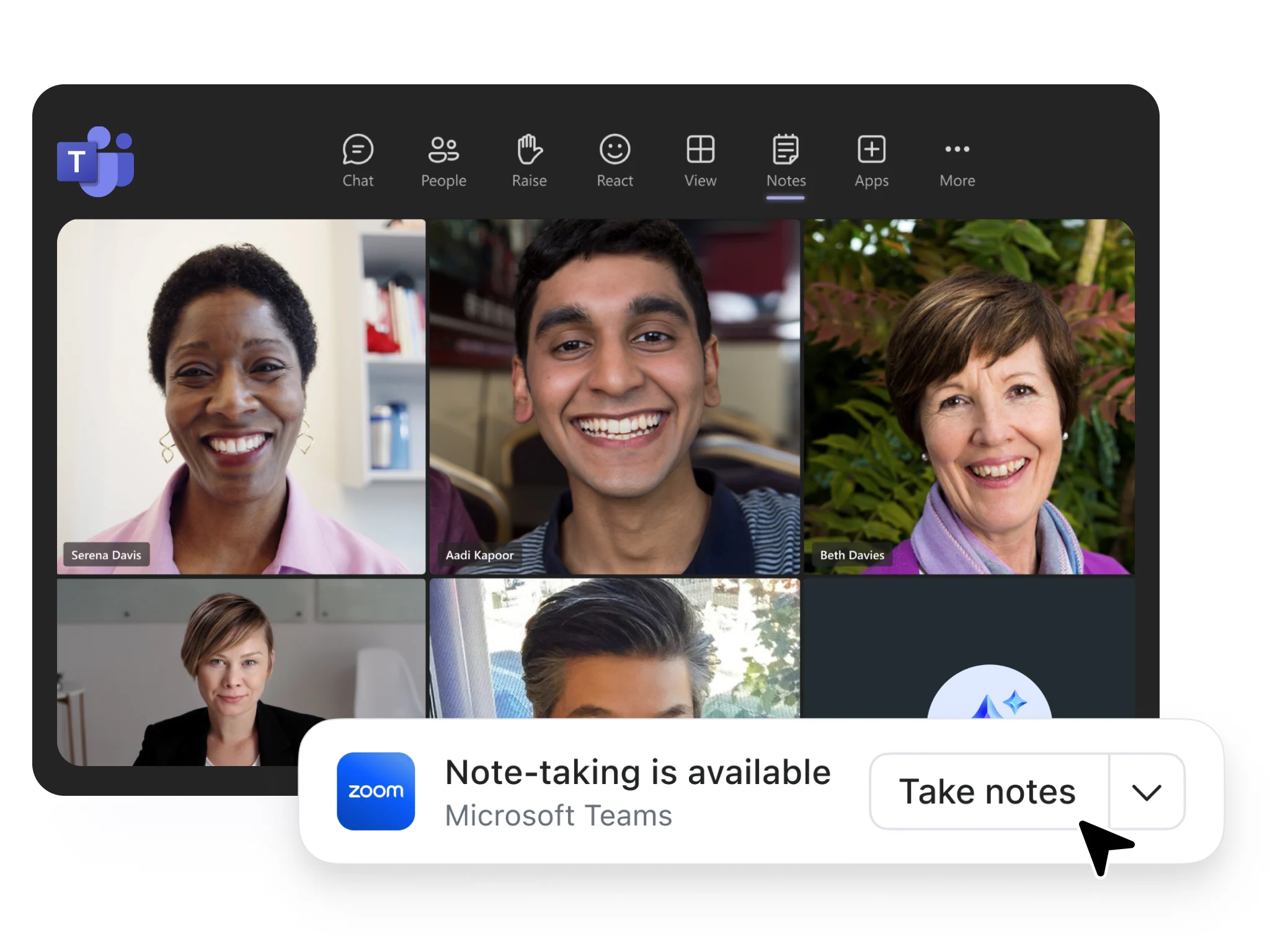
Automatically take notes across Zoom, Teams, Google Meet, and other third-party meeting platforms — no bots required.

Turn meetings into action
Allow My notes to transcribe your meetings to generate summaries, key takeaways, and next steps to keep work moving forward.
Conversations don’t end when the meeting does
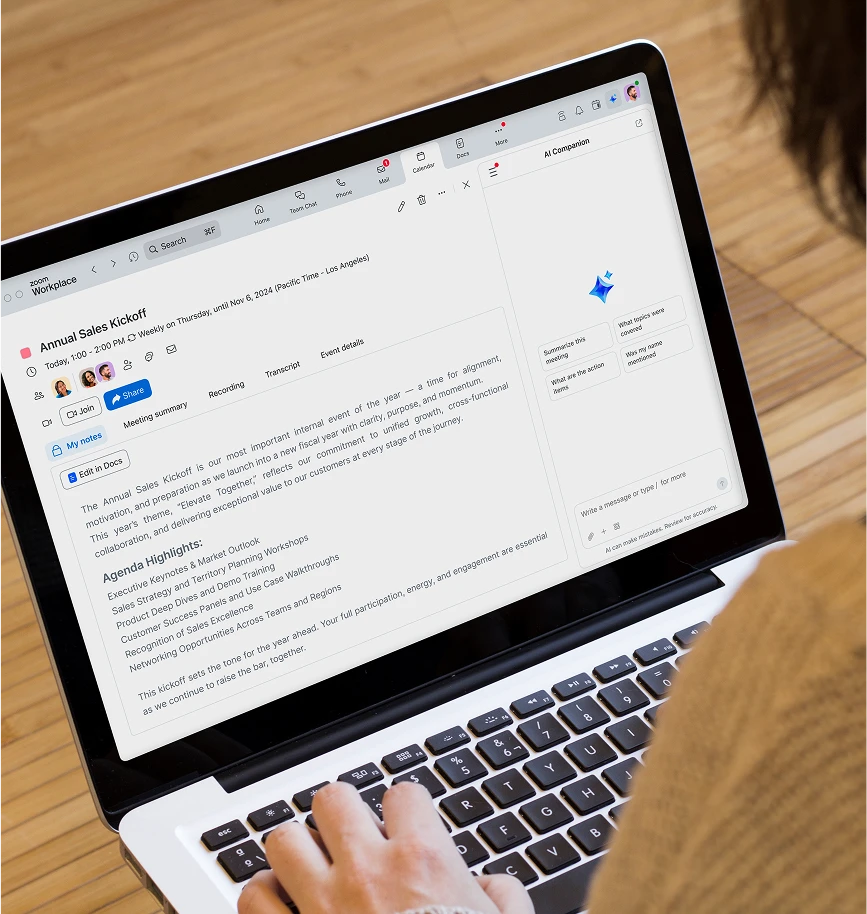
Stay connected before, during, and after meetings with My notes. Every idea, action, and update stays with you across chats, meetings, and docs. No lost context, no missed momentum.
How to use My notes

Open My notes
Start a meeting in Zoom—or join one on Microsoft Teams, Google Meet, or in person—and click the My notes icon in your Zoom meeting window or app to begin capturing notes.

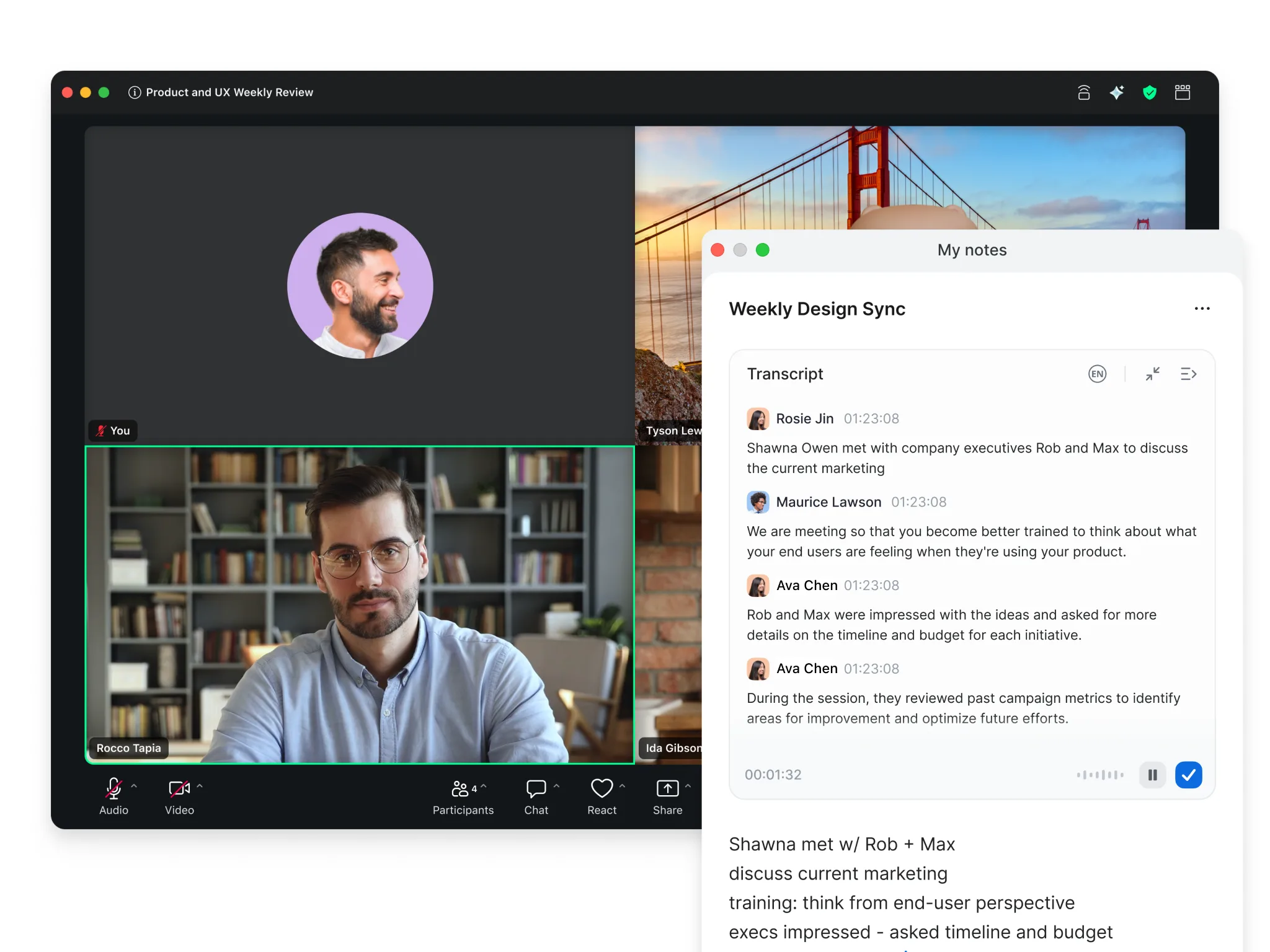
Take or transcribe notes
Type quick thoughts manually, and turn on transcription to let AI Companion capture what’s said in real time. You’ll see a visible indicator in your Zoom meeting when transcription is active.

Get your AI summary
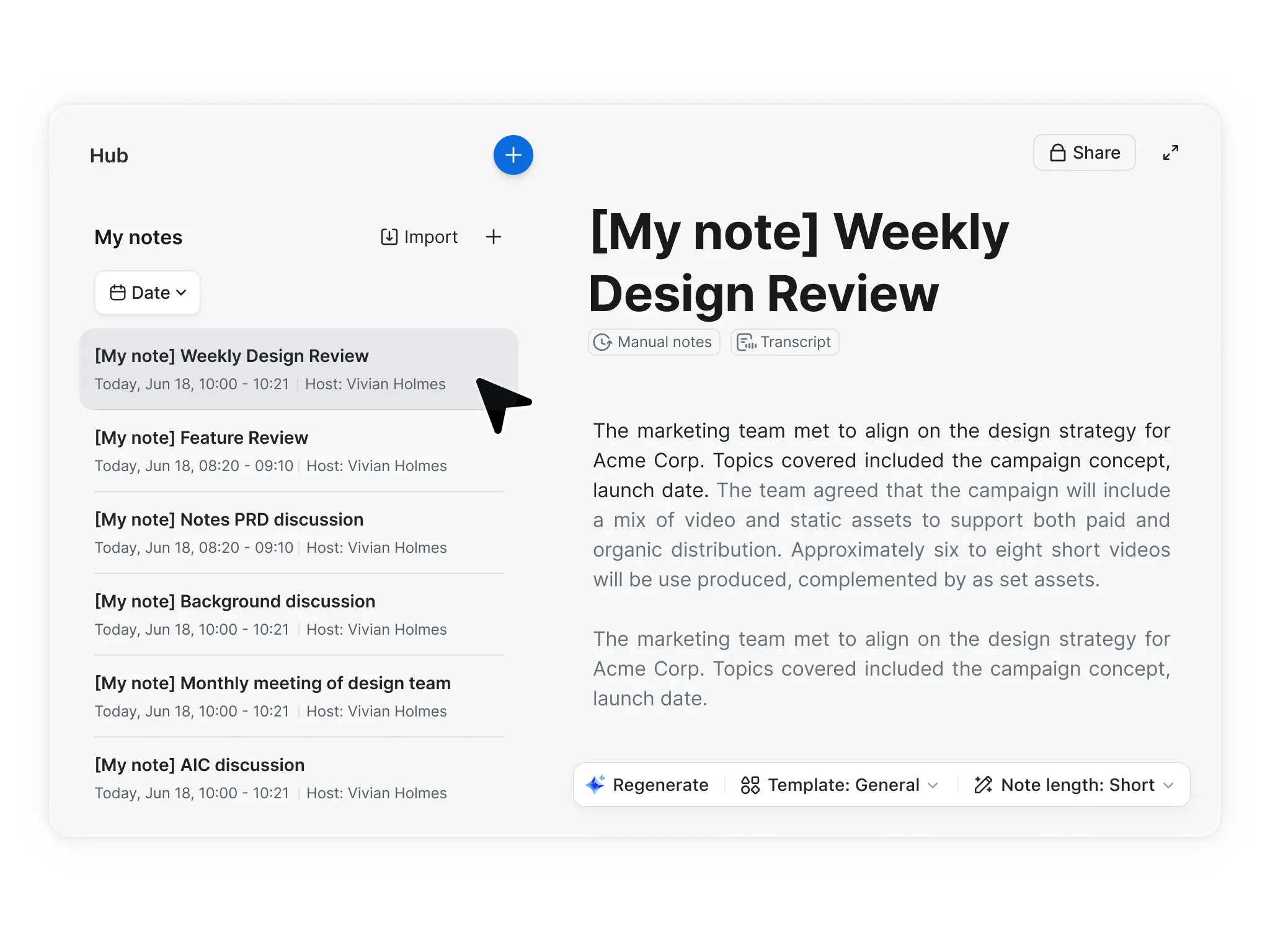
After the meeting, My notes organizes your notes and transcript into a clear summary with key takeaways and action items.

Review and share
Find all your notes in Zoom Hub under My notes. Edit, share, or turn them into templates to keep everyone organized.
Note: Make sure you’re on the latest Zoom client (version 6.7.5 or higher) to access all My notes features. You can manage My notes settings—like transcription permissions and voice activity detection—in the Zoom web portal under Settings → Notes → My notes

Zoom vs. the competition
See how Zoom stacks up
Zoom AI Companion with Meeting summary, Meeting questions, and My notes
Otter.AI
Fathom
Granola
Pricing
Zoom AI Companion is included in Zoom Workplace paid plans starting at $14.16 per user per month billed annually, as well as available as AI Companion standalone plans starting at $8.33 per user per month billed annually.
Workplace paid plans and AI Companion standalone plans include My notes, an AI note-taking tool for Zoom Meetings and third party meeting platforms and web apps (Microsoft Teams and Google Meet)
$8.33 or $19.99 per user, per month billed annually for Pro or Business plans
$16, $15, or $25 per user, per month billed annually for Premium, Team, or Business plans, respectively
$14 or $35 per user, per month for Business or Enterprise plans
Native to Zoom Workplace for seamless workflows
Ask questions within a Zoom meeting
Yes, with meeting questions
—
Available only through web portal and monthly query limit depend on plan type
—
Only available post meeting via web browser
How to activate for Zoom meetings
Automate AI Companion with an intuitive onboarding flow that allows you to set it up and forget it, or have AI Companion join specific Zoom meetings as per your choice.
—
Add AI bot as an extra participant or configure automatic join
—
Add AI bot as an extra participant or configure automatic join
—
Limited automation supported (detect upcoming meetings based on calendar integration), however requires manually enabling the ability to start transcribing and generate notes post meeting.
Multi-language support for meeting summaries
Over 30 languages for meeting summary; 9 languages supported with My notes
Supports 4 languages for meeting summary
Supports 6 languages for meeting summary
Supports 10 languages for transcription and meeting summaries
Easily manage user settings with admin controls
Requires paid Business plan or above
Requires paid Team Edition plan or above
Only provides workspace-level admin controls, primarily in Enterprise plans.

AI note-taking for every team
Power through meetings and
to-do's with an AI note taker
-
Consulting and freelance
Back-to-back meetings leave little time for client follow-up. With meeting summary templates, AI Companion automatically transforms meeting summaries into client-ready documents with no additional editing needed.
-
Sales
Focus on your sales pitch while AI takes meeting notes, captures action items, and customer insights. After the call, move deals forward faster with automatic, AI-generated follow-up emails in one of the predefined meeting summary templates.
-
Educators and tutors
Record session meetings with your AI note taker, then automatically turn transcripts into easily digestible summaries to reinforce student learning. Ask AI to create a lesson plan outline that reflects your session progress.


Pricing
Explore My notes
plans and pricing
My notes is included with Zoom Workplace and AI Companion plans.*
*My notes is offered in a limited capacity for Zoom Basic plans.
**Features are available on the AI Companion web surface at ai.zoom.us
Get started with AI
note-taking in Zoom AI Companion




FAQs
Got questions? We've got answers.
An AI note-taker is a software tool that uses artificial intelligence technology, voice and speech recognition, and machine learning to automatically transcribe, analyze, and summarize meetings content in real time, eliminating the need for people to take notes manually. By handling tasks like transcription, summarization, and identifying action items, the AI note-taker allows meeting participants to focus fully on the conversation while ensuring all important details are documented efficiently.
My notes is your personal AI note‑taking companion built into Zoom. It can automatically capture, organize, and summarize conversations across Zoom, third party, and in‑person meetings. My notes links directly to your Zoom account, so notes and transcripts are stored securely in Zoom Hub and Zoom Docs, and can include AI‑generated summaries, key takeaways, and action items.
In‑Person transcription (formerly called Transcribe) is designed for users who want to capture in person conversations. It’s available on both the web and the Zoom client (coming soon) and focuses on real‑time transcription for in‑person discussions or voice notes. It does not connect to Zoom meeting transcripts or AI summaries, and it stops automatically when a Zoom Meeting is detected.
Yes, AI Companion includes an AI note taker and AI note-taking capabilities. Zoom’s AI note taker transcribes meetings in real time, then quickly summarizes the meeting and organizes notes on one page that’s easily accessible from your calendar. My notes, Zoom’s AI note taker feature, works with Zoom Meetings as well as other third-party platforms.
AI Companion, along with the My notes note-taking tool, is available with paid Zoom Workplace plans. Explore plans and pricing.
Yes, Zoom's AI note-taking tool automatically summarizes meetings and extracts action items. It works by transcribing calls, identifying key discussion points, decisions, and actionable tasks, and then generating summaries. Zoom's AI note taker works with popular video conferencing platforms, allowing you to use My notes to get transcript-enhanced manual notes. Additionally, Zoom offers custom meeting summary templates that can be tailored for different meeting types such as one-on-ones, brainstorming sessions, or customer calls, making the automated summaries more relevant to specific meeting contexts.
The primary benefit is the ability to stay fully present in the conversation without the distraction of writing.
- Better Focus: Engage with speakers rather than your notebook.
- Accuracy: Capture details and technical figures you might otherwise miss.
- Efficiency: Instantly receive a summary instead of re-watching hour-long recordings.
- Accountability: Automatically track follow-ups and to-do lists.
Zoom does not use any customer audio, video, chat, screen sharing, attachments, or other communications-like customer content (such as poll results, whiteboard, and reactions) to train Zoom’s or its third-party artificial intelligence models. Learn more about how Zoom AI Companion handles data privacy and security.
Professionals who juggle multiple meetings and need accurate information benefit most from AI note takers. Consultants and freelancers with back-to-back client meetings can focus on conversations while AI captures follow-up items. Sales professionals can concentrate on building relationships and delivering pitches rather than documenting customer pain points and action items. Educators and tutors can be fully present during sessions, using AI-captured insights to create better lesson plans and provide more comprehensive student feedback.
Beyond basic transcription, look for productivity-driving features such as:
- Topic segmentation: Breaking the meeting into logical chapters.
- Action item extraction: Automatically listing who promised to do what.
- Interactive AI: The ability to "ask" the AI questions about the meeting content later.
- Integration: The ability to sync notes directly into your CRM or project management tools.
No, you don't need to take manual notes when using AI and My notes. Zoom's AI note-taking capabilities automatically capture meeting content, transcribe conversations, identify key points, and extract action items. My notes even allows you to jot down quick thoughts during meetings that AI will automatically organize and expand upon. However, some users prefer a "hybrid" approach — letting AI handle verbatim records while they focus on noting creative ideas or strategic thoughts that might require human context and critical thinking.
Get started with
My notes
My notes is part of a Zoom AI Companion or Zoom Workplace license. It may not be available in all regions or industry verticals. Learn more.