CX Contact Center

What is an auto attendant, and how does it work?

7 min read

Published on April 15, 2025

Photo of two individuals side by side with headsets on, at their workstations

An auto attendant is a virtual receptionist tool that efficiently directs calls to the right person or department within an organization — no live agent required. It's an essential component of any auto attendant phone system for businesses looking to optimize their customer service by managing incoming calls quickly and accurately.

With auto attendant, you can offer customers an intuitive experience that allows them to navigate different options and reach the right representative with minimal wait in a smart, user-friendly way that helps keep your contact center running smoothly. In this post, we'll explore what an auto attendant is, how it works, and what it can do to streamline your team's work.

Streamline your call routing today

What is an auto attendant?

An auto attendant is an automated system that guides callers through a menu using voice commands or keypad inputs, enabling them to select the options that best match their needs. Sometimes called a digital receptionist or automated phone receptionist, it serves as the first point of contact for incoming calls.

Using pre-configured menus, the auto attendant directs callers to specific departments, provides quick answers to FAQs, or connects them with the right team.

For example, if a customer calls a company's main phone line, they'd hear a clear, automated menu that can help redirect their call instead of waiting for a live agent. The menu can direct them to the right person to speak to or toward resources and documentation that can help them figure out a solution on their own.

How does an auto attendant work?

Auto attendants come with a set of helpful features, some of which are customer-facing, like the menu-driven navigation, while others cater to the agent side of the equation. We’ll explore what these features can accomplish, how they work, and why they should matter to you. Keep in mind that not all auto attendants inherently offer all of these features.
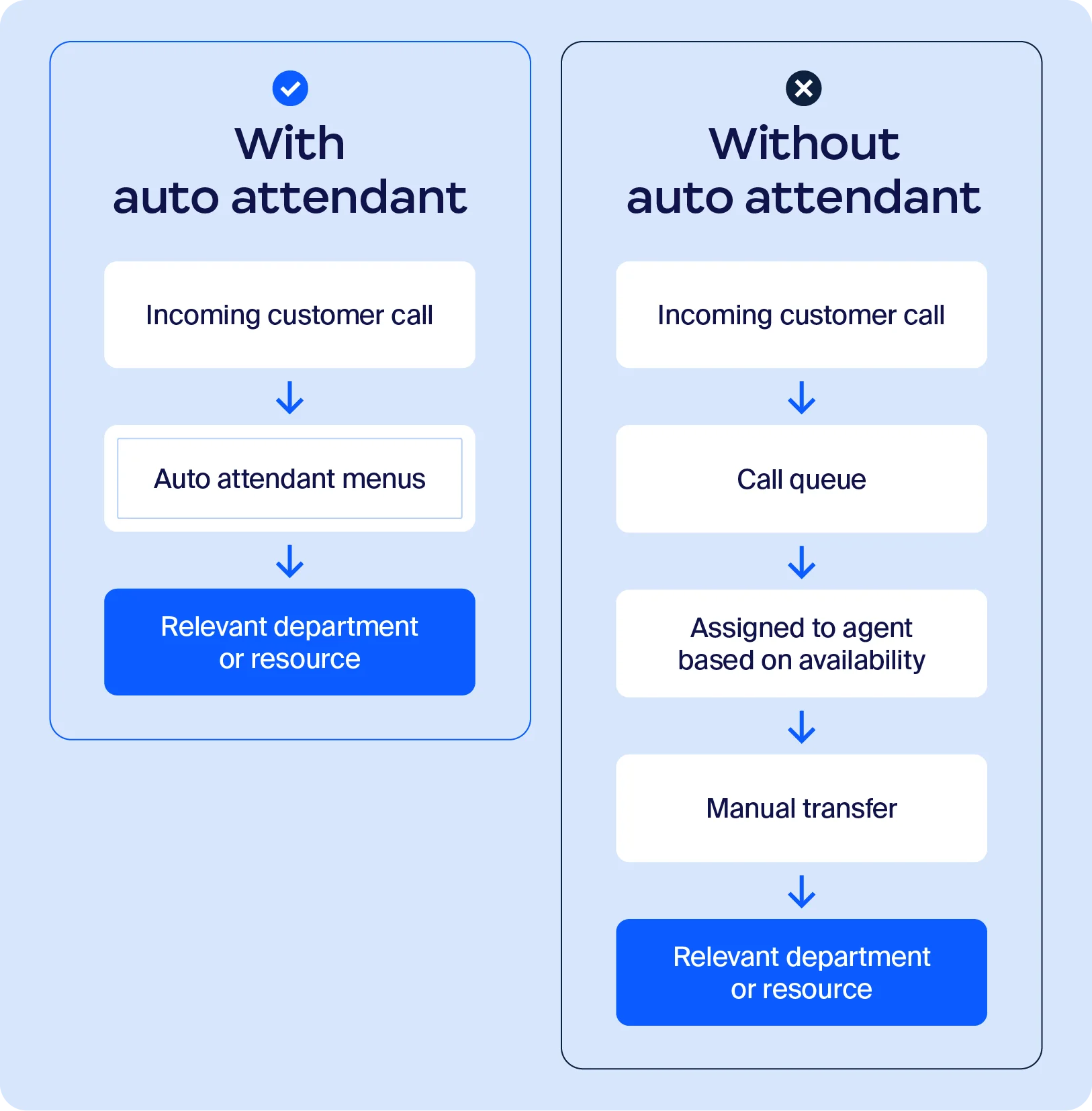
Graphic showing the process with an auto attendant and without an auto attendant

Menu-driven navigation

The auto attendant uses a menu-driven system that guides callers through a series of clear options. This can be customized so the caller can choose from department options or service categories using either voice commands or keypad input. 

Skill-based routing

This feature directs callers to the most suitable agent based on specific needs or inquiries. For example, if the customer’s issue pertains to billing or pricing, they’d be routed to an experienced or knowledgeable agent. This reduces transfers and unnecessary redirects.

Call queue management

Auto attendants can also organize incoming calls into a queue so callers are served in the right order. This helps reduce wait times, minimizes call abandonment rates, and allows managers to prioritize calls based on urgency or caller history.

Message handling

Message handling adds another layer of support with customizable greeting messages, voicemail options, call transfers, and call forwarding. Auto attendants greet callers professionally, capture missed calls, and forward calls to other departments or agents as needed.

Why do you need an auto attendant?

Your business needs an auto attendant — not because it can't run without it, but because the benefits of implementing one into your existing processes can help improve team efficiency and productivity. With one tool, you're able to improve workflows, save money, and do so much more:
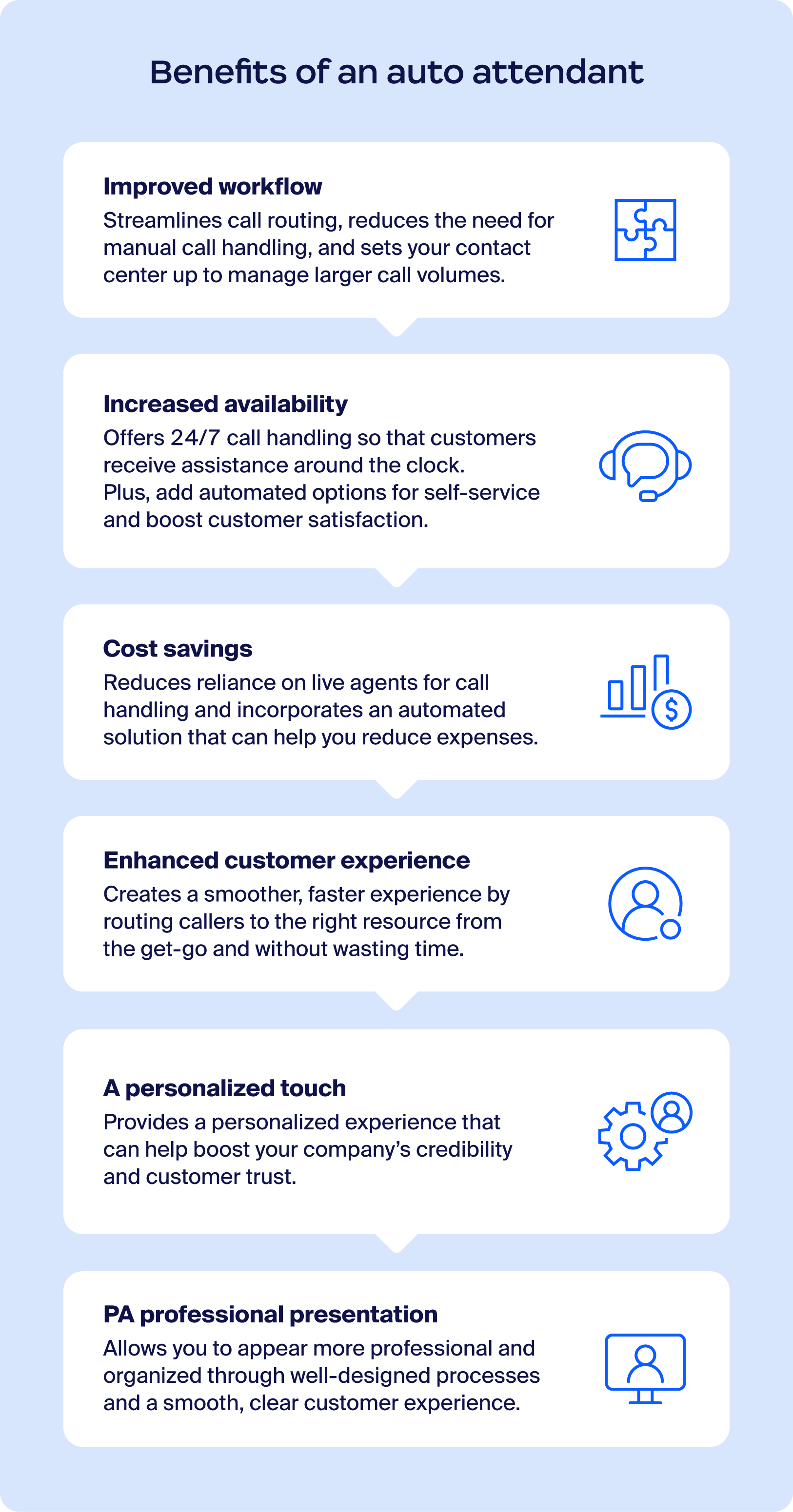
  • Improved workflows: Calls are routed to the right person or department quickly, eliminating manual transfers, reducing delays, and making the customer's journey shorter.
  • More integrated systems: Many auto attendants can connect with other business tools like CRMs, help desks, and messaging platforms. Integration can help surface relevant customer information, enhance agent efficiency, and improve the overall customer experience.
  • Increased agent availability: With routine and repetitive call routing out of the way, your agents have more time to answer complicated queries.
  • Cost savings: While maintaining an auto attendant comes with its own subscription and integration costs, it helps reduce the costs associated with employing dedicated staff to manage incoming calls — functioning as an effective automated phone answering service.
  • Superior customer experience: Customers enjoy clear, easy-to-follow options, reducing wait times and helping them reach the right team quickly.
  • Personalized greetings and messaging: Tailored messaging creates a welcoming experience and aligns with your brand's voice.
  • A professional outlook: A polished, automated system gives customers confidence in your organization's efficiency and reliability.
  • Better spam handling: An auto attendant phone system may help reduce unwanted or spam calls so agents spend less time handling irrelevant calls.
  • Stronger employee experience: A digital receptionist that provides actionable intelligence and saves time can make agents more satisfied with their work and better equipped to deliver excellent customer service.
  • Greater scalability: Organizations can sustainably handle activity spikes and gradually increase call volume without compromising on call center performance metrics.

See how auto attendant simplifies call management

Graphic showing the benefits of using an auto attendant

How to set up auto attendants

Setting up an auto attendant doesn’t have to be complicated. With a little planning and the right approach, you can create a system that improves customer experience and streamlines call management. Follow these key steps to get started:

  • Assess your provider options: Start by evaluating different providers based on your business needs, budget, and desired features. Look for solutions that offer intuitive setup processes, robust customization options, and reliable support.
  • Design your call flow: Map out a clear and logical call flow that directs callers efficiently. Keep menu options simple, concise, and intuitive — too many options can overwhelm callers. Think through the most common inquiries and prioritize routing to reduce hold times.
  • Record messages as needed: Your greetings and menu prompts set the tone for customer interactions, so make sure they’re professional, clear, and on brand. Use high-quality recordings and well-phrased messaging to guide callers.
  • Set up your system: Each provider will have its own setup process and timeline, so be sure to familiarize yourself with their tools and support resources. Whether it’s configuring menus, assigning call routing rules, or testing the system, taking time to get it right will pay off with a better experience for customers and agents.

Auto attendant best practices

To get the most out of your auto attendant, it's important to focus on the details that enhance efficiency and customer satisfaction. Follow these best practices to create a professional call experience:

  • Make a customer journey chart: Mapping out the customer's call journey helps you identify and eliminate potential pain points. Test the entire call flow from the caller's perspective so that every menu option is clear, intuitive, and leads to the right outcome with minimal hassle.
  • Hire professional voice talent: Audio quality plays a major role in how customers perceive your business. A professional voice recording results in clear, easy-to-understand greetings and menu prompts that align with your brand's tone.
  • Keep menus simple and concise: Avoid overwhelming callers with too many options. Limit your menu to three to five primary choices and use clear, straightforward language to guide them quickly to their destination.
  • Consider accessibility features: Make your auto attendant more inclusive by incorporating features like text-to-speech, multilingual support, and options for callers with disabilities. These enhancements can make your system more accessible to customers and improve the overall experience.
  • Regularly review and update your system: As your business evolves, so will your call routing needs. Periodically review your auto attendant setup to check if it still reflects current departments, hours, and priorities.

How to choose the right auto attendant system for your business

With so many options available, choosing the right VoIP auto attendant can be tricky. Here are a few recommendations to help get you started:

  • Consider your call flows: Evaluate options in the context of your existing call flows. For organizations with simple customer service needs, a simple solution may be enough. But for those with more complex CX flows, a multi-level auto attendant with advanced features is likely needed to achieve benefits at scale.
  • Keep scalability in mind: When you sign up for an automated phone answering service, think ahead. Make sure the system actually helps agents handle spikes in activity and growing call volumes with 24/7 availability.
  • Measure impact: Consider outlining a list of KPIs to assess the auto attendant's true impact on your CX workflows. When an auto attendant has been set up properly and agents have been adequately trained, the impact should be visible over time.
  • Look for AI features: Auto attendants can be much more than just an automated phone receptionist. For example, an AI auto attendant may integrate with supported systems to provide analytics and insights that can help agents deliver a more personalized customer experience.
  • Prioritize security: Like with any solution that handles sensitive customer and business data, security must be a priority. When you're scrolling through websites, look for security and compliance pages that outline the platform's policies and regulatory adherence. Prioritize those that include advanced security measures and support organizations’ efforts to meet applicable data privacy and security requirements.

Set up auto attendants with Zoom Phone

An auto attendant can make it easier for customers to connect with the right agents at the right time, while helping agents save time and access operational insights that support customer service workflows.

Zoom Phone offers customizable auto attendant capabilities. With Zoom Virtual Agent, you can also create an AI-powered auto attendant with automated call routing, appointment scheduling, and FAQ answering capabilities. For organizations with deeper contact center needs, both are packaged in our CCaaS software, Zoom Contact Center.

See how Zoom Phone auto attendant works

Auto attendant FAQ

What is another name for an auto attendant?

An auto attendant tool is also commonly referred to as a virtual receptionist or automatic phone menu. This is due to its nature as a "receptionist," routing and transferring calls to the relevant department or agent.

What is the difference between IVR and an auto attendant?

Auto attendants are designed primarily to answer, route, and organize calls effectively, while IVR systems enable customers to handle more complex tasks, such as checking balances and making payments.

Can an auto attendant handle complex inquiries from callers or just simple routing?

An auto attendant is designed for straightforward call routing and handling basic inquiries, like directing callers to the correct department or providing simple information.

However, advanced auto attendants can integrate with intelligent features (often present in AI contact centers) that allow for more complex handling, like identifying keywords in a caller's input to provide relevant menu options or answers.

Can a virtual receptionist schedule appointments for my staff in addition to answering calls?

It depends on the virtual receptionist you choose. Some virtual receptionists are limited to specific tasks, while more advanced ones can be set up to function at a full receptionist capacity, scheduling meetings and taking calls automatically.

Who controls and manages the auto attendant?

Generally speaking, your company's administration should control and manage your auto attendant. Depending on your provider, their tools, setup, and control over the auto attendant settings are typically centralized within the platform's dashboard, making it easy for administrators to configure call flows, update menu options, and adjust settings.


Our customers love us

Okta
Nasdaq
Rakuten
Logitech
Western Union
Autodesk
Dropbox
Okta
Nasdaq
Rakuten
Logitech
Western Union
Autodesk
Dropbox

Zoom - One Platform to Connect