
Meet Zoom AI Companion, your new AI assistant!
Boost productivity and team collaboration with Zoom AI Companion, available at no additional cost with eligible paid Zoom plans.
 14 min read
Updated on January 22, 2025
Published on January 22, 2025




Did you know that 59% of customers report switching to a competitor after just one bad experience, according to a recent Morning Consult survey commissioned by Zoom? This shows that in today’s fast-paced world, delivering exceptional customer service is no longer optional — it’s essential. Yet, many businesses still face challenges such as long wait times, disconnected communication channels, and frustrated customers slipping away.
This is where an effective contact center can make all the difference. By streamlining customer interactions, cutting response times, and offering support across multiple channels, contact centers help businesses deliver the seamless service that keeps customers loyal.
In this blog, we’ll explore how contact centers can transform your customer support strategy. We’ll cover their key benefits, essential features, and actionable strategies to help you improve customer service. Let’s dive in!
A contact center is a centralized hub where businesses manage all customer interactions across various channels — think phone calls, emails, live chat, social media, and even SMS.
Contact centers often use advanced technologies such as AI, analytics, and CRM integration to streamline workflows, improve customer service, and drive business outcomes.
While contact centers and call centers are similar, the difference lies in their communication channels. Call centers focus solely on phone support, while contact centers handle customer interactions across multiple channels.
Customer contact centers go beyond phone calls, offering support through email, live chat, social media, messaging, and SMS. This multichannel approach allows customers to reach out using their preferred method, whether it’s a quick chat or a detailed email.
In contrast, traditional call centers are limited to phone interactions, which can feel restrictive for customers who expect faster, more convenient options.
Contact centers don’t just handle customer inquiries — they’re gold mines for data because of the vast amount of customer insights they gather every day.
Every interaction, whether it’s a phone call, chat message, or social media query, generates valuable data points that can be analyzed to solve customer complaints and understand customer behavior and preferences.
By leveraging this data, businesses can uncover trends, predict customer needs, and personalize interactions.
For example, if contact center analytics reveal that many customers are asking about a specific feature, businesses can use this insight to improve their product offerings or update their FAQs. Understanding recurring issues also helps businesses address problems proactively before they escalate.
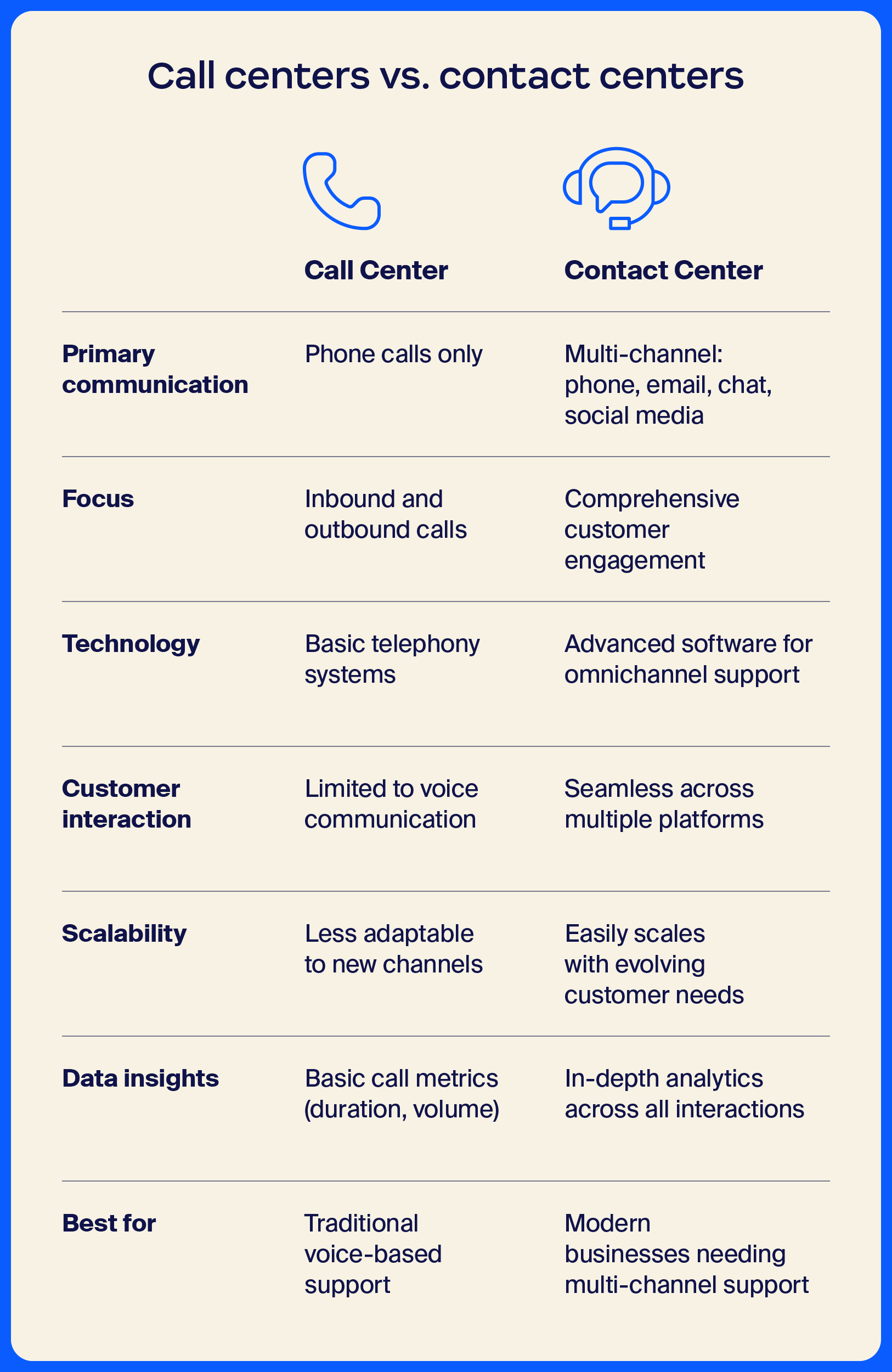
Contact center agents require a more diverse skill set than traditional call center agents. While call center agents primarily focus on phone communication, contact center agents handle a variety of channels, including email, live chat, and social media.
This means they need strong writing skills to craft clear, professional responses and the ability to switch seamlessly between platforms.
Contact center agents must also be tech-savvy, able to navigate multiple software tools, and adapt quickly to new technologies. Soft skills are equally important — agents need to excel in empathy, active listening, and problem-solving to provide personalized support across every interaction.
Contact centers are designed to deliver a more holisticcustomer experience by supporting interactions across multiple channels. These interactions can then be brought together into a single view to give agents the full picture of the customer journey. Whether customers reach out by phone, email, chat, or social media, contact centers provide a seamless, consistent experience.
This omnichannel approach means customers can pick up conversations where they left off without having to repeat themselves or switch platforms.
Self-service options are a key feature of modern contact centers, empowering customers to find answers on their own without needing to speak to an agent.
These options include tools like automated chatbots, interactive voice response (IVR) systems, and comprehensive knowledge bases that provide quick answers to common questions.
By offering self-service, contact centers can reduce wait times and free up agents to handle more complex inquiries. Customers also appreciate the convenience of getting instant support, whether it’s checking an order status, troubleshooting an issue, or finding product information.
Contact centers come in various forms, each tailored to different business needs and customer service strategies. Understanding these different types can help you choose the right setup to enhance your customer interactions and streamline your support operations.
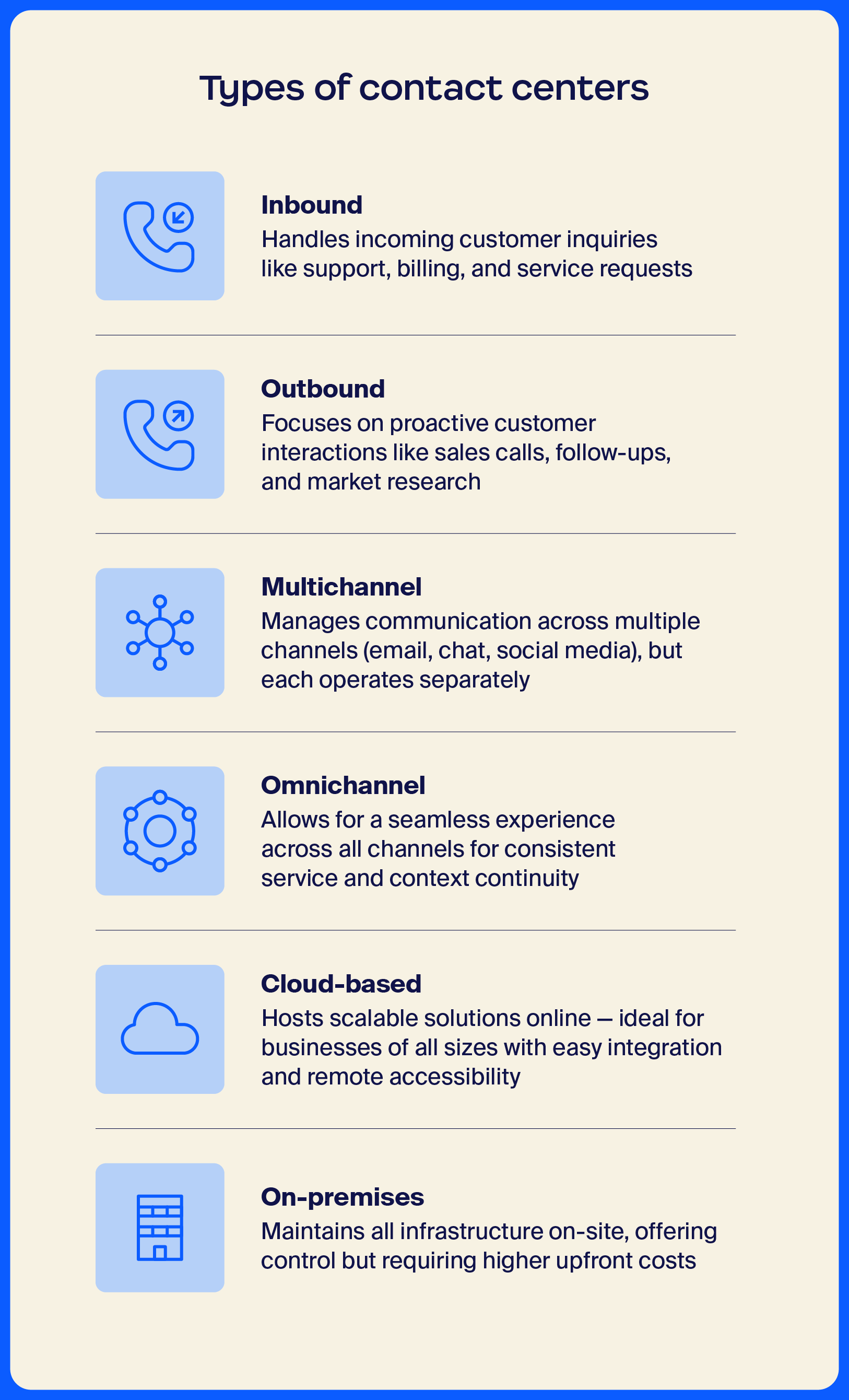
When it comes to contact centers, businesses typically choose between inbound and outbound models, with each catering to different needs. Understanding the distinction can help you decide which setup aligns best with your goals.
Inbound contact centers focus on handling incoming customer inquiries. They’re all about providing support — whether it’s answering questions, resolving issues, or assisting with orders.
Customers typically reach out via phone, email, or chat. This type of contact center works well for businesses such as tech support, customer service departments, and e-commerce companies that prioritize quick and effective customer responses.
Outbound contact centers, on the other hand, are geared toward proactive outreach. Agents make outgoing calls or send messages to customers for activities like sales, follow-ups, surveys, or marketing campaigns.
The goal is to initiate contact — whether it’s to generate leads, nurture customer relationships, or gather feedback. These centers are ideal for industries like telemarketing, sales, and market research, where the focus is on driving engagement and outreach.
Blended contact centers handle both inbound and outbound engagements.
Multichannel and omnichannel contact centers may sound similar, but they work differently.
Multichannel contact centers offer several ways to connect, though each channel operates separately. This means if a customer switches from email to phone, they might need to repeat their issue to the new agent.
Multichannel is great for smaller businesses or those just starting to expand their support options, as it’s flexible without needing complex integration.
Omnichannel contact centers, on the other hand, integrate all communication channels into one seamless experience. Customers can start a conversation on chat and follow up via email, and the agent will see the entire conversation history. This creates a smoother, more personalized experience.
Omnichannel is ideal for larger businesses or those focused on delivering a consistent, high-quality experience across all channels.
On-premises contact centers are set up on your company’s own infrastructure, offering greater oversight over hardware and security.
While this setup can be more secure and customizable, it often comes with higher upfront costs and requires a dedicated IT team for ongoing support. Plus, scaling the system as your business grows can be more complicated and expensive.
On the flip side, cloud-based contact centers are hosted on remote servers and accessed over the internet. They’re much easier to scale, and you don’t need to worry about maintaining the infrastructure — that’s handled by the provider.
Zoom’s cloud capabilities offer businesses a flexible, cost-effective solution that allows support teams to stay connected from anywhere without the hassle of managing hardware.
Explore the key benefits that make contact centers an essential tool for modern businesses.
Contact centers excel at improving customer service. Customer service contact centers support across multiple channels, allowing customers to contact businesses in the way that works best for them. This makes it easier for businesses to respond quickly and solve problems faster, helping boost customer satisfaction.
Contact centers also use customer data to personalize interactions. For example, if a customer contacts them about a delayed order, the agent can instantly pull up the customer's details to offer a more informed, tailored response. This thoughtful, efficient service helps customers feel valued and builds loyalty over time.
Automated workflows can make a huge difference in how efficiently a contact center operates. By automating routine tasks like ticket routing, data entry, and follow-up reminders, agents are free to focus on more complex issues. This helps speed up response times, reduce human error, and make sure customers aren’t kept waiting for simple tasks to be completed.
Integrated workflows also enable different systems — such as CRM tools, ticketing platforms, and communication channels — to work together seamlessly. For example, when a customer sends a message, the system can automatically route it to the right agent based on their skills or availability, enabling quicker resolution.
Contact centers leverage data analytics to make smarter, more strategic decisions. By analyzing customer interactions, feedback, and trends, businesses can identify patterns, measure agent performance, and spot areas for improvement.
For example, if data shows that customers frequently ask about a specific issue, you can address it proactively by improving the product or creating helpful resources.
Data also helps optimize operations by tracking key metrics like response times, resolution rates, and customer satisfaction scores. This insight allows you to fine-tune processes, allocate resources more effectively, and ultimately deliver a better customer experience.
Effective contact centers do more than just handle customer service — they can also drive sales and generate leads. By providing exceptional support and personalized experiences, agents can identify cross-selling and upselling opportunities during customer interactions.
For instance, if a customer calls about a product, the agent might recommend complementary items or upgrades based on their preferences and purchase history.
Contact centers can also be a valuable tool for lead generation. With integrated CRM systems, agents can capture and qualify leads in real time and promptly follow up with potential customers.
Contact center technology can significantly reduce operational costs by streamlining processes and improving efficiency. Automation plays a key role here, handling routine tasks such as ticket routing, follow-ups, and data entry, reducing the need for manual labor and minimizing errors.
Cloud-based contact centers, in particular, eliminate the need for costly on-premises infrastructure and ongoing maintenance. And with more efficient workflows, businesses can handle a higher volume of customer inquiries with fewer agents, optimizing labor costs.
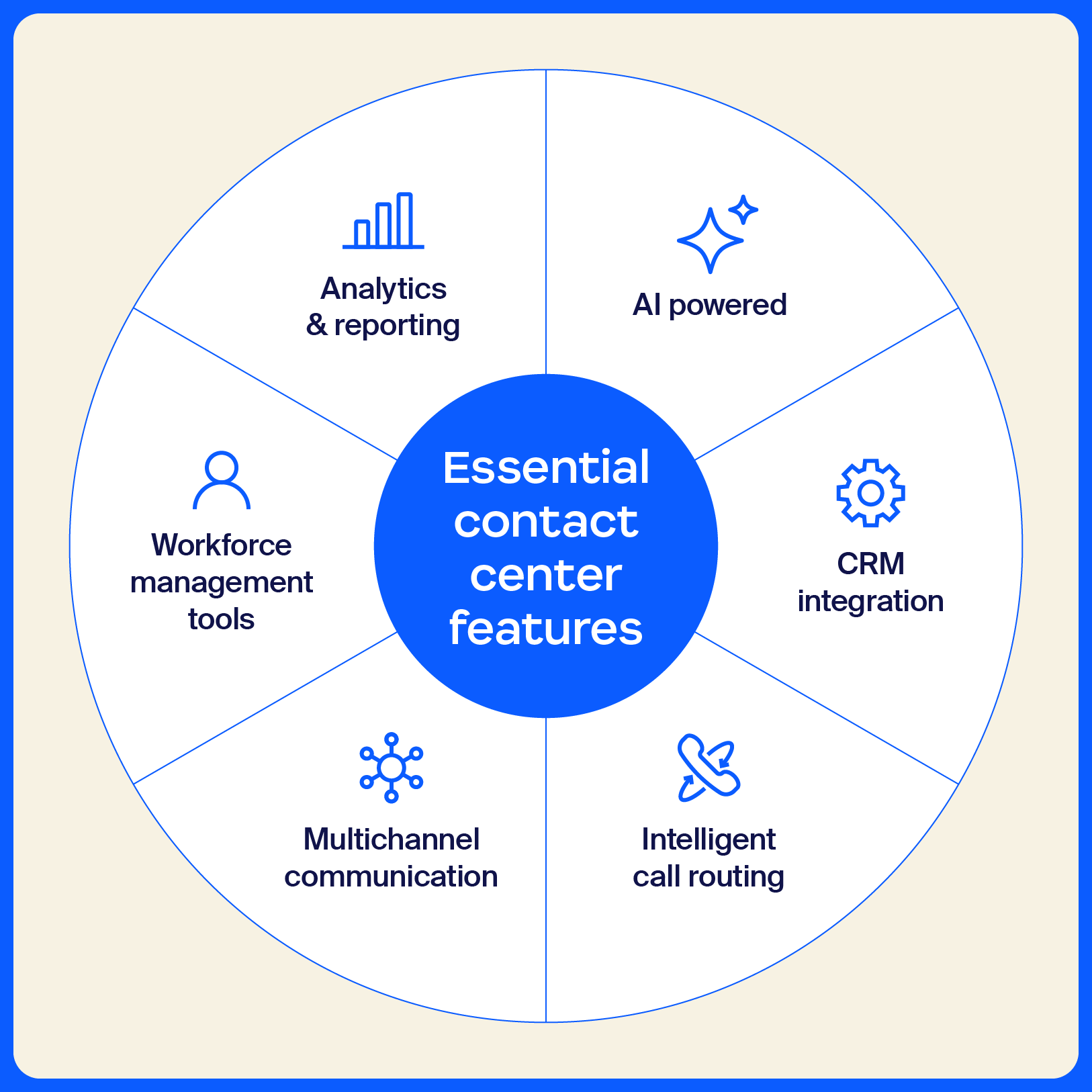
The right contact center software can make all the difference in providing smooth, efficient customer support. Below, we’ll explore the essential features every contact center solution should include to optimize performance and enhance the customer experience.
AI transforms contact centers by delivering instant, 24/7 resolutions through chatbots, streamlining repetitive tasks, and intelligently routing customers to the right agents based on their complete interaction history. It boosts efficiency by automating after-call work, simplifying queues, and offering real-time coaching to agents.
With predictive analytics and smart scheduling, AI can help optimize operational resources and improve service levels, while personalized support across all channels enhances customer satisfaction. Beyond basic automation, AI agents are now autonomously taking on more complex workflows. They can handle multi-step processes, make decisions, and even proactively reach out to customers before issues arise.
By integrating AI, contact centers can provide faster outcomes and create seamless, tailored experiences for every customer.
Integrating a CRM system with your contact center software enables agents to quickly access important customer information, such as past purchases and previous interactions. This makes it easier for agents to provide relevant support and resolve issues faster.
With CRM integration, all customer data is stored in one place, so agents can easily track and manage conversations across different channels. This saves time for both agents and customers, as it eliminates the need to repeat information. For businesses, it means smoother operations and better customer relationships, leading to more efficient support overall.
Intelligent call routing improves customer interactions by directing calls to the most suitable agent quickly. Using data such as the customer’s previous interactions, their specific issue, or the agent’s area of expertise, the system automatically routes calls to the right person.
For example, if a customer calls with a technical support question, the system can route them to an agent who specializes in tech issues, ensuring a quicker, more accurate resolution.
This process helps reduce wait times and prevents customers from repeating themselves. By quickly connecting the right customer with the right agent, intelligent call routing streamlines support, improving both customer satisfaction and operational efficiency.
Omnichannel integration connects all your customer communication channels, like phone, email, chat, and social media, into one unified system. Unlike multichannel support, where each platform operates separately, omnichannel integration creates a seamless experience where every interaction is linked, giving agents more context no matter how customers reach out.
For instance, if a customer reaches out via social media but later follows up via email, the agent can access both conversations in a single view. This reduces the likelihood that customers will have to repeat themselves and provides a smoother, more cohesive experience.
Workforce engagement management tools help contact centers optimize operations, enabling agents to work more efficiently and feel connected to the wider organization. Zoom’s Workforce Engagement Management suite includes Zoom Workforce Management and Zoom Quality Management, both of which integrate with Zoom’s cloud contact center, offering an easy-to-use, all-in-one solution.
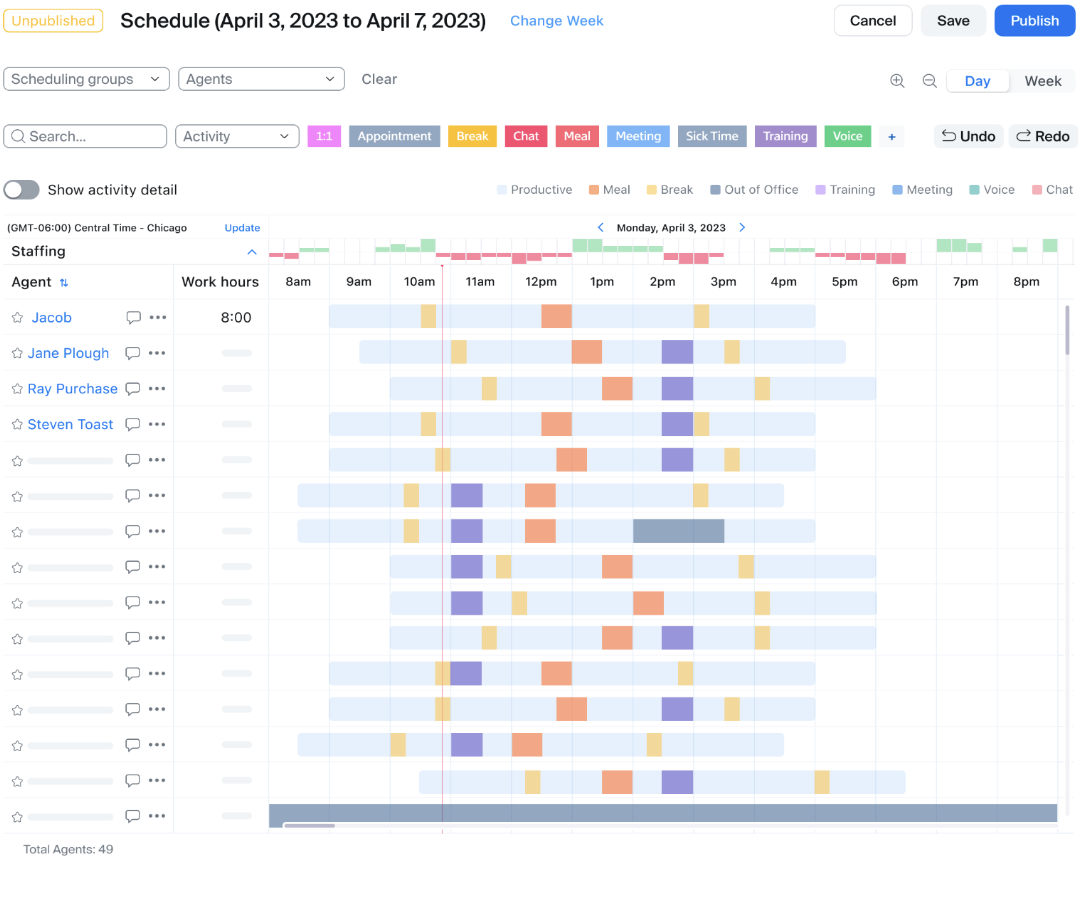
Workforce Management uses AI to forecast operational needs based on historical trends, helping leaders automate scheduling and have the right number of agents available. It also enables intraday management, letting leaders track real-time agent performance and make quick adjustments as needed. This reduces manual scheduling and helps improve team efficiency.
Quality Management complements workforce management by enabling contact center leaders to monitor and evaluate customer interactions for continuous improvement. Organizations can analyze calls, chats, and other customer interactions to identify opportunities for agent training and maintain high service standards. Automated scoring tools and detailed reporting make it easier to measure agent performance and provide actionable feedback.
Data analytics are key in contact centers, helping teams make smarter decisions and track performance. Tools such as voice analytics, meeting monitoring, and reporting enable contact centers to monitor key metrics like call volume and shrinkage.
This data helps managers spot trends, make adjustments (like changing staffing levels), and identify areas for improvement, enabling teams to work more efficiently and deliver better customer experiences.
Contact centers serve as the operational backbone for customer interactions across industries, supporting routine inquiries and complex problem-solving. By centralizing communication and leveraging advanced technologies, they enable businesses to efficiently handle diverse scenarios.
Here are some of the most common and impactful ways organizations use contact centers to drive better outcomes.
Self-service capabilities empower customers to resolve issues independently through AI-powered chatbots, IVR systems, and knowledge bases. Customers can check order status, reset passwords, or troubleshoot problems 24/7. This reduces call volume and wait times while freeing agents to handle complex inquiries.
Omnichannel contact centers enable customers to receive consistent service across phone, email, chat, and social media. Interactions are tracked and accessible to agents, creating a unified customer journey. This approach helps businesses maintain context and deliver the smooth, connected experiences that build loyalty.
Technical support teams use contact centers to troubleshoot issues and resolve system problems efficiently. Features such as screen sharing and remote access enable agents to diagnose and resolve issues in real time. Contact centers also help teams categorize problems by severity and maintain records for faster resolution.
Contact centers help drive revenue by helping sales teams qualify leads, conduct campaigns, and nurture prospects. With integrated CRM systems, agents can quickly access customer data to personalize pitches and identify upsell opportunities. Real-time analytics help managers track conversions and coach teams to close more deals.
Contact centers guide new users through product setup, explain key features, and answer questions for a smooth start. Agents can schedule training sessions and provide ongoing support as customers get familiar with products. This proactive approach can help customers realize value quickly, reducing churn.
Developing a strong contact center strategy is key to delivering exceptional customer service and achieving long-term success. Here are a few actionable tips to help you build an effective approach:
As your business grows and customer expectations evolve, Zoom Contact Center is designed to scale with your needs. Whether you’re expanding support channels or growing your team, Zoom Contact Center adapts to meet those demands while enabling you to deliver consistent, high-quality customer service.
It also seamlessly integrates with your existing tools and software, streamlining operations and improving data management. With its powerful AI-driven features and flexible architecture, your contact center will remain efficient and capable of meeting your business’s future needs.
Let us help you with a tailored solution for your contact center. Book a free demo today!
If you’re considering implementing a contact center for your business, here are answers to some frequently asked questions.
Your business needs a contact center to efficiently manage customer interactions across multiple channels, provide prompt support, and improve customer satisfaction. It helps streamline communication, boost team productivity, and enhance customer experience, ultimately driving loyalty and growth.
The cost of contact center solutions varies depending on the features you need, the number of agents, and the scale of your operations. Cloud-based solutions like Zoom Contact Center offer flexible subscription pricing models, making it easier to scale up or down based on your business needs.
AI can streamline operations by automating repetitive tasks, intelligently routing calls, and providing real-time support to agents. It can also enhance customer interactions by offering self-service options through chatbots and analyzing data to optimize agent performance and forecast staffing needs.
Omnichannel contact center software integrates all customer communication channels — such as phone, email, chat, and social media — into a single seamless system. This way, agents have access to a customer’s full history, providing a more personalized, efficient experience regardless of the channel the customer uses.








