
Meet Zoom AI Companion, your new AI assistant!
Boost productivity and team collaboration with Zoom AI Companion, available at no additional cost with eligible paid Zoom plans.
 12 min read
Updated on February 16, 2026
Published on February 16, 2026




When projects stall, it’s often because tasks aren’t clearly defined or tracked. Managers waste time chasing updates, and team members feel pulled in different directions. A task management workflow solves this by mapping out steps, deadlines, and ownership so work stays on track.
The result is fewer bottlenecks, more accountability, and stronger outcomes. Below, we’ll explore what task management is, how workflows improve collaboration, and how the right tools can transform the way your team gets work done.
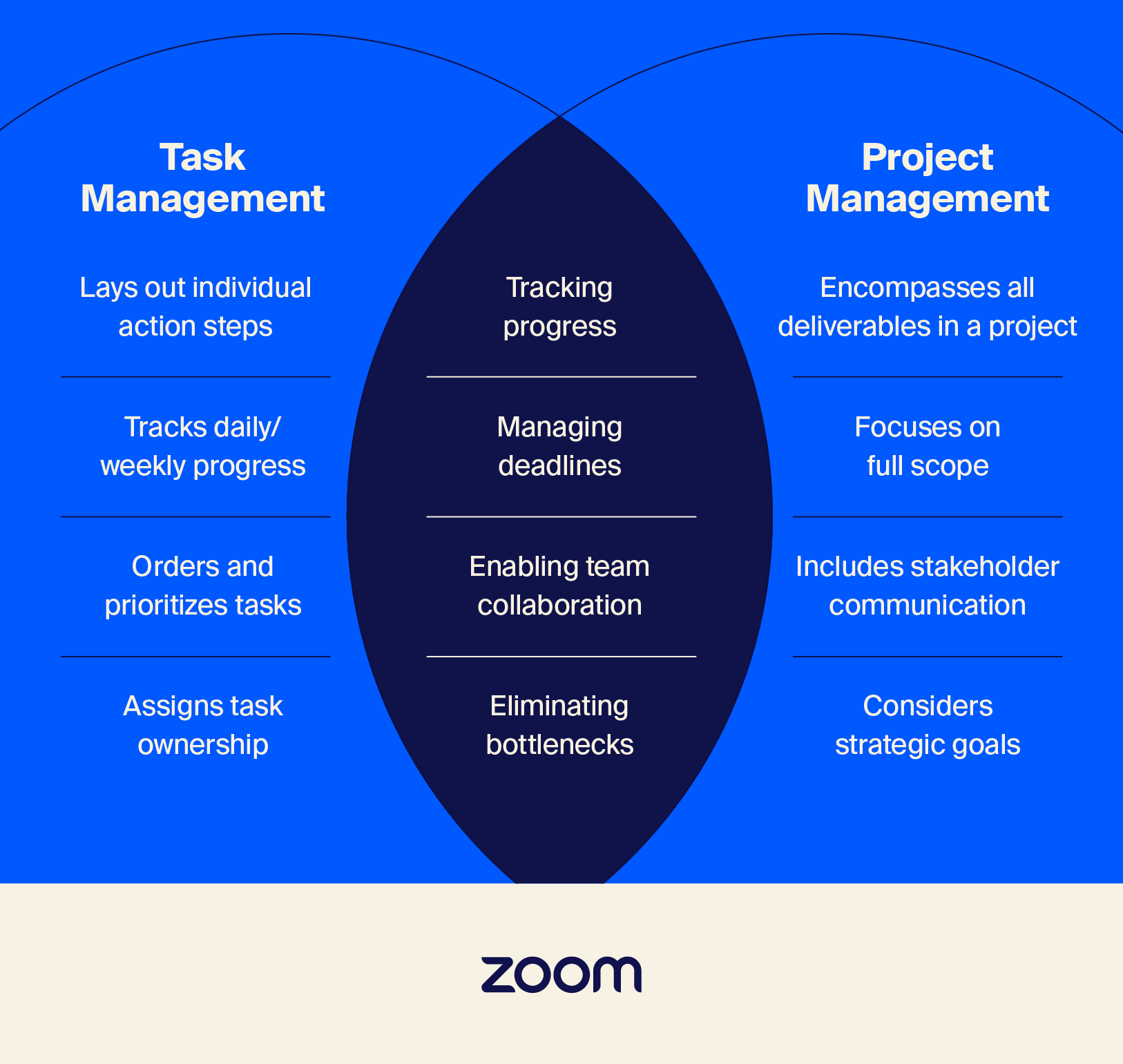
Task management is the process of organizing, assigning, and tracking individual tasks. Unlike project management, which covers the full scope of delivering a project, task management focuses on the day-to-day actions that keep work moving.
It’s useful for managers who need visibility into progress, team leads balancing resources, and employees looking for clarity on priorities. Strong task management reduces confusion, limits duplication of effort, and keeps teams aligned. Knowing how to prioritize tasks also means the most important work gets attention first.
There are many ways to manage tasks: to-do lists for simple tracking, Kanban boards for visualizing work in progress, calendars and spreadsheets for scheduling, or agile methods for fast-moving teams. Each provides structure to keep important work from slipping through the cracks.
Even the most capable teams struggle to stay organized when tasks aren’t managed effectively. Without structure, managers and employees may lose clarity, duplicate work, and miss deadlines. Here are some of the most common challenges:
A task management workflow is the structured process a team follows to move a task from start to finish. Rather than relying on scattered emails or meetings, a workflow outlines clear steps for creating, assigning, tracking, and completing tasks. This keeps managers informed and gives employees confidence in their responsibilities.
A typical workflow includes:
By following this structured approach, teams can gain visibility into every stage of work, reduce miscommunication, and avoid the inefficiencies of unorganized processes.
Using task management workflow software helps teams centralize tasks and communication. Instead of juggling spreadsheets, emails, and status meetings, everything lives in one place. The benefits are clear: stronger collaboration, better visibility into progress, fewer missed deadlines, and more time spent on meaningful work.
A workflow tool centralizes communication so teams don’t have to hunt for updates across multiple apps. For example, a marketing team launching a campaign can assign tasks, track progress, and share real-time feedback — all on the same platform. These built-in collaboration features help reduce back-and-forth and align everyone on the next steps.
With a workflow tool, teams spend less time chasing updates and more time completing work. For instance, instead of a manager manually emailing reminders, automated notifications can alert a product team when a deadline is approaching. This cuts wasted effort and keeps projects on schedule.
Task management tools bring order to what can otherwise feel like chaos. A sales team, for example, can use workflow tracking to see every client follow-up in one place, organized by stage. This helps prevent duplicate work and stops opportunities from falling through the cracks.
When teams have clear workflows, they spend less time searching for information and more time delivering results. For instance, a design team can move seamlessly from intake to approval within the same platform, eliminating delays and scattered feedback.
Not all tools are created equal; the right choice depends on your team’s needs. The best solution for workflow task management is the one that closely matches your objectives and works for every stakeholder involved.
When evaluating options, focus on features that help streamline work and adapt to your team’s operations. Consider these core criteria before deciding on the workflow management software that best fits your organization.
Automation reduces repetitive manual work and frees up time for higher-value activities. Instead of managers sending constant reminders, workflows can trigger automatic notifications, recurring tasks, or deadline alerts. This helps teams stay on track without the extra overhead.
Advanced platforms even leverage AI in the workplace to recommend next steps or identify potential blockers. These intelligent automations save time while improving accuracy across the entire workflow.
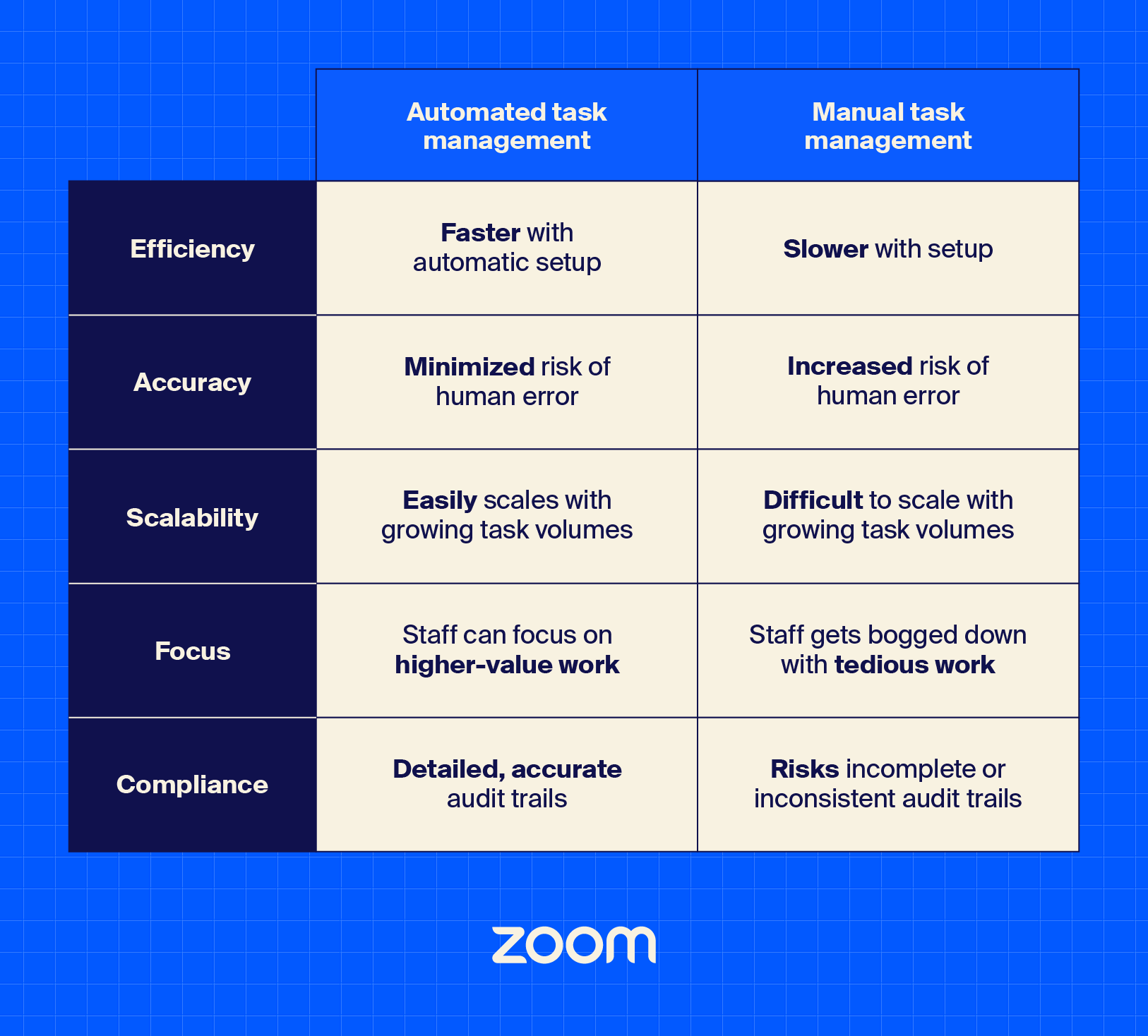
Strong collaboration is critical to effective task management. The right tool should make it easy to share updates, provide feedback, and keep conversations tied to the work. For example, commenting or sharing files directly inside a task prevents information from scattering across multiple apps.
Teams can avoid miscommunication and move faster when everyone collaborates in one place. This is especially important for cross-functional projects, where different departments need to stay aligned.
No tool should exist in isolation. The best solutions integrate seamlessly with the apps your team already uses, from calendars to messaging platforms. This way, tasks connect naturally with your existing workflows instead of creating extra steps.
Third-party integrations also prevent duplicate work by syncing data across systems. When everything works together, teams save time and maintain consistency.
A well-designed dashboard interface makes complex workflows easy to understand at a glance. If a manager can’t quickly see which tasks are overdue or who’s responsible, the tool adds friction instead of clarity.
Look for platforms with visual dashboards that highlight priorities, progress, and potential bottlenecks. Intuitive design reduces the learning curve and increases adoption across your organization.
Your team’s needs today may look different a year from now. Scalable tools grow with you, handling more users, bigger projects, and more complex workflows without a drop in performance.
This flexibility prevents teams from outgrowing their tools too quickly, avoiding costly transitions to new systems down the line. Scalability provides long-term value for your investment.
Sensitive data — from client information to strategic project plans — often lives inside task management platforms. That makes security a top priority. Look for features like encryption, role-based access, and compliance certifications to help protect sensitive information.
By choosing a secure tool, organizations can protect not only their information but also the trust of their teams and customers. Security serves as a foundation for reliable, long-term adoption.
A strong task management workflow can help keep work organized and teams aligned, but the real impact comes from using an effective platform to bring it all together. With Zoom Tasks, you can streamline task intake, assignment, and tracking directly within the place you already meet, chat, and collaborate.
As a whole, Zoom Workplace combines task management with powerful collaboration tools so your team doesn’t have to switch between apps to stay productive. It’s built to help you move faster and work smarter, from automation to seamless integrations.
Discover how Zoom Workplace can transform your workflows today.








