


전화 시스템

전화 시스템을 제대로 활용할 때 가능한 일
통화는 맥락을 만들고 AI에 정보를 제공하며, 이제 나머지 워크플로와도 연결될 수 있습니다. 전화 시스템이 이런 역할을 하지 못한다면 제 기능을 다하고 있지 못한 것일 수 있습니다.
VoIP를 사용하면 유선 전화 대신 인터넷을 통해 통화할 수 있습니다. 작동 방식, 장단점, 주요 기능 및 전환 방법을 알아보세요.
 8 분 읽기 분량
게시 날짜 2024년 7월 16일



| VoIP는 무엇의 약자인가요? VoIP는 Voice over Internet Protocol(음성 인터넷 프로토콜)의 약자입니다. Voice over IP 또는 IP 전화 통신이라고도 하지만, 세 용어 모두 기존 전화선이 아닌 인터넷을 통해 통화한다는 같은 의미입니다. |
The shift away from old-school phone lines has opened the door to faster, smarter ways to stay in touch. Voice over Internet Protocol (VoIP) routes calls over the internet, giving you clearer audio, flexible setup options, and features that traditional systems struggle to match.
도입은 계속 가속화되고 있습니다. 최신 VoIP 통계에 따르면 2034년까지 미국 VoIP 시장 규모는 약 1,520억 달러에 이르고, 전 세계 시장은 4,152억 달러에 이를 것으로 예상됩니다.
In this article, you’ll get a quick, practical look at what VoIP is, how it works, and the advantages and tradeoffs to keep in mind. We'll also cover the features that help teams communicate more efficiently.
VoIP is a technology that lets you make phone calls using the internet instead of traditional phone lines.
Unlike regular phones, which rely on physical wires, VoIP converts your voice into digital data and sends it over the internet to the person you’re calling. It works similarly to sending an email but transmits your voice instead of text.
일반적으로 VoIP 환경에서 조직은 필요한 하드웨어, 소프트웨어 및 인프라를 포함하는 Zoom Phone과 같은 자체 VoIP 시스템을 유지 관리합니다. 이러한 접근 방식을 사용하면 비용을 절감하는 동시에 팀이 더욱 유연하게 소통할 수 있습니다.
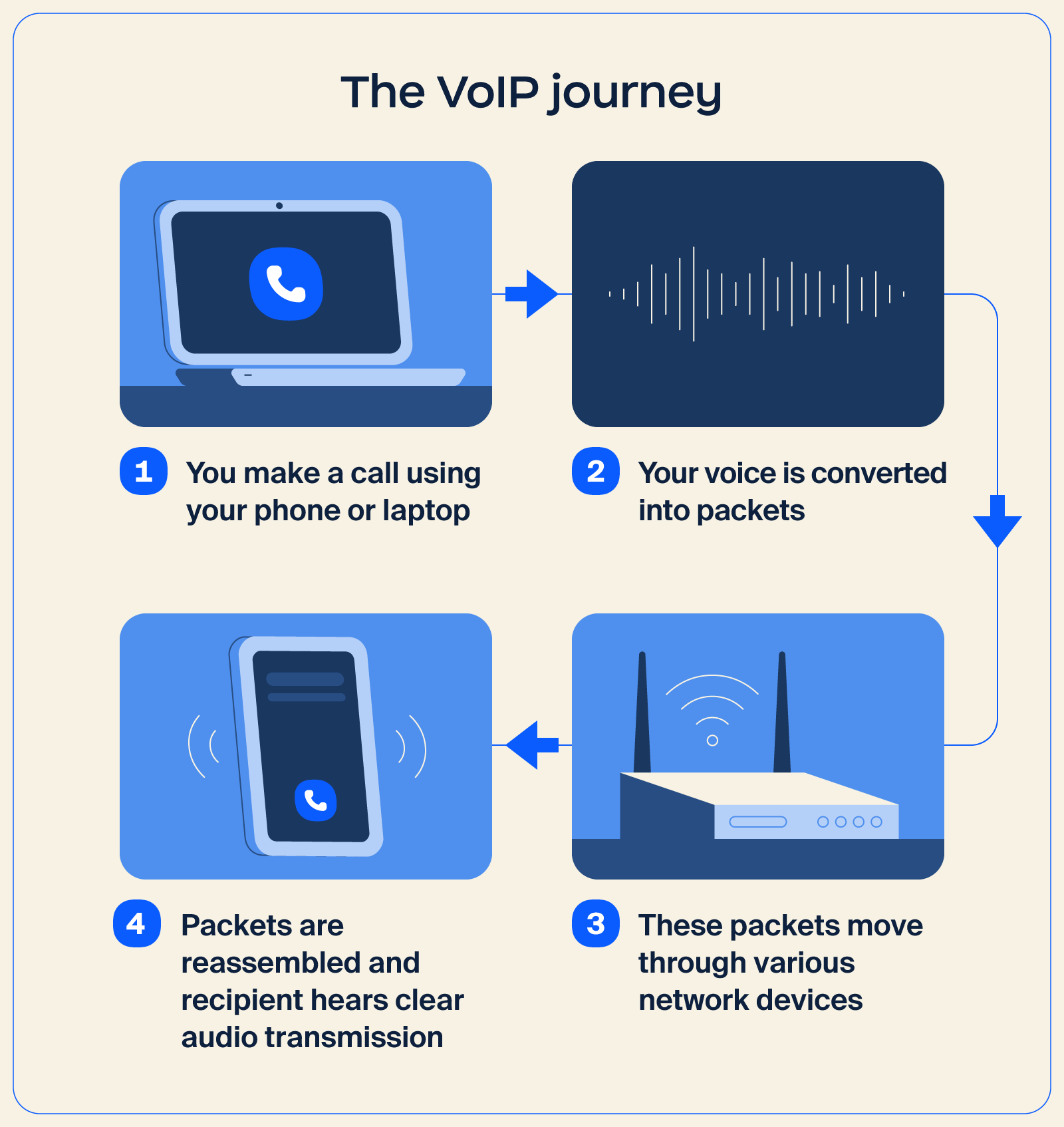
The voice calls you make over Wi-Fi or mobile data are a simple example of VoIP in action. While many apps use this approach for personal communication, the same concept extends for professional use through an IP phone system.
Solutions like Zoom Phone use VoIP technology to provide reliable calling, business numbers, call routing, and other features that help your business manage call workflows more efficiently.
Here’s how VoIP works behind the scenes:
VoIP can transform your business communication by replacing fixed phone lines with an internet-based system that’s easier to scale, manage, and adapt. This is especially useful for teams that want a flexible setup or use a Bring Your Own Carrier (BYOC) approach, since everything runs on a cloud-based foundation.
There are also a few tradeoffs to consider, particularly surrounding connection quality. Here’s a closer look at both sides:
| Pros | Cons |
|
|
If your team wants modern calling features, simpler management, and room to grow, VoIP offers a strong foundation. Teams see the strongest results when VoIP is paired with a stable internet connection and a provider that fits their workflow.
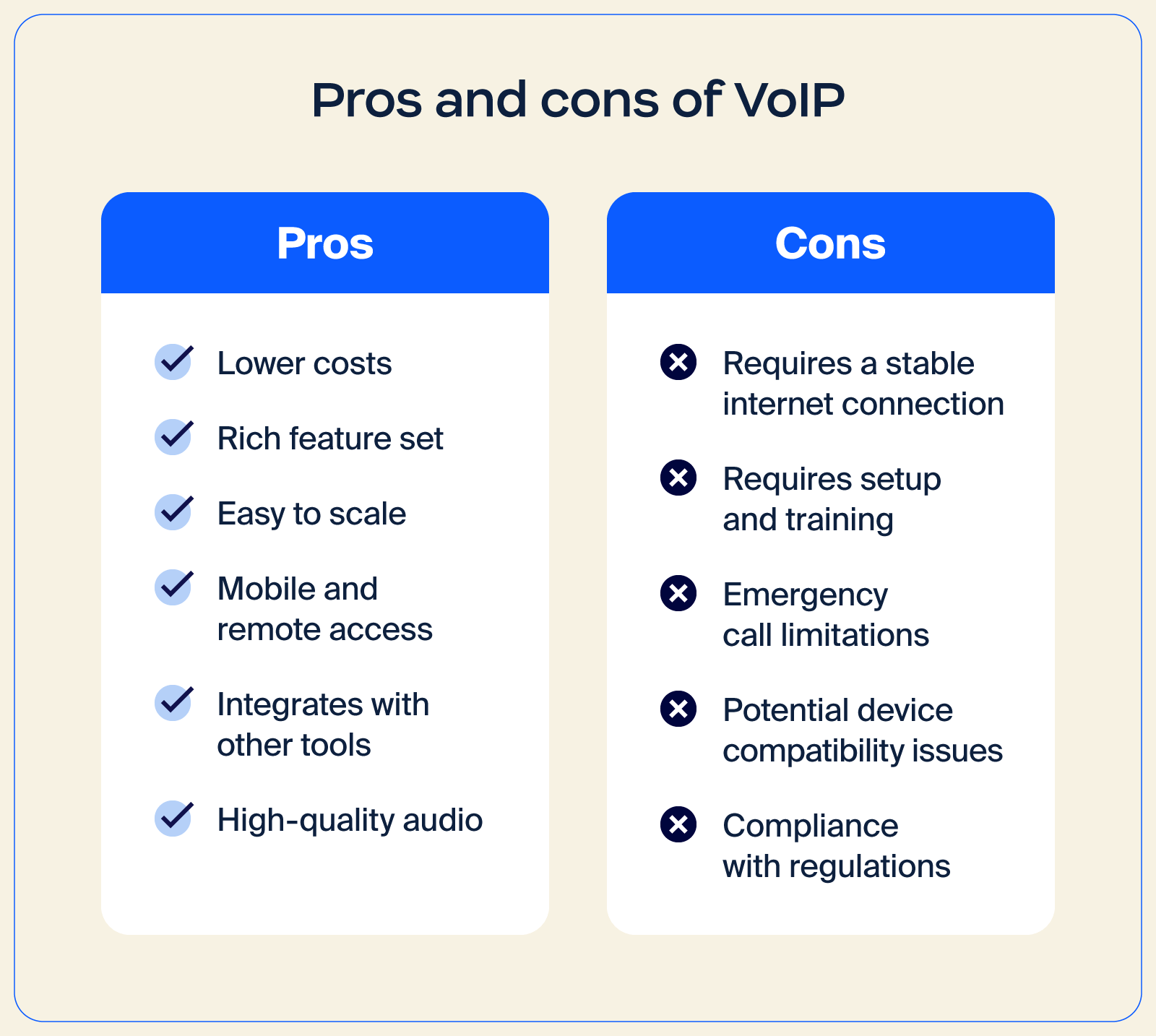
VoIP는 수많은 이점을 제공하지만, 몇 가지 단점과 제한 사항도 있습니다. 여러분이 겪을 수 있는 몇 가지 문제를 살펴보겠습니다.
귀사의 모든 커뮤니케이션 요구 사항을 충족하는 VoIP 전화 시스템을 찾고 계신가요? 다음은 비즈니스 커뮤니케이션을 더 원활하게 만들어 줄 수 있는 몇 가지 기능입니다.
모든 커뮤니케이션 도구가 한 곳에 있다고 상상해 보세요. 통합 커뮤니케이션을 사용하면 회의, 전화, Zoom Chat을 원활하게 통합할 수 있습니다. 이는 팀 협업을 위한 강력한 중앙 사령탑이 생기는 것과 같습니다.
자동 전화 교환이라고도 하는 자동 접수 교환원은 전담 프런트 데스크 직원 없이도 연중무휴 24시간 발신자에게 안내하고 적절한 담당자나 부서로 자동 라우팅합니다. Zoom Phone에서는 업무 시간 외 통화에 응대하고, 예약을 접수하며, 일반적인 질문을 인간 상담원 개입 없이 처리하는 AI 접수 교환원(부가 기능으로 제공)을 추가할 수도 있습니다.
데스크톱과 모바일 호환성을 통해 이동 중에도 연결 상태를 유지하세요. 사무실에 있든 외부에 있든 호환되는 모든 장치에서 VoIP 전화 시스템에 액세스할 수 있으므로 중요한 통화를 놓칠 일이 없습니다.
암호화와 강력한 보안 조치로 민감한 커뮤니케이션을 보호하세요. 이는 통화를 위한 안전한 금고와 같은 기능을 하는 것으로, 대화를 비공개 및 기밀로 유지합니다.
VoIP는 안정적인 인터넷 연결이 확보된 경우 일반 유선 전화보다 더 선명한 경우가 많은 HD 오디오를 제공합니다. 최신 코덱과 적응형 품질 도구는 경미한 네트워크 변동의 영향을 최소화하는 데 도움이 됩니다.
최신 VoIP 플랫폼은 기본적인 통화 기능을 훨씬 넘어섭니다. 예를 들어 Zoom Phone에는 통화 요약, 음성 메일 작업 및 음성 메일 우선순위 지정 기능이 포함되어 있어 집중력을 유지하고 더 빠르게 대응할 수 있습니다. 따라서 통화 메모를 검토하는 대신 비즈니스 운영에 집중할 수 있습니다.
Zoom Phone의 포괄적인 통화 기능을 이용하면 통합 기능, HD 음질, 통화 녹음 및 모바일 앱 액세스를 갖춘 유연한 모바일 클라우드 전화 시스템을 사용할 수 있습니다.
VoIP and traditional landlines both handle business calling, but they work in very different ways. VoIP runs over the internet, making it easier to scale and manage, and is typically packed with features that help teams in today’s workplace communicate more efficiently.
Landlines rely on physical phone lines, which limit flexibility and make it harder to support modern workflows. Additional differences include:
| Category | VoIP | Landlines |
| Startup cost | Usually lower, especially for teams already using cloud tools App download is free; optional adapter cost: $20-$50 |
Can be higher due to hardware ($50-$100) and on-site phone installation ($40-$100) |
| Monthly fees | Often more predictable and budget-friendly Per user estimate: $15-$40 + taxes/fees |
Can increase with long-distance and maintenance charges Per line estimate: $20-$60 + taxes/fees |
| Call quality | High quality with a stable connection | Consistent, backed by physical infrastructure |
| International calls | More affordable — lower per-minute rates, often in cents | Higher rates — $1+ |
| Features | Rich capabilities, including call routing, voicemail transcription, and video options | Limited features |
| Unified communications | Can support meetings, phone, and chat in one place | Not designed for integrated communication |
| Security | Enterprise-grade security and protection are normally built in | Dependent on carrier systems |
| Other considerations | Easily scalable and adaptable to changing needs | Less flexible and harder to expand |
All in all, VoIP stands out for businesses that want a flexible IP phone system with modern workplace features. Landlines still offer steady reliability, but they lack the flexibility, speed, and range of capabilities that VoIP platforms offer for everyday communication.
프로세스를 명확한 단계로 나누면 VoIP 전환은 간단합니다. 필요 사항을 계획하고, 연결 상태를 확인하고, 공급자를 선택한 후, 필요한 장비를 준비하고 온보딩으로 설정을 완료하게 됩니다.
속도 테스트에서 지터를 확인한 적이 있다면, 인터넷 환경이 통화 품질에 영향을 준다는 점을 알 수 있습니다. 따라서 네트워크를 미리 준비하면 IP 음성 환경을 최대한 활용할 수 있습니다.
먼저 팀의 커뮤니케이션 방식을 파악하세요. 통화량, 원격 근무 환경, 현재 사용 중인 도구, 적용되는 보안 규정을 확인하세요. 예를 들어 HIPAA 규정 적용 대상인 의료 기관은 암호화된 통화와 통화 기록에 대한 제어된 액세스와 같은 기능을 제공하는 VoIP 공급자를 찾을 수 있습니다.
다음으로 명확한 예산을 설정하세요. 계획 수립에 참고할 예산 추정치:
이 예상 비용을 활용하여 투자 대비 잠재적인 이점을 비교해 보세요. 많은 조직은 VoIP로 전환한 후 비용 및 인프라 측면에서 측정 가능한 개선 효과를 확인하고 있습니다. 예를 들어, Flex는 Zoom Phone으로 전환하면서 전 세계 회선 및 인프라를 50%-70% 줄이고 총소유비용(TCO)을 절감했습니다.
현재 설정이 충분하지 않다면 소규모 업그레이드를 고려해 보세요. 새로운 라우터, 더 강력한 Wi-Fi, 또는 다른 ISP를 선택하면 통화 끊김을 줄이고 대화 중 지터를 최소화하는 데 도움이 됩니다.
좋은 VoIP 공급자는 현재 비즈니스 운영 방식을 지원하면서도 앞으로의 성장을 위한 확장 여지를 제공해야 합니다. 여러 옵션을 비교할 때는 다음 사항을 확인하세요.
또한 모바일 앱 지원, 국제 통화 옵션, 지역별 제한 사항도 확인하세요. Zoom Phone을 사용하면 이동성을 고려해 설계된 유연한 클라우드 전화 시스템과 유용한 통합 기능, AI 우선 생산성 도구, HD 음성 품질을 활용할 수 있습니다. 통화 녹음, 음성 메일 전사, 모바일 액세스와 같은 추가 VoIP 전화 기능은 일상적인 커뮤니케이션 관리를 더욱 편리하게 만들어 줍니다.
공급자를 선택한 후에는 원활한 온보딩을 위해 필요한 항목을 준비하세요. 포함되는 항목은 다음과 같습니다.
공급자는 온보딩 과정을 안내하며, 일반적으로 기능 간단 안내와 사용자 트레이닝이 포함됩니다. 기존 번호를 유지하는 경우 공급자가 번호 포팅을 처리합니다. 새 번호를 사용하는 경우 웹사이트, 이메일 서명, 고객 채널 등에서 새 번호를 공유할 수 있습니다.
모든 연결이 완료되면 팀은 새로운 VoIP 시스템으로 전화를 걸고 받을 수 있으며, 업무 중단을 최소화하면서 일상적인 사용 환경으로 전환할 수 있습니다.
VoIP는 Voice over Internet Protocol(음성 인터넷 프로토콜)의 약자입니다. 기존 유선 전화나 아날로그 전화선 대신 광대역 인터넷 연결을 사용하여 전화를 걸고 받을 수 있는 기술입니다. IP 전화 통신 또는 인터넷 전화 통신이라고도 합니다.
VoIP는 매우 경제적일 수 있습니다. 많은 요금제의 비용은 사용자당 월 10~40달러 정도입니다. 장비나 추가 기능을 추가하면 비용이 증가할 수 있습니다. 설정 비용은 일반적으로 무료이거나 매우 적기 때문에 VoIP는 기존 전화 시스템보다 초기 비용이 훨씬 저렴한 경우가 많습니다.
예. 많은 휴대폰에서 Zoom Workplace와 같은 앱을 통해 VoIP를 사용할 수 있습니다. Wi-Fi에 연결되면 이러한 앱은 셀룰러 네트워크 대신 인터넷을 통해 통화를 라우팅하므로 비용을 절감하고 추가 통화 기능을 이용할 수 있습니다.
예. 대부분의 VoIP 공급자는 번호 포팅을 지원하므로 기존 비즈니스 전화번호를 새 시스템으로 이전할 수 있습니다.
공급자가 암호화, 역할 기반 접근 제어, 규정 준수 도구 등 최신 보안 방식을 적용하는 경우 VoIP는 기존 유선 전화보다 더 강력한 보호 기능을 제공할 수 있습니다. 보안 경험은 선택한 공급자에 크게 좌우됩니다.
일반적인 VoIP는 기술 자체를 의미합니다. 클라우드 전화 시스템이라고도 하는 호스팅형 VoIP 시스템은 공급자가 인프라를 대신 관리하고 사용자는 서비스를 이용하는 방식입니다. 오늘날 Zoom Phone을 비롯한 많은 비즈니스 VoIP 솔루션은 호스팅형입니다.
통화는 맥락을 만들고 AI에 정보를 제공하며, 이제 나머지 워크플로와도 연결될 수 있습니다. 전화 시스템이 이런 역할을 하지 못한다면 제 기능을 다하고 있지 못한 것일 수 있습니다.
 5 분 읽기 분량
무전기는 일선 근로자들의 효과적인 의사소통 수단입니다. 실제 현장에서 무전기를 어떻게 사용하는지, 장점은 무엇인지 알아보세요.
 7 분 읽기 분량
호스팅형 VoIP는 인터넷을 통해 전화를 걸 수 있는 통신 기술입니다. 호스팅형 VoIP가 비즈니스에 어떤 이점을 제공하는지 알아보세요.









